Saskatoon bridge

Trent Watts

Well-Known Member
Awhile ago I posted an iPhone photo of my city at sunset. Yesterday I was walking without my regular camera but had my iPhone 10 and thought the city looked quite nice on an over cast day so took a few shots from another bridge and from the river bank. I'm really interested in any comments people may have about the results after post processing in Lightroom. I wonder if the soft focus in the background would be better with my micro/four/thirds camera and would it be better with the new iPhone 15.
I couldn't seem to get rid of the overall green cast in the reflections.
Thanks for any help you can give me.

This shot taken from a nearby bridge near the middle of the river.
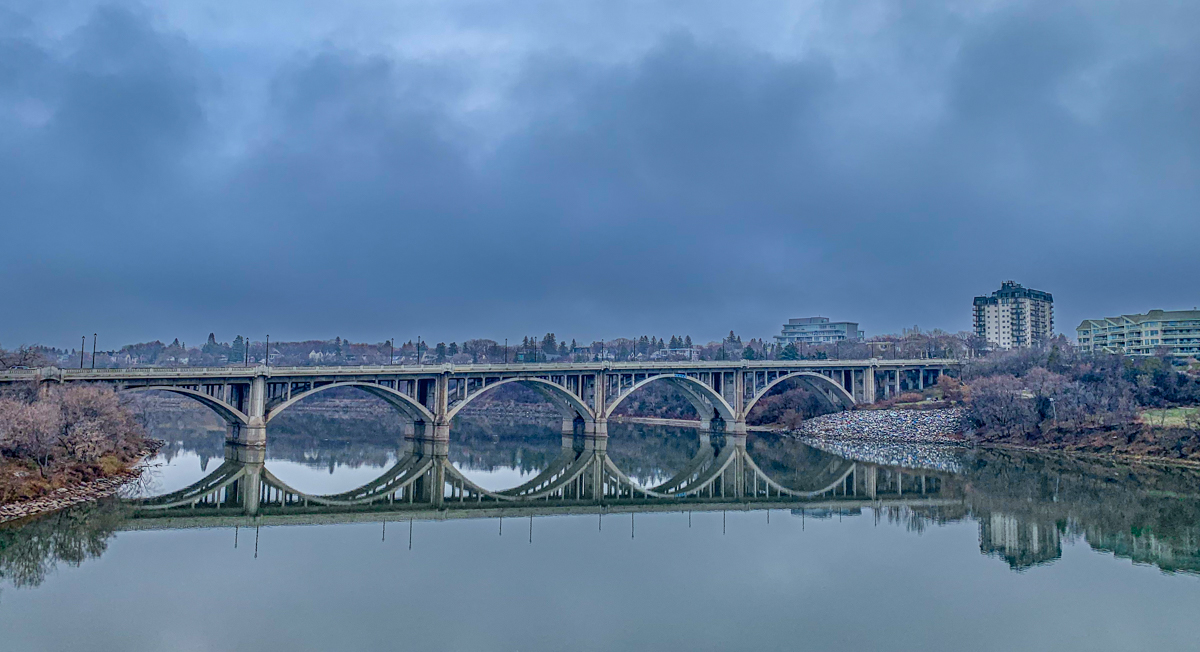
IMG_5099.jpg


Taken from the other bridge close to the riverbank.
IMG_5101.jpg


Taken from the riverbank.
IMG_5103.jpg
 

AlanLichty

Moderator
Neat bridges in your city and even better looking with the reflections you got with these. Nice series of views. I have seen hue issues with older iPhone images prior to when Apple gave us access to DNG outputs where it was easier to correct WB. Color corrections with JPEGs is limited.

While our phones have really upped the ante for point and shoot I'm not convinced they can completely replace a camera for control over the capture. Especially when it comes to controlling the exposure and focus. There are quite a few tricks for selective focus in the phone software but they are mostly aimed at portrait images where the software can recognize a face. I haven't had good luck with this in images without a face in the middle. Much easier to do when you can control both the focal point and f/stop for depth of field.

The phone is still the one that fits well in my pocket all the time :)
 

JimFox

Moderator
Staff member
Hey Trent, first off what cool bridges! I really love bridges. I enjoy seeing them, and I enjoy driving on them. There is just something cool about bridges, especially longer ones.

My favorite here is #1, followed by #3.

As for the green color cast, I don't believe after looking at these, that there is a color cast. I think that's just the color of the water. If you look in all 3 images, the reflections of buildings are all slightly green. I am betting the water is kind of greenish, so the reflections just reflect that color. :)

Now you can change that easily. A couple of ways:

1. Use a Layer Mask to select the water areas. It doesn't have to be exact, just draw your selection in the ground area above the the water and feather it by 100 or so. I am not sure on your iPhone resolution, but your feathering may have to be as little as 50. Then just change the color balance in the reflection by taste.

2. Again use a Layer Mask. Then pull the water section up and go into ACR, and the Color Mixer and choose the green color to change the hue more towards Blue. Since this method is limiting itself to the color green, you may not need a layer mask to pull it off as most of the green in your images is confined to the reflections.

And to add to Alan's point about focusing. If there is one huge weakness to all phones, it's setting the focus. I can do it with the iPhone 15, but it still seems to then move based on if the phone is moved at all. For the most part I am just allowing everything to be in focus with the iPhone, but the newer ones do have more control over focusing, but more on the end of purposely having Limited DOF and getting something in focus while the background goes blurry by choice.
 

Trent Watts

Well-Known Member
Hey Trent, first off what cool bridges! I really love bridges. I enjoy seeing them, and I enjoy driving on them. There is just something cool about bridges, especially longer ones.

My favorite here is #1, followed by #3.

As for the green color cast, I don't believe after looking at these, that there is a color cast. I think that's just the color of the water. If you look in all 3 images, the reflections of buildings are all slightly green. I am betting the water is kind of greenish, so the reflections just reflect that color. :)

Now you can change that easily. A couple of ways:

1. Use a Layer Mask to select the water areas. It doesn't have to be exact, just draw your selection in the ground area above the the water and feather it by 100 or so. I am not sure on your iPhone resolution, but your feathering may have to be as little as 50. Then just change the color balance in the reflection by taste.

2. Again use a Layer Mask. Then pull the water section up and go into ACR, and the Color Mixer and choose the green color to change the hue more towards Blue. Since this method is limiting itself to the color green, you may not need a layer mask to pull it off as most of the green in your images is confined to the reflections.

And to add to Alan's point about focusing. If there is one huge weakness to all phones, it's setting the focus. I can do it with the iPhone 15, but it still seems to then move based on if the phone is moved at all. For the most part I am just allowing everything to be in focus with the iPhone, but the newer ones do have more control over focusing, but more on the end of purposely having Limited DOF and getting something in focus while the background goes blurry by choice.
Thanks so much to you and Alan for your in depth answers. I really appreciate your help.
 
Top Bottom