Organizing Galleries and Albums

AlanLichty

Moderator
I have been uploading gallery images and then using the media gallery embed button to create threads for the forums for a while now and it didn't take long for a single large gallery to grow to unwieldy sizes that made it hard to find anything. I was regretting not making this into a set of albums organized by general subject and decided to see if there was any way to shuffle the pieces around without breaking all of the links in the threads I have created/posted in. As it turns out this is much easier than I thought.

Gallery images are indexed by the file name and an index number when they are initially uploaded but then all of the subsequent organization of the gallery information is tied to that index number. The link in your forum thread for an image has no reference to the gallery organization at all just the filename and the index number.

This means you can move the images around into new albums without breaking the links in the forum threads.

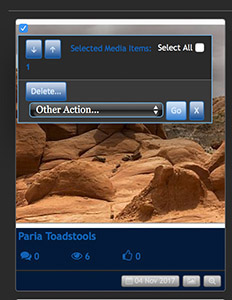
How to move an image - when you are looking at an album you have a screen of thumbnails with the various images. In the upper left corner of the image is a small check box and when clicked a popup menu will come up with some options for that image.

Check box:

Move1.jpg


File action dialogue:

Move2.jpg


Click on Other Action and you will have the option to move the image. Once you do that you will see a new menu with the following:
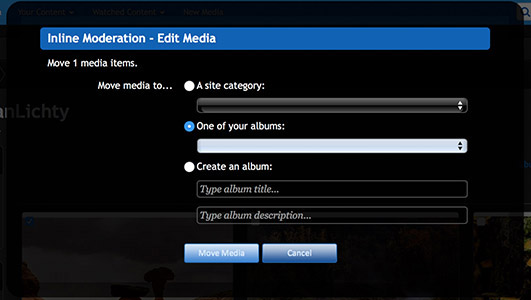
Move3.jpg


You can select an existing album (through a drop down menu) or create a new one to move the image to. The image will be removed from the original album and into the new one.

You can select multiple images via the original upper left check box and move all of them at once if you wish.

Albums appear to be organized as a flat collection and are not in any kind of hierarchy under the creator/owner of the album so if you want to have your albums identified by your name you will need to include that in the album title. I would prefer some kind of hierarchal organization myself but I don't see any mechanisms for doing that right now.
 

Ben Egbert

Forum Helper
Staff member
Thanks for doing this Alan, I am off to make some changes in mine now. I did create some different albums early on, but not early enough to get them all.

Worked as advertized once I learned how to get albums opened. Its in a pull down.
 
Last edited:

Mike Mancil

Well-Known Member
Alan:

Along these same lines I have a question. I’ve just started posting here and assumed that images I post would collect in a portfolio somewhere in my name, but if they do I can’t find them. So, if they don’t collect somewhere, then is there a way to move or link images posted in the forums to my albums without losing comments?

Mike
 

Ben Egbert

Forum Helper
Staff member
Direct embed only show in the post they are embedded in. But you can go to gallery, add media and create your own galleries and add images to them and then post directly from the gallery. If you need any help, just ask.
 

AlanLichty

Moderator
I don't believe that there is a way to move the thread attached files over to the galleries. I liked the idea of having a gallery of the images I have posted so I switched over to uploading my images to my gallery albums and then linking them into my posts.
 

AlanLichty

Moderator
I just did some quick checks and from what I can see we really don't have access to the files that become attachments beyond being able to delete them and/or replace what is in your post. The file can't be moved to a new location like a gallery album.
 

Mike Mancil

Well-Known Member
Ben:

Thanks, I’ll look into that and feel sure I’ll have questions. The terms and operation are a tad confusion.

Since my current posted images were straight to a forum, then I’m assuming I can’t back them into my gallery and/or albums without a new upload which would not contain any of the previous comments?

Mike
 

Mike Mancil

Well-Known Member
I just did some quick checks and from what I can see we really don't have access to the files that become attachments beyond being able to delete them and/or replace what is in your post. The file can't be moved to a new location like a gallery album.
Yep, what I figured. I need to re-educate my approach.

Thanks... Mike
 

JimFox

Moderator
Staff member
Hey Mike,

I am glad that Alan has been helping you, as I have been busy filling up memory cards here in Yosemite. :)

Other then being able to put a photo that you had previously uploaded to your Media Gallery there is no connectivity between the Forum Posts and the Media Gallery.

You have expressed some good ideas, and ideas that has been discussed by some of us. I hope we can get some of those ideas implemented in the future, but for now Alan has come up with the best working solution.

Thanks again, now its time for me to get on the road. :)

Jim
 

Mike Mancil

Well-Known Member
I have been uploading gallery images and then using the media gallery embed button to create threads for the forums
Ok, I’m going to plead for some help to do this. I’m usually pretty software cognizant but this is not jelling for me.

No hurry, but at your convenience I’d appreciate a few instructions.

Thanks... Mike
 

Mike Mancil

Well-Known Member
Hey Mike,

I am glad that Alan has been helping you, as I have been busy filling up memory cards here in Yosemite. :)

Other then being able to put a photo that you had previously uploaded to your Media Gallery there is no connectivity between the Forum Posts and the Media Gallery.

You have expressed some good ideas, and ideas that has been discussed by some of us. I hope we can get some of those ideas implemented in the future, but for now Alan has come up with the best working solution.

Thanks again, now its time for me to get on the road. :)

Jim
Thanks, as soon as I wrap my head around this all will be well. I’ve just had experience with another site where all uploaded images go to your “Portfolio” and can reside there with no action or you can then post that image to whatever forum desired and then all member comments follow the image and are visible in either the Portfolio or Forum post.

This isn’t a suggestion for change, I’m just learning how to most efficiently use this site.

Have a great time in Yosemite, we’re jealous.

Mike
 

AlanLichty

Moderator
Mike -

It's actually pretty easy - add the media to a gallery and when you want to insert it instead of uploading an image click on the camera icon and a new popup will appear with your gallery media. The icon to choose is shown in this image:

galleryimbed.jpg

This will bring up a new thumbnail display below your post that allows you to simply point and click on the media you want to include in the post.
 

Mike Mancil

Well-Known Member
Mike -

It's actually pretty easy - add the media to a gallery and when you want to insert it instead of uploading an image click on the camera icon and a new popup will appear with your gallery media. The icon to choose is shown in this image:

View attachment 2951
This will bring up a new thumbnail display below your post that allows you to simply point and click on the media you want to include in the post.
Alan:

Bingo! I’ll give it a try later.

Thanks much, have a good evening... Mike
 
Top Bottom