Let’s play #29

Ben Egbert

Forum Helper
Staff member
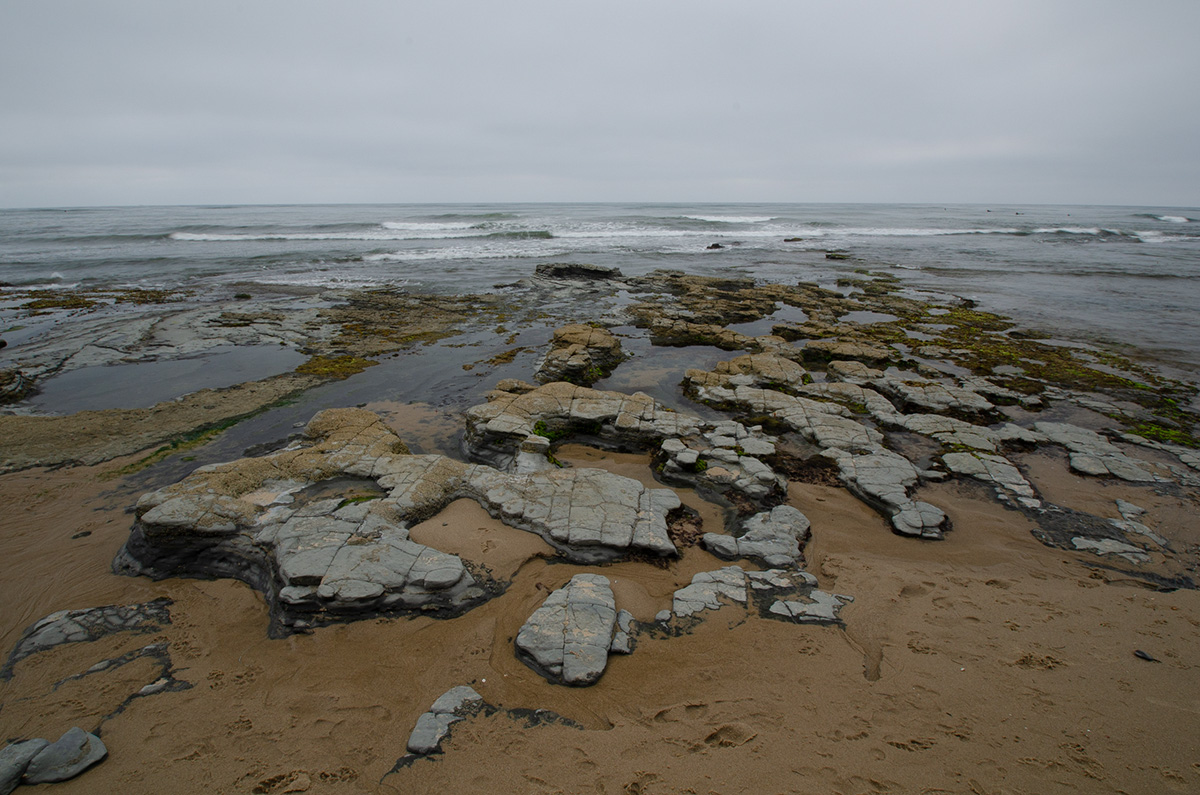
Here is my entry. I think I see the problem and fixed it, but I will let you find it for yourself.

_D7K4383.jpg
 

JimFox

Moderator
Staff member
Here is my stab at it.

The biggest issue on this one is going to be all of those zillion footprints. I worked to decrease those for Let's Play purposes by making 3 layers in Photoshop. The first layer mask selected most of the sand. The second layer mask selected the dark shadow areas. In the 3rd layer I basically used Shadow Recovery to lighten up the shadows in the footprints to match the sand as close as possible. So the texture of the footprint on most of them is still there, but because the shadow is gone, they are not as visible. I didn't worry about some of the smaller foot prints in the more rocky areas for this, but would have if this is one I would have printed.

_D7K4383_dp.jpg
 

AlanLichty

Moderator
Here is my stab at it.

The biggest issue on this one is going to be all of those zillion footprints. I worked to decrease those for Let's Play purposes by making 3 layers in Photoshop. The first layer mask selected most of the sand. The second layer mask selected the dark shadow areas. In the 3rd layer I basically used Shadow Recovery to lighten up the shadows in the footprints to match the sand as close as possible. So the texture of the footprint on most of them is still there, but because the shadow is gone, they are not as visible. I didn't worry about some of the smaller foot prints in the more rocky areas for this, but would have if this is one I would have printed.
That technique was pretty effective - those footprints were bad enough that I likely would not have taken the shot.
 

Ben Egbert

Forum Helper
Staff member
Thanks for the entries everyone. Yes, the footprints were the gotcha. I used a separate layer with content aware to clean them up, but Jim got a better texture.
 

AlanLichty

Moderator
OK - this feels like cheating. I tried Jim's solution although with my own twist of making virtual copies in Lightroom and then opening them as layers in PS to blend for the sands. This works remarkably well and is much better for this depth of a footprintage infestation :)

_D7K4383-3.jpg


Ben - don't change my entry - this is just a fun example of someone learning a new trick by playing in this sandbox called Let's Play.
 

JimFox

Moderator
Staff member
OK - this feels like cheating. I tried Jim's solution although with my own twist of making virtual copies in Lightroom and then opening them as layers in PS to blend for the sands. This works remarkably well and is much better for this depth of a footprintage infestation :)

View attachment 18801

Ben - don't change my entry - this is just a fun example of someone learning a new trick by playing in this sandbox called Let's Play.
That’s awesome Alan! I think one of the greatest things about Let’s Play isn’t who wins but what we all can learn together.

If anyone needs any clarification on what I did to lessen the impact of the foot prints, please let me know here so I can go in better detail about it.
 

Darcy Grizzle

Well-Known Member
That’s awesome Alan! I think one of the greatest things about Let’s Play isn’t who wins but what we all can learn together.

If anyone needs any clarification on what I did to lessen the impact of the foot prints, please let me know here so I can go in better detail about it.
yes I need better detail if I am going to try that :)
 

Ben Egbert

Forum Helper
Staff member
Here is my stab at it.

The biggest issue on this one is going to be all of those zillion footprints. I worked to decrease those for Let's Play purposes by making 3 layers in Photoshop. The first layer mask selected most of the sand. The second layer mask selected the dark shadow areas. In the 3rd layer I basically used Shadow Recovery to lighten up the shadows in the footprints to match the sand as close as possible. So the texture of the footprint on most of them is still there, but because the shadow is gone, they are not as visible. I didn't worry about some of the smaller foot prints in the more rocky areas for this, but would have if this is one I would have printed.

View attachment 18799
Ok I tried it but it did not work very well. My problem was selecting the dark shadow areas. I tried color range and it was too general. I then use quick selection just as I did for my first version, but it was just as tedious and when applied, it did not hide the footprints well and also left a ring of lighter sand around them.
 

Jameel Hyder

Moderator
Staff member
Downloaded it on Friday but just got a chance to work on it. Here is my stab at it. Used spot healing brush to fix the foot marks. Will look into Jim's suggestion later.

D7K4383.jpg
 

Ken Rennie

Well-Known Member
2 versions both using the technique I outlined in an article about removing footprints, total time less than 5 minutes. The second version adds selective negative clarity and negative texture to produce a just washed clean by a wave look add 4 minutes. If voting use the second version Ken
_D7K4383-1 not washed clean.jpg

_D7K4383-1 sand washed clean.jpg
 
Last edited:
Top Bottom