

I captured the Milky Way 2 nights in a row at the Firehole River in Yellowstone National Park a few weeks ago. I had meant to only capture it there 1 night, but ended up with 2 nights. My first night it rained during the night, thankfully even though it was clear after sunset on that first night I had the intuition to put a rain jacket on my D850 the first night. But the rain did create totally different dynamics.
So as I was leaving I drove further down the Firehole River road to turn around, and literally a 100 yards further south on the road I spotted what I thought would have been the perfect spot and a better composition then I had just used. So I did a little kick me in the rear while sitting in my 4Runner, which actually isn't that easy to do while sitting in the drivers seat.
I hadn't planned on shooting the Milky Way there a 2nd night, but sometimes circumstances dictate what we do, and I ended up back there in this new spot 100 yards south for Night 2.
Now on Night 2, it was mainly clear, there were some clouds to the East blocking the Milky Way initially, but they went away. The thing I was hoping for, was during the day, that's when it rained like Buffalo and Bison for a while. Not like cats and dogs, because this was heavy drops of rain! Anyway, during the night, because of the moist ground, there was mists that began to rise and swirl. Then they went away a bit, and then they came back, and eventually they literally turned into London Fog and you couldn't see 30 feet in front of you.
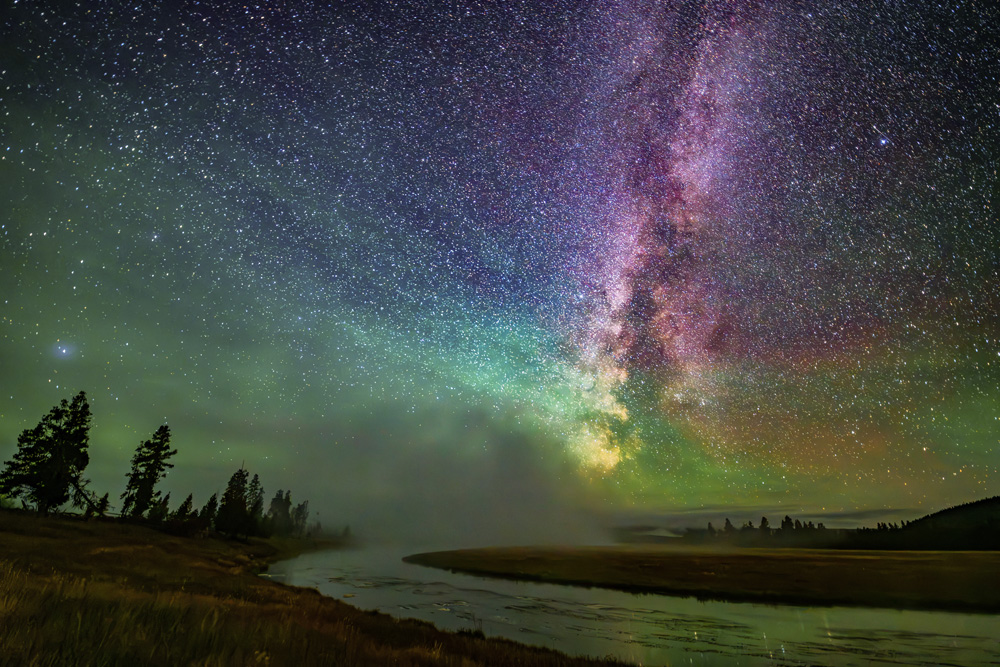
During all of that my D850 with the Sigma 14mm f1.8 captured it all. I thankfully also had the foresight to put dew heaters on the lens both nights, and they earned their money. So this image was after the first Mist incursion, and while the Mist was beginning to make it's final and full approach.
It appears that sometime during the night Airglow intensified, but also all of the mist helped to create some crazy colors. You will notice in this scene, there is some heavy magenta/purple in the sky, while lower in the sky it's green. So for anyone wanting to color correct this, that alone will tell you there really is nothing you can do except to artificially remove it. Because if I raise the Purple Tint to remove the Green Tint, then the Purple becomes overwhelming, and if I raise the Green Tint to combat the Purple Tint, then the Green gets too much.
So where the color balance in the sky is now, it seems to be the balance point.
Some of the Milky Way is getting obscured, but I like this little window into the night. It's a bit later in the night so the Milky Way is starting to curve to the West now, so I think it's one of the best I got in terms of balancing with the Firehole River.
Nikon D850
Sigma 14mm f1.8
20 secs
ISO 3200
f1.8
All comments are welcome,
Jim
So as I was leaving I drove further down the Firehole River road to turn around, and literally a 100 yards further south on the road I spotted what I thought would have been the perfect spot and a better composition then I had just used. So I did a little kick me in the rear while sitting in my 4Runner, which actually isn't that easy to do while sitting in the drivers seat.
I hadn't planned on shooting the Milky Way there a 2nd night, but sometimes circumstances dictate what we do, and I ended up back there in this new spot 100 yards south for Night 2.
Now on Night 2, it was mainly clear, there were some clouds to the East blocking the Milky Way initially, but they went away. The thing I was hoping for, was during the day, that's when it rained like Buffalo and Bison for a while. Not like cats and dogs, because this was heavy drops of rain! Anyway, during the night, because of the moist ground, there was mists that began to rise and swirl. Then they went away a bit, and then they came back, and eventually they literally turned into London Fog and you couldn't see 30 feet in front of you.
During all of that my D850 with the Sigma 14mm f1.8 captured it all. I thankfully also had the foresight to put dew heaters on the lens both nights, and they earned their money. So this image was after the first Mist incursion, and while the Mist was beginning to make it's final and full approach.
It appears that sometime during the night Airglow intensified, but also all of the mist helped to create some crazy colors. You will notice in this scene, there is some heavy magenta/purple in the sky, while lower in the sky it's green. So for anyone wanting to color correct this, that alone will tell you there really is nothing you can do except to artificially remove it. Because if I raise the Purple Tint to remove the Green Tint, then the Purple becomes overwhelming, and if I raise the Green Tint to combat the Purple Tint, then the Green gets too much.
So where the color balance in the sky is now, it seems to be the balance point.
Some of the Milky Way is getting obscured, but I like this little window into the night. It's a bit later in the night so the Milky Way is starting to curve to the West now, so I think it's one of the best I got in terms of balancing with the Firehole River.
Nikon D850
Sigma 14mm f1.8
20 secs
ISO 3200
f1.8
All comments are welcome,
Jim


