Let’s play #11

Ben Egbert

Forum Helper
Staff member
See the let’s play guidelines above

Brian has generously provided this week’s subject, a milky way for another change up.

Show us what you would do with it.

Here is a link to the download page.

http://www.focalworld.com/index.php?resources/lets-play-11.22/


The attached image is a small jpg of the raw, but use the download dng file for rework.

Note that I have changed to a number rather than date format. This is the 11th in the series. This keeps us more constant with the other contests.
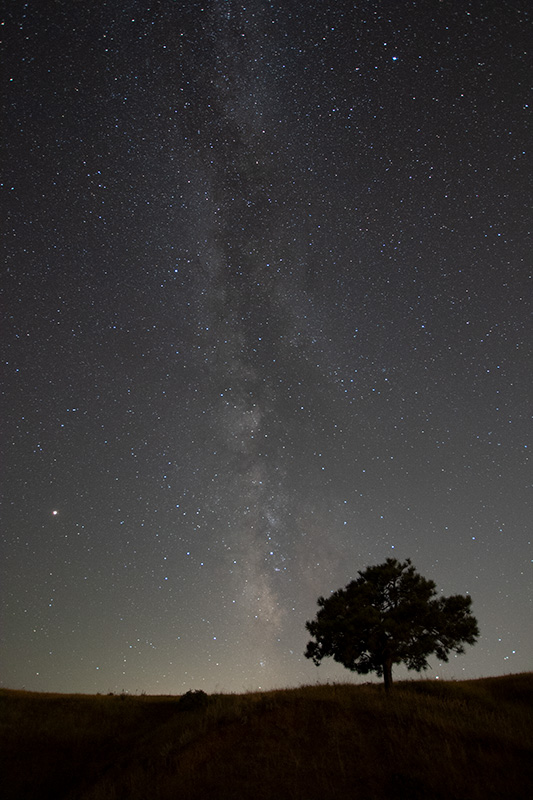
Dsc_4205.nef_2 (1).jpg
 

JimFox

Moderator
Staff member
This will be a fun one Ben!

Thanks to Brian for letting us use it.

I downloaded it and have done some preliminary raw conversions. I am liking what I see so far. I probably won't be able to actually do any processing until later tonight.
 

Ben Egbert

Forum Helper
Staff member
Two good entries. Kyle, I see you got the light pollution under better control. I made a special layer and worked it but could not tame it as much as I wanted.
 

JimFox

Moderator
Staff member
Hey Ben, you did pretty good here.

The key with Milky Way shots is not to process them as you see them most times, but to process them to the potential they could have. At least that's how I see it. With Milky Way shots, we are definitely presenting an artform since the camera does capture more light then we often can see.
 

JimFox

Moderator
Staff member
Once thing I am noticing in both Kyle's and Darcy's photos is that the sky is too bright where it's showing in between the tree leaves in the middle of the tree. I would definitely darken those area's using the Darken Blending mode.
 

Kyle Jones

Moderator
Once thing I am noticing in both Kyle's and Darcy's photos is that the sky is too bright where it's showing in between the tree leaves in the middle of the tree. I would definitely darken those area's using the Darken Blending mode.
I would claim that the sky within the tree is accurate relative to the rest of the sky, as it is included in the same mask as the rest of the sky. At the same time, the sky is brighter closer to the ground and looks even brighter in contrast to the tree
 

Brian

Well-Known Member
Awesome guys. I love this. The light at the bottom is my issue when taking pictures from my back yard. That is all noise pollution from Colorado Springs. I really enjoy seeing what you all come up with. I know you all will be handicapped with the my photo as I certainly don't have the skills you have. Or the equipment. This was taken with f/3.5 Sigma 10-20. So probably not the best lens out there. But regardless, I have really been looking forward to what you more experienced folks can come up with.
 

Darcy Grizzle

Well-Known Member
Once thing I am noticing in both Kyle's and Darcy's photos is that the sky is too bright where it's showing in between the tree leaves in the middle of the tree. I would definitely darken those area's using the Darken Blending mode.
Yeah that light in the tee b bothered me & I tried darkening it, but it darkened the tree also, I may try again :)
 

Darcy Grizzle

Well-Known Member
Awesome guys. I love this. The light at the bottom is my issue when taking pictures from my back yard. That is all noise pollution from Colorado Springs. I really enjoy seeing what you all come up with. I know you all will be handicapped with the my photo as I certainly don't have the skills you have. Or the equipment. This was taken with f/3.5 Sigma 10-20. So probably not the best lens out there. But regardless, I have really been looking forward to what you more experienced folks can come up with.
Brian I have no skills hahahah!
 

JimFox

Moderator
Staff member
I would claim that the sky within the tree is accurate relative to the rest of the sky, as it is included in the same mask as the rest of the sky. At the same time, the sky is brighter closer to the ground and looks even brighter in contrast to the tree
That's true, it is brighter along the horizon, and perhaps some of it is just relative to the darkness of the tree.
 
Top Bottom