iPhone 13 Pro - a small field test

AlanLichty

Moderator
I recently upgraded to an iPhone 13 Pro and had a chance to give it a bit of a field test this last week in the coastal mountains near Florence, Oregon. I set the iPhone camera system up for RAW output as a default format which I can switch to jpeg if I wish while using the camera app. I made a point of shooting scenes I had already shot with my DSLR (Canon 5D MkIV) just so I could make a comparison of what Apple had done with the camera compared to my old iPhone 11 Pro. This post is not intended to be a hard core scientific test or shootout comparison between devices. Go to youTube or the dedicated photography web magazines if you want something along those lines.

Quick summary - the 13 Pro is a considerable improvement over the 11 Pro and the ability to get the output as a RAW file offers a lot more latitude in edits for lighting and color when using a RAW editor such as LR or PS ACR.

The 13 Pro macro photography feature offers some amazing levels of detail with ridiculously simple efforts. It's worth noting that the RAW output is not a simple dump of the sensor output but is in fact a processed stacking result from a series of captures that the iPhone takes automatically when you press the shutter release. This is especially apparent with the Macro mode where the depth of focus is considerably deeper than you would otherwise get from a single capture on your DSLR/mirrorless rig. The maidenhair fern image I posted a couple of days ago is a good example of this - the image is a handheld shot with the phone about 3/4 inch from the fern frond with no effort to brace my hands to keep the phone steady at all. For a normal digital camera I would need to create a focus stack to get a shot with this much depth.
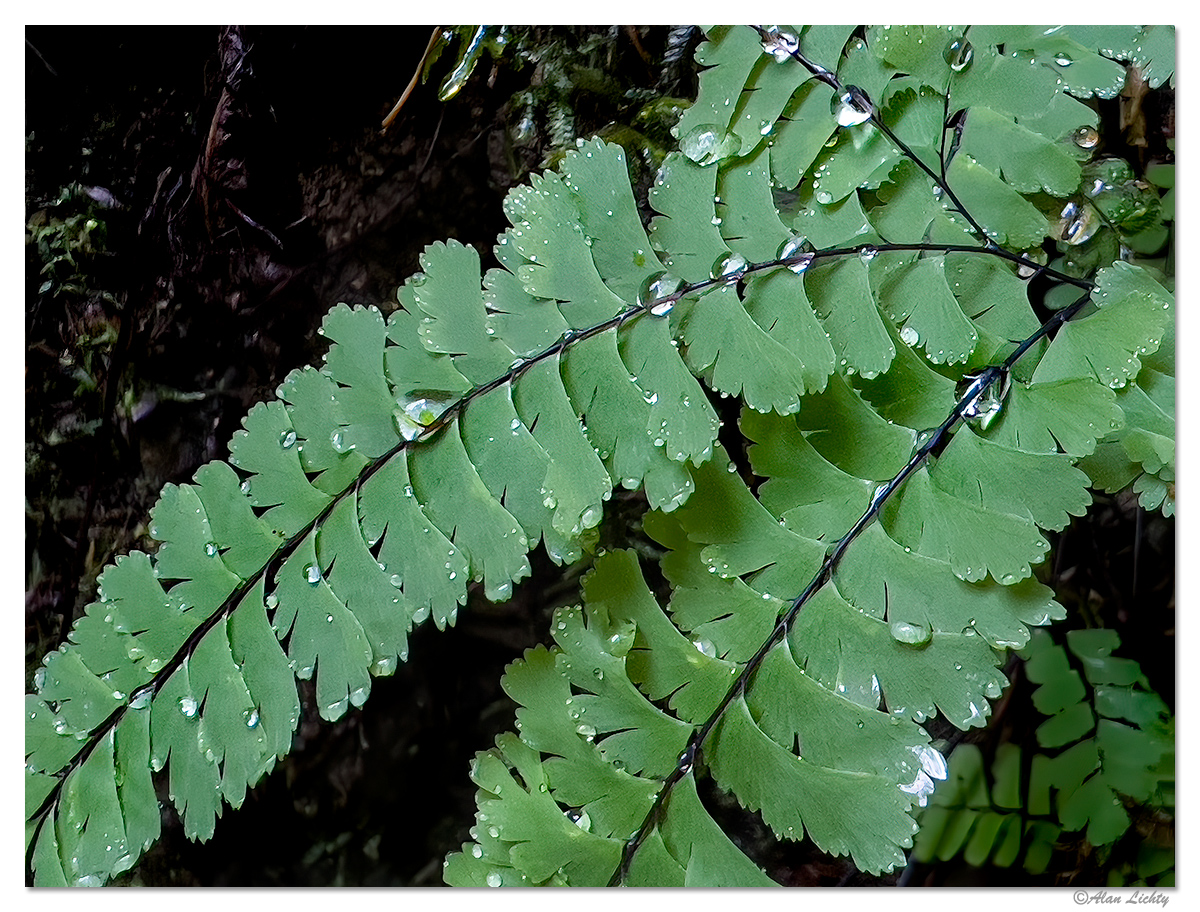
MaidenhairRain.jpg


Not sure this would survive being blown up to a wall sized print but it did result in a pleasing web image.

I was also curious about how the iPhone 13 Pro would hold up for larger scale photography so as I mentioned above I pulled out the iPhone on a number of occasions where I had just shot the same scene on my DSLR. Not a completely fair fight since I was hand holding the iPhone to replicate a shot I had done with the DSLR on a tripod. I don't have any LR presets for the 13 Pro RAW files yet but went out of my way to try to match the light/color balance with the RAW edits between the camera outputs. I did try this same experiment when I first got the 11 Pro a couple of years ago and the jpeg/heic outputs didn't have enough headroom to do the necessary edits without introducing ridiculous noise levels. The 13 Pro did allow me to get reasonably close to the DSLR light/color balance although I don't consider it to be a replacement for the DSLR.

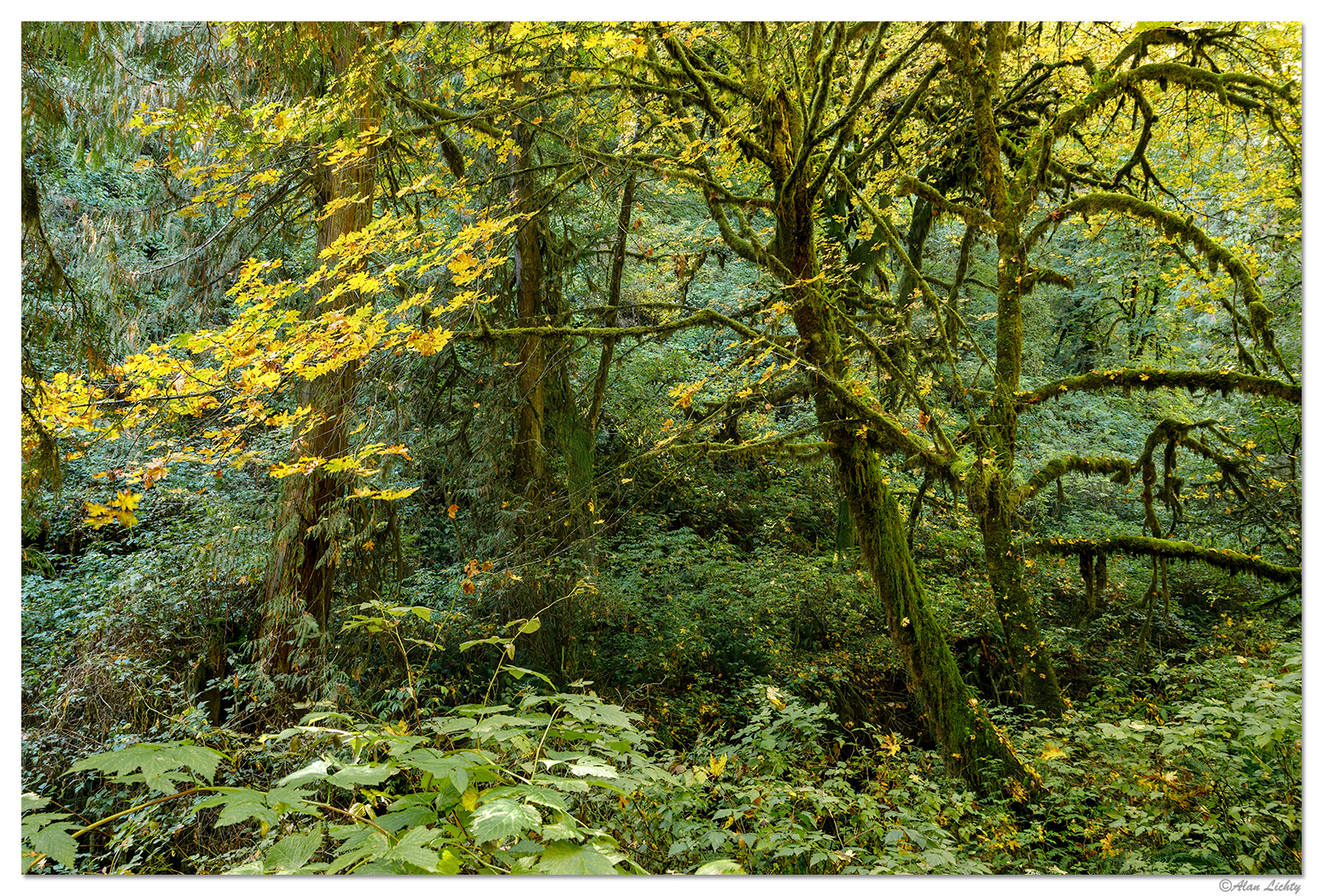
This is a scene from Thompson Creek just above its confluence with the Siuslaw River showing a heat stressed big leaf maple with some nice moss encrustations and early colors. The aspect ratios are not the same and the viewpoint is slightly different as I held the iPhone above my DSLR still in place on my tripod.

iPhone 13 Pro:
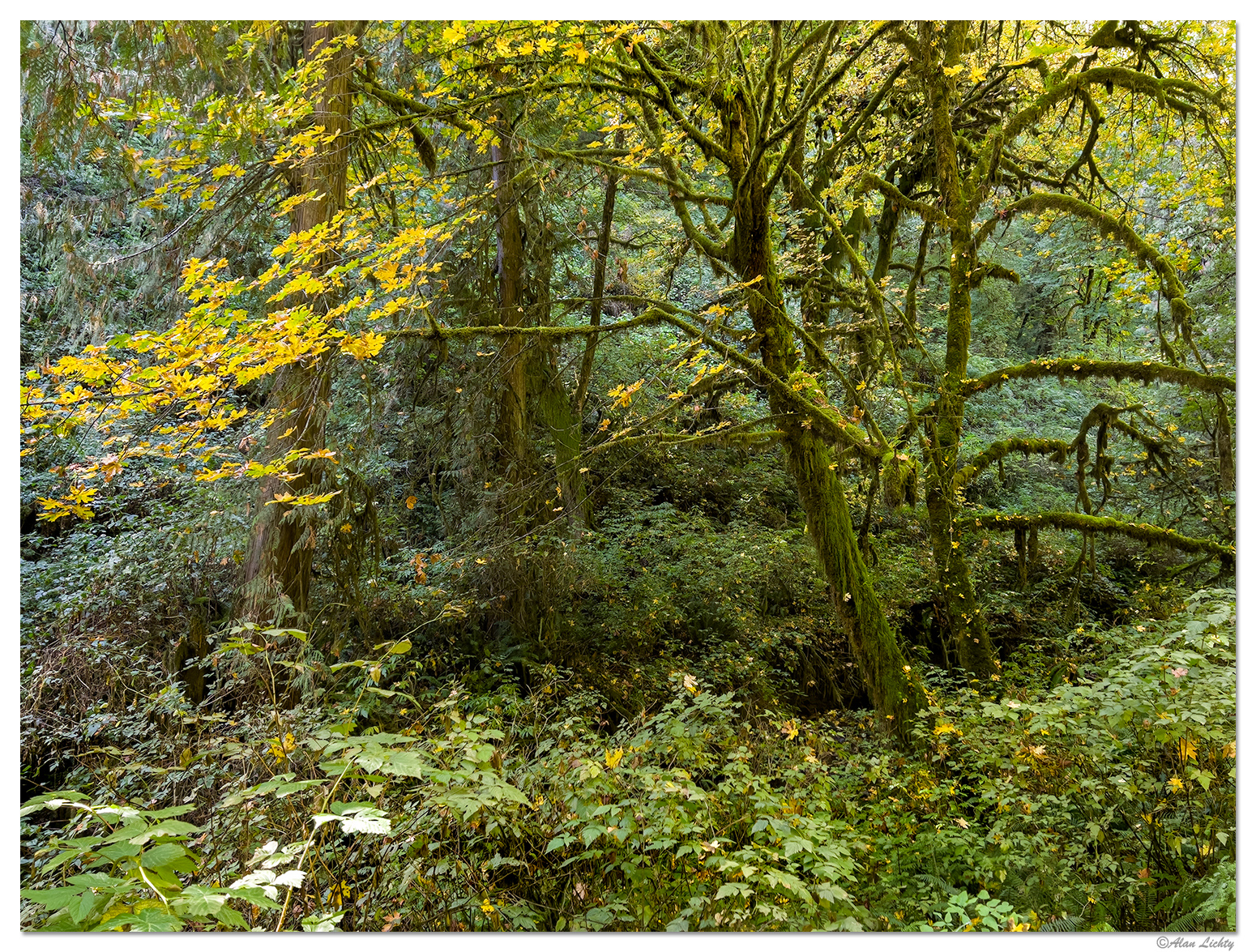
TC-MossyMaple-i13.jpg


Canon 5D MkIV:

TC-MossyMaple-5d4.jpg


In general I am quite impressed with what can be done with this device although as I already mentioned it is not a replacement for my DSLR rig by any means. As a camera that sits flat in my pocket most of the time its an accomplished point and shoot camera.
 

Ben Egbert

Forum Helper
Staff member
Thanks for doing this Alan, great results. I have the 12pro X but I don't use it as much as I should. Not sure it has raw.
 

AlanLichty

Moderator
Thanks for doing this Alan, great results. I have the 12pro X but I don't use it as much as I should. Not sure it has raw.
I believe your 12 Pro X does have the ability of do RAW outputs. It is something you need to set prior to taking the photo.
 

JimFox

Moderator
Staff member
That's really great of you to test it like this Alan. It sure looks capable. So Raw capability is built into the iphone now? Before I think you could get Raw but only from using an App?

I would be curious just how big you can print now from the iPhone. If you ever feel the urge on one of yours, it would be cool to see an array of prints from say 8x10 up to 16x20?
 

AlanLichty

Moderator
That's really great of you to test it like this Alan. It sure looks capable. So Raw capability is built into the iphone now? Before I think you could get Raw but only from using an App?

I would be curious just how big you can print now from the iPhone. If you ever feel the urge on one of yours, it would be cool to see an array of prints from say 8x10 up to 16x20?
Thanks Jim - yes RAW is built into the camera system and no other apps are necessary. The iPhone 12 Pro Max also has this capability from what I have read but I have never used one of them. The default is to shoot jpegs every time you start the camera app but you can switch to RAW using the oval button in the upper right hand area of the screen:

CameraScreen.jpg


There is a setting which I invoked on mine that makes RAW the default like you see above and if you press that icon it will show with a red line through it and the camera will shoot jpegs again.

As for printing I don't have a clue - I haven't printed anything for years now. I had ProPhoto in Portland make the most recent prints for me but that's been years as well. My now ancient Cannon R2880 would likely need a pretty thorough cleaning to get it back to full working condition.
 

Ben Egbert

Forum Helper
Staff member
I can attest that 12 has this icon. Mine was turned off. but I turned it on.

The test for prints is in PPI. 200 is a good number. You can test this in Photoshop. change the resolution without upres and see how large you can go and stilt have 200 PPI
 

Jim Dockery

Well-Known Member
I also got a 13 Pro and have been very impressed. I ended up taking it as a replacement for my RX100 IV when I wanted to go light and simple on many hikes in the desert on a recent trip. The computational photos have really advanced and can easily produce great shots that would take many shots and then processing time at home to create with my "big camera."

Here are a couple taken in the same time frame for reference.

Castle-Valley-09.jpg

Castleton Tower, A7rII, 24-105 @ 105

Castle-Valley-55.jpg

My friend's front yard, Castle Valley UT, iPhone 13 Pro, standard lens.
 

AlanLichty

Moderator
I also got a 13 Pro and have been very impressed. I ended up taking it as a replacement for my RX100 IV when I wanted to go light and simple on many hikes in the desert on a recent trip. The computational photos have really advanced and can easily produce great shots that would take many shots and then processing time at home to create with my "big camera."

Here are a couple taken in the same time frame for reference.


Castleton Tower, A7rII, 24-105 @ 105


My friend's front yard, Castle Valley UT, iPhone 13 Pro, standard lens.
Thanks for chiming in Jim - its hard to not be impressed with what they do to create the shots. I have shot closeups of flowers swaying in notable breezes and they look like something I shot in a still day from a tripod. Wonderful way to get good shots on hikes where you want to stay light but still get some captures to play with. The computational graphics engine is not limited to jpeg outputs and appears that it has been applied to shots that are output as RAW too. That's not a complaint on my part at all - that's what makes these things work so well.
 

JimFox

Moderator
Staff member
I also got a 13 Pro and have been very impressed. I ended up taking it as a replacement for my RX100 IV when I wanted to go light and simple on many hikes in the desert on a recent trip. The computational photos have really advanced and can easily produce great shots that would take many shots and then processing time at home to create with my "big camera."

Here are a couple taken in the same time frame for reference.

View attachment 43822
Castleton Tower, A7rII, 24-105 @ 105

View attachment 43823
My friend's front yard, Castle Valley UT, iPhone 13 Pro, standard lens.
Your friend has quite the impressive front yard!

I think printing might be the only limitations with using the iphone to photograph with, but I don't print much at all anymore, everything is online posting, so that's not the limitation it was 6 or 7 years ago. And it might just be me that doesn't print as much, but I wouldn't be surprised if more people are printing less then they used to. I know Costco is or has closed down all of their Print area's at their stores, so that could be a sign of less print demand?
 

JimFox

Moderator
Staff member
I also got a 13 Pro and have been very impressed. I ended up taking it as a replacement for my RX100 IV when I wanted to go light and simple on many hikes in the desert on a recent trip. The computational photos have really advanced and can easily produce great shots that would take many shots and then processing time at home to create with my "big camera."

Here are a couple taken in the same time frame for reference.

View attachment 43822
Castleton Tower, A7rII, 24-105 @ 105

View attachment 43823
My friend's front yard, Castle Valley UT, iPhone 13 Pro, standard lens.
I missed commenting on your first shot! It's genuinely impressive!

I have picked up a gimbal to use with my iPhone 11 Pro to use in place of my GoPro Hero 9 for video. I still will use the GoPro occassionally, it's small and waterproof size has it's purpose, but I was struggling with it in any kind of low light or high dynamic range, where I have found the iPhone even with their video's are able to expose really well with much greater DR. The sensor sizes between the 2 are not much different, and for sure with Video's I am not printing them.... :) So I will be using my iPhone a lot more coming up. I have been testing it out with the gimbal the last few days.

One of my biggest struggles with the iphone is the most simplest of issues.... transferring the photos and video's over to my PC or Laptop. Connecting a USB/Lightning connector to the PC from the iPhone was the most unreliable act I have ever seen. Once out of 40 or 50 tries it would finally let the PC see the photos on the iPhone. While I could use the iTune App, I didn't feel like having to do a complete backup each time just to retrieve 2 or 3 videos. I have bought a couple of generic USB memory sticks with the Lightning connector on them to download the photos and videos off the iphone. They would work usually, but not always. I had seen Sandisk also made one, but the price was always so hard to deal with being 10 times the cost of the generic ones for the same memory size. Finally I noticed this last week that Sandisk has made their USB Memory sticks with the Lightning connector to be competively priced. A 256gb is only $64.99. So I took a chance and got one, and the memory stick is flawless and fast. The app is not buggy, it's really awesome! So now I can easily copy images from my iphone to my PC for editing.

Amazon.com: SanDisk 256GB iXpand Flash Drive Go for iPhone and iPad - SDIX60N-256G-GN6NE : Everything Else
 

AlanLichty

Moderator
I missed commenting on your first shot! It's genuinely impressive!

I have picked up a gimbal to use with my iPhone 11 Pro to use in place of my GoPro Hero 9 for video. I still will use the GoPro occassionally, it's small and waterproof size has it's purpose, but I was struggling with it in any kind of low light or high dynamic range, where I have found the iPhone even with their video's are able to expose really well with much greater DR. The sensor sizes between the 2 are not much different, and for sure with Video's I am not printing them.... :) So I will be using my iPhone a lot more coming up. I have been testing it out with the gimbal the last few days.

One of my biggest struggles with the iphone is the most simplest of issues.... transferring the photos and video's over to my PC or Laptop. Connecting a USB/Lightning connector to the PC from the iPhone was the most unreliable act I have ever seen. Once out of 40 or 50 tries it would finally let the PC see the photos on the iPhone. While I could use the iTune App, I didn't feel like having to do a complete backup each time just to retrieve 2 or 3 videos. I have bought a couple of generic USB memory sticks with the Lightning connector on them to download the photos and videos off the iphone. They would work usually, but not always. I had seen Sandisk also made one, but the price was always so hard to deal with being 10 times the cost of the generic ones for the same memory size. Finally I noticed this last week that Sandisk has made their USB Memory sticks with the Lightning connector to be competively priced. A 256gb is only $64.99. So I took a chance and got one, and the memory stick is flawless and fast. The app is not buggy, it's really awesome! So now I can easily copy images from my iphone to my PC for editing.

Amazon.com: SanDisk 256GB iXpand Flash Drive Go for iPhone and iPad - SDIX60N-256G-GN6NE : Everything Else
I import from the iPhone to Lightroom via a lightning/USB cable and it works flawlessly to copy the image files onto my hard drives. I have been doing this for over 8 years now. Lightroom can't develop videos but it can import them to a destination of your choosing. Lightroom does not alter the files when it imports - it just copies the files.
 

Jameel Hyder

Moderator
Staff member
I also got a 13 Pro and have been very impressed. I ended up taking it as a replacement for my RX100 IV when I wanted to go light and simple on many hikes in the desert on a recent trip. The computational photos have really advanced and can easily produce great shots that would take many shots and then processing time at home to create with my "big camera."

Here are a couple taken in the same time frame for reference.

View attachment 43822
Castleton Tower, A7rII, 24-105 @ 105

View attachment 43823
My friend's front yard, Castle Valley UT, iPhone 13 Pro, standard lens.
these are pretty impressive. I am still on 11 and while it’s tempting to upgrade can’t justify the 1300 or so for a phone. The computational capacity of these phones is impressive. I wonder if the camera companies will incorporate this and augment their sensors with the processing to take this up a notch.
 

AlanLichty

Moderator
these are pretty impressive. I am still on 11 and while it’s tempting to upgrade can’t justify the 1300 or so for a phone. The computational capacity of these phones is impressive. I wonder if the camera companies will incorporate this and augment their sensors with the processing to take this up a notch.
I like having all the tech on the iPhone but I still like the level of control my DSLR gives me over the process. It makes photography engaging.

That said my DSLR is almost out of a job for quick closeup work.
 

JimFox

Moderator
Staff member
I import from the iPhone to Lightroom via a lightning/USB cable and it works flawlessly to copy the image files onto my hard drives. I have been doing this for over 8 years now. Lightroom can't develop videos but it can import them to a destination of your choosing. Lightroom does not alter the files when it imports - it just copies the files.
Hmmm.... I don't use Lightroom, so that's why I didn't do that or know of it. Though I think you have shared that before. Are you using a PC or a Mac?
 

Jameel Hyder

Moderator
Staff member
I like having all the tech on the iPhone but I still like the level of control my DSLR gives me over the process. It makes photography engaging.

That said my DSLR is almost out of a job for quick closeup work.
I can imagine a future mirror less camera which can auto bracket based on the DR of the scene to capture the requisite number of RAW files as well as combine them auto aligning them into a jpeg.

I was amazed that I could take the night image of the Sh Zayed Mosque I posted on my iPhone instantly whereas my DSLR needed an exposure of around 20s.
 

AlanLichty

Moderator
I can imagine a future mirror less camera which can auto bracket based on the DR of the scene to capture the requisite number of RAW files as well as combine them auto aligning them into a jpeg.

I was amazed that I could take the night image of the Sh Zayed Mosque I posted on my iPhone instantly whereas my DSLR needed an exposure of around 20s.
That kind of scenario with a mirrorless wouldn't be hard at all given what they have done in the phones. The notion of taking a rapid sequence of shots to compute the image eliminates the need for bracketing. In the case of the iPhones (including your 11 Pro) by the time you remove your finger from squeezing off the shot the iPhone has actually taken 9 or 10 images and started its computations. The advantage for an action shot (bird in flight, waves) is that you can better handle a high dynamic range with the multiple images. That's not really possible with current generation DSLRs.
 

JimFox

Moderator
Staff member
I can imagine a future mirror less camera which can auto bracket based on the DR of the scene to capture the requisite number of RAW files as well as combine them auto aligning them into a jpeg.

I was amazed that I could take the night image of the Sh Zayed Mosque I posted on my iPhone instantly whereas my DSLR needed an exposure of around 20s.
I agree Jameel, I can see it going that way. I am really amazed though that it isn't already available. That for as much as the Smart Phone has eaten away at the volume of cameras sold each year, and eaten away at it by a substantial amount, it's mind boggling that internal photo processing is so much more advanced in a cell phone compared to a dedicated camera.
 

AlanLichty

Moderator
I agree Jameel, I can see it going that way. I am really amazed though that it isn't already available. That for as much as the Smart Phone has eaten away at the volume of cameras sold each year, and eaten away at it by a substantial amount, it's mind boggling that internal photo processing is so much more advanced in a cell phone compared to a dedicated camera.
Worth recalling just how much compute power is in one of these phones these days. The things that the phones are doing for the images above would have taken months of compute time on most mainframes in the mid 80's.

While its neat that things like this are possible in a larger camera I still want to capability to shoot and process my images manually. It probably says a lot that both of our daily driver vehicles have manual transmissions 😁
 

AlanLichty

Moderator
A new article in an online publication named The Verge outlines how Nikon's new Z9 camera is getting quite close to what the perquisites necessary to add computational photography to its spec sheet. Eliminating the mechanical shutter is at the top of the list of what it will take and the Z9 has an electronic shutter.

Timely info for some of the discussion above.
 

JimFox

Moderator
Staff member
Yeah, the Z9 is out of this world amazing. I wish the price also wasn't out of this world. And despite the price I am still being tempted, it's even better then the rumors had been.

It's perhaps a weird paradox.... I do want to still process my own photos, that doesn't change. But I also would like to get the added DR that the iphone has shown is possible. There are times that added DR would be really helpful, like in shooting sports or maybe weddings? Where you want to deliver finished photos without having to spend hours upon hours of processing.

is it possible to have both?
 
Top Bottom