Vegas sunset

Teresa Gilbert

Well-Known Member
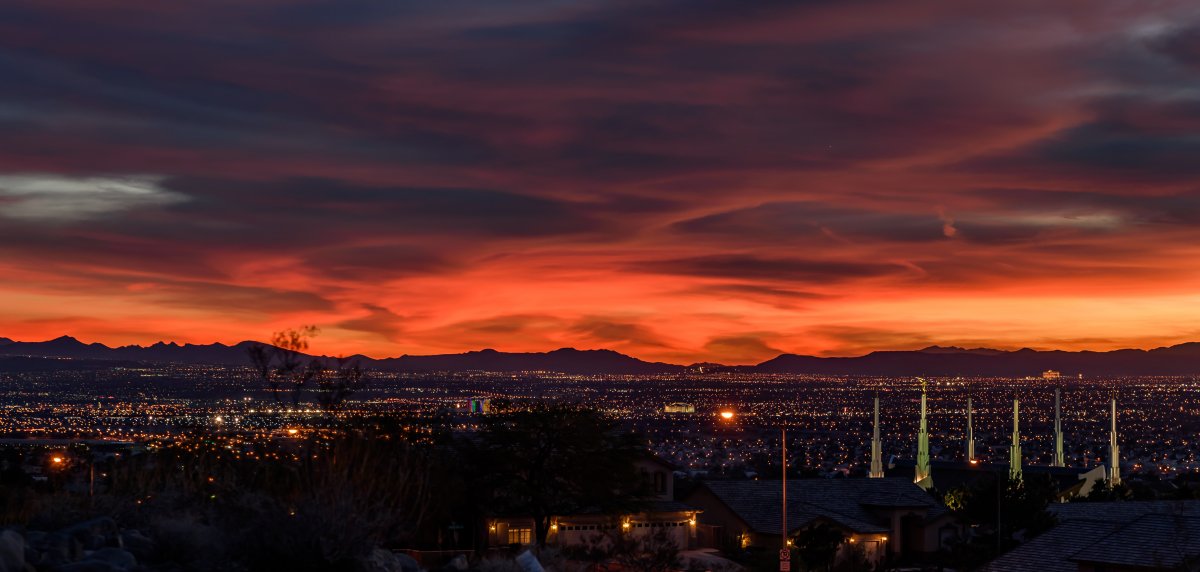
Need help with this image - I need to get rid of the light post, but what I've tried so far hasn't worked effectively. I suck at PS, so any step by step instructions would be fabulous!
DSC_7140.jpg
 

Kyle Jones

Moderator
I'd probably try cloning the light itself. It's pretty big and the glow extends for a way. I feel like cloning would give you more control than a content aware fill.
 

JimFox

Moderator
Staff member
Cloning as Kyle suggests is one way to do it, I will show you another way in about an hour.
 

JimFox

Moderator
Staff member
This method works a lot, it depends on the surrounding patterns.

Basically you duplicate the layer.
Then select around what you want to remove, leave a little space around it.
Then feather it slightly.
Make a layer mask.
Turn the bottom layer into a layer and not the background.
Choose the "Move Tool" (top tool)
Now with the bottom layer selected use the arrow keys to nudge the bottom layer, which moves the object (Light Pole) out of the image and moves the night sky, etc next to it into view.
That's how I removed the light pole and light in yours.

If you need it, I can post screen shots to explain it better.
 

JimFox

Moderator
Staff member
Jim, unless I'm missing something yours still has the light itself...

View attachment 3557
Hmmm, Well I got an extra lamp housing at the bottom of the image if that counts... :)

I actually thought Teresa was referring to that lamp housing on the bottom initially, I didn't realize it was the pole till later.

But really at the low resolution here, I didn't realize that light was from the light pole or I would have taken it out with the layer mask too. :)
 
Top Bottom