Ox bow bend

Ben Egbert

Forum Helper
Staff member
This was taken on a morning that had some fantastic light earlier, but I could not resist getting these geese involved before packing up.

I would love to hear your opinion, is it a tosser? How would you crop it, process it? If you want there is a link the raw below, but comments are also welcome if you don't wish to try your hand at it.


https://we.tl/t-gZAvLHl8yB
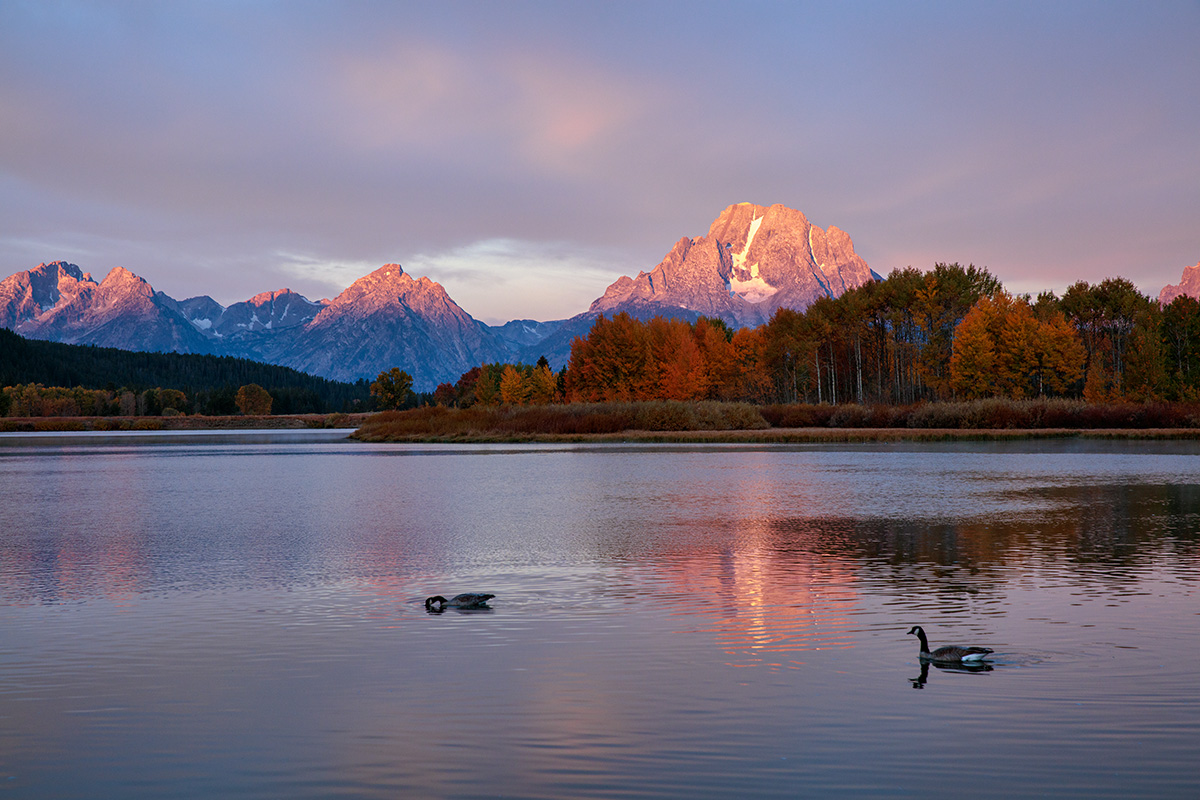

180924-8461-5DS R.jpg
 

PhotoShootGC

Active Member
The only critique I can say about this image would be the Swan the one on the left(if its a swan :p) would just swimming rather reaching for things in the water, other than that everything is perfect to my eye.

I have made a Black and white version of it. I think it seems to be quite dramatic


Jameel Hyder

Moderator
Staff member
I would definitely NOT toss it. Here is my quick edit on the image. Here is what I did.

a. Crop - 16x9 format works well. However after I did that crop, I wanted to crop out the right most part of the mountain range.
b. I tend to favor Camera Faithful/Neutral profile over Adobe Color.
c. Warmed up the image a tad over the "As shot" white balance.
d. Pushed the exposure about 3/4 of a stop.
e. Did some burning of the peaks to bring out additional contrast.

180924-8461-5DS R.jpg
 

Ben Egbert

Forum Helper
Staff member
The only critique I can say about this image would be the Swan the one on the left(if its a swan :p) would just swimming rather reaching for things in the water, other than that everything is perfect to my eye.

I have made a Black and white version of it. I think it seems to be quite dramatic

This is a great version, it is dramatic. You could have cloned out the Canada Goose. It would have been an easy process with content aware. And thanks a ton for your comments and rework.
 

Ben Egbert

Forum Helper
Staff member
I would definitely NOT toss it. Here is my quick edit on the image. Here is what I did.

a. Crop - 16x9 format works well. However after I did that crop, I wanted to crop out the right most part of the mountain range.
b. I tend to favor Camera Faithful/Neutral profile over Adobe Color.
c. Warmed up the image a tad over the "As shot" white balance.
d. Pushed the exposure about 3/4 of a stop.
e. Did some burning of the peaks to bring out additional contrast.

View attachment 14399
Thanks Jameel. This is a very different look than I got and helps me to get a different concept. Yours is much brighter than mine and would really help with printing. I too prefer Camera faithful.
 

Ben Egbert

Forum Helper
Staff member
Hey Michal, here is some words on how to do content aware fill.

Create a duplicate layer.

Using the lasso tool. Circle the goose.

Go to Edit>Fill. A dialog box pops up.

Use the arrow in the first dialog box window and scroll down to “content aware”

Check the box for “color adaptation”

Set blending mode “normal

Opacity at 100%.


And here is the result.

2qso2s7 ben.jpg
 

Ken Rennie

Well-Known Member
I decided to go for amore sunset look. I used to work/ overwork skies and decided to give this a go. I cloned out the orphan mountain at the far RHS and overall went for more saturation and sharpness. Ken
180924-8461-5DS R-1.jpg
 

Ben Egbert

Forum Helper
Staff member
Thanks Rick, I think that second crop is my favorite, but both crops work pretty well. The processing is pretty good as well.
 

Ben Egbert

Forum Helper
Staff member
I decided to go for amore sunset look. I used to work/ overwork skies and decided to give this a go. I cloned out the orphan mountain at the far RHS and overall went for more saturation and sharpness. KenView attachment 14402
Thanks Ken, this also works. Looks like you darkened it and added some color to the clouds as well as more sat and sharpening.
 

Amy Nelson

Well-Known Member
My thoughts on this great image:
Standard 16:9 Crop
Sharpen, color toning, increase light in certain areas, but over all decreased exposure...I wanted to keep the appearance of morning light so I increased the Magenta and yellow in the sky. Did a little burning on the water, increased the saturation on the trees...and other steps that I just can't remember now...past my bed time.

Very nice image Ben, was a pleasure to work on it!
Ox Bow Bend - AJN - 12-03-2018-2-1.jpg


Without feeding Goose
Ox Bow Bend - AJN - 12-03-2018-3-1-3.jpg
 
Last edited:

JimFox

Moderator
Staff member
My thoughts on this great image:
Standard 16:9 Crop
Sharpen, color toning, increase light in certain areas, but over all decreased exposure...I wanted to keep the appearance of morning light so I increased the Magenta and yellow in the sky. Did a little burning on the water, increased the saturation on the trees...and other steps that I just can't remember now...past my bed time.

Very nice image Ben, was a pleasure to work on it!
View attachment 14412
Nice one Amy, I like the look of this. I think cloning out that swan in the middle though is really important in this image, so I would suggest adding that to your edit.
 

JimFox

Moderator
Staff member
The only critique I can say about this image would be the Swan the one on the left(if its a swan :p) would just swimming rather reaching for things in the water, other than that everything is perfect to my eye.

I have made a Black and white version of it. I think it seems to be quite dramatic

I like this a lot Mike! Clone out that one swan on the left and this will be really cool.
 

Amy Nelson

Well-Known Member
Nice work Amy, I like the one with the goose cloned out.
You don't think that it looks to obvious that something was removed? I really like the new Content Aware Fill that Photoshop has, does a lot better job of removing stuff. But I still think it looks off, I don't know if it's because I know that the goose was supposed to be there, or what.
 

Ben Egbert

Forum Helper
Staff member
180924-8461-5DS R x.jpg
Here is an edit that incorporates Ricks crop, Kyles gees suggestion (slopppy job) and some of t
 
Top Bottom