Otter Creek Reservoir

Darcy Grizzle

Well-Known Member
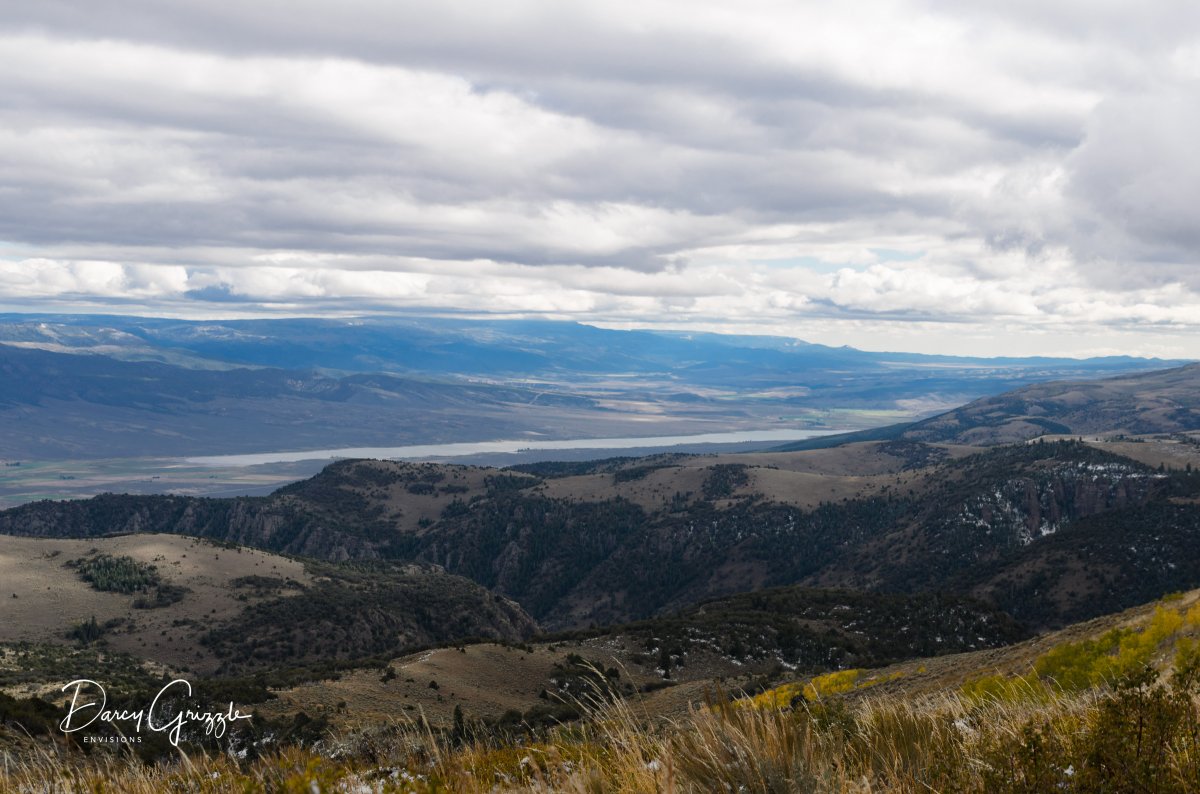
Looking down on Otter Creek Res from Monroe Mtn., near Marysvale Utah from around 8000-9000 ft. We were just coming down from the top at 10,500. The range in the background is the Tushar Mountains. Any who, I would like you guys to advise me on this. I really don't edit much, and this is my first time for dodging & burning. I also used the gradient filter on the clouds in Lightroom.

I am really embarrassed after really looking at all the postings, as you guys are like Peter Lik's compared to my level. But I was told this is the place to learn.
The 1st is my original edited Raw file that I posted as jpg on fb.
DSC_7341.jpg


DSC_7341-Edit-3.jpg
 

Darcy Grizzle

Well-Known Member
After perusing all the gallery of photos, I realized how flat & boring they are, what I thought looked good! At least you got me trying right off the bat! ::)
 

AlanLichty

Moderator
Darcy - you certainly added some pop to the original and it's nice teasing out some sun rays through the clouds. For me the clouds are just a little bit too dark but emphasis on the "a little" part. The grasses in the foreground could use just a teensy bit less saturation so they don't jump out and distract from the view of the valley and the Tushar Mtns. I like the extra detail you got out of the hills on the far side of the valley.

Your observation that the photos seem flat coming out of your camera is a correct one and better cameras don't really produce images that are a match for what your eyes saw when you squeezed the shot off. Post processing is everything. When you take a shot, try to also take a mental image of what the scene looks like with emphasis on contrasts and color saturation so you know what you want to correct when you start your processing. The nice part about digital is that you can make a quick copy and tweak it until you trash it and then make another copy and try again.
 

Ben Egbert

Forum Helper
Staff member
Ok, here is my stab at it. As you can see, yours is better already. So that tells you something right off.

DSC_7341.jpg
 

Darcy Grizzle

Well-Known Member
Hah, but I know pics are supposed to be warm in the foreground & cool in the background (according to editing videos I have watched), so you got the coolness correct) thank you for saying that though! And you only had the jpeg to work with. Can we post the raws here?
I think I may not post in actual forums until I think I have some better images LOL.
 

Darcy Grizzle

Well-Known Member
Darcy - you certainly added some pop to the original and it's nice teasing out some sun rays through the clouds. For me the clouds are just a little bit too dark but emphasis on the "a little" part. The grasses in the foreground could use just a teensy bit less saturation so they don't jump out and distract from the view of the valley and the Tushar Mtns. I like the extra detail you got out of the hills on the far side of the valley.

Your observation that the photos seem flat coming out of your camera is a correct one and better cameras don't really produce images that are a match for what your eyes saw when you squeezed the shot off. Post processing is everything. When you take a shot, try to also take a mental image of what the scene looks like with emphasis on contrasts and color saturation so you know what you want to correct when you start your processing. The nice part about digital is that you can make a quick copy and tweak it until you trash it and then make another copy and try again.
I didn't even notice the rays until I made the clouds darker, so thought that would be something to highlight! Thank you for your input.
 

Ben Egbert

Forum Helper
Staff member
Hah, but I know pics are supposed to be warm in the foreground & cool in the background (according to editing videos I have watched), so you got the coolness correct) thank you for saying that though! And you only had the jpeg to work with. Can we post the raws here?
I think I may not post in actual forums until I think I have some better images LOL.
yes, I could not tease out the rays from the JPG. One thing that I have done in the past is to use dropbox to put up RAW's. I am pretty sure we can't share them here. But put one in dropbox and share a link.

I also plan to put some of my images here when I think that they are not presentation quality.
 

MonikaC

Well-Known Member
Darcy, these forums are a fantastic way to learn about post processing. I did a lot of that on the NPN forums (when they were active) and it was invaluable. Like most of us, I'm still learning. There are numerous points of view, some general, some specific , some conflicting. The conflicting ones are as valuable as the others as it reminds one that there is no one "right" way to process your vision. I'm new to this site, but am seeing that Alan Lichty has very good, specific advice. You can always push the sliders all of the way to the side & see what the way-over-the-top effect is & then back it down to where you're just getting enough of the effect that you like. I think that another thing that may be helpful is figuring out just what it is in that scene that captivates you and makes you want to make a photo of it, then eliminating the extraneous or distracting elements. In this one, maybe cropping about half of the clouds & and grasses, if what drew your eye was the valley. Keep at it!
 

lightsgood

Well-Known Member
Wow Darcy! This image is OUTSTANDING! Looks you are getting some great advice here. In my opinion Alan is spot on, and as he stated "just a little" was all it needed . Like Monika said "there is no one "right" way to process your vision". I like your first edit. It is wonderful! You have no reason to worry about posting here. I have seen your work and it is very good. Keep them coming. The advice we get here all adds up to making us better.
 

Kyle Jones

Moderator
I'll also agree with Alan's advice. It's a really nice image and your edit brings it a long way. I think the mid ground is just about right and you've done a great job bringing out the rays. I think the foreground grass area is a little too yellow. You can back off on that yellow slider like you mentioned or use another gradient filter in Lightroom to push the white balance toward blue. Similarly, I agree that the clouds are too dark. I'd probably look to use another gradient to lighten the shadows in the sky.
 

Ben Egbert

Forum Helper
Staff member
Darcy, these forums are a fantastic way to learn about post processing. I did a lot of that on the NPN forums (when they were active) and it was invaluable. Like most of us, I'm still learning. There are numerous points of view, some general, some specific , some conflicting. The conflicting ones are as valuable as the others as it reminds one that there is no one "right" way to process your vision. I'm new to this site, but am seeing that Alan Lichty has very good, specific advice. You can always push the sliders all of the way to the side & see what the way-over-the-top effect is & then back it down to where you're just getting enough of the effect that you like. I think that another thing that may be helpful is figuring out just what it is in that scene that captivates you and makes you want to make a photo of it, then eliminating the extraneous or distracting elements. In this one, maybe cropping about half of the clouds & and grasses, if what drew your eye was the valley. Keep at it!
This is great advice, I hope you will be a regular at Critique.
 

JimFox

Moderator
Staff member
Hey Darcy and all. :)

Sorry I am late to this party, I am still here in Colorado though, spending too much time freezing my feet while standing in Beaver ponds shooting the sunrise, or up high getting covered in snow while trying to capture some misty peaks. :eek:

There has been some really good advice and suggestions here. For instance, I liked a lot how Ben handled those foreground grasses in his attempt. I did like how Darcy emphasized those Sun Beams in your originals.

As Monika stated, it's your vision ultimately you are working for Darcy, but what I have always found cool though is to see other peoples interpretations. I think sometimes our vision can be shifted or modified as we see other things, and maybe even see an interpretation that we didn't even realize was possible.
 
Top Bottom