Noise Reduction and HDR Using Burst Photography

Alex Vasile

Well-Known Member
I would like to introduce to you a free and open source photography app that I have been helping develop. It's called Burst Photo. Before I get your hopes too high, you should know it's only for macOS. It does:
  • Noise reduction: burst of photos all with the same exposure.
  • HDR + noise reduction: exposure bracketed shot (e.g. -2, 0, +2EV)
  • Synthetic long exposure: you can also turn off the aligning of images and do a temporal average (including HDR support).
  • Breathing new life it your old cameras: If a single photo does not have the dynamic range or noise levels of current cameras, a burst of them will. Lets you hold onto your gear longer, unless you want an excuse to buy new gear ;).
There's a lot to this application so this post is long, and somewhat technical. If you'd like to skip all that, take a look at the photos, download the application, take a burst of photos and drag the raw files into the application. The output raw file will be in the Pictures folder inside a folder called Burst Photo.

The basic idea is very similar and many of the people on this forum i'm sure are already aware of, and it is image stacking. Very common in astrophotography. Some of you probably have experience doing this in photoshop with landscape, architecture, or still life. It's less common in other types of photos because of the difficulties (and tediousness) associated with aligning everything in the frame. The way Burst Photo handles this is by splitting each image into very small rectangles and then automatically aligning each of those rectangles. Something like this gif from our website:
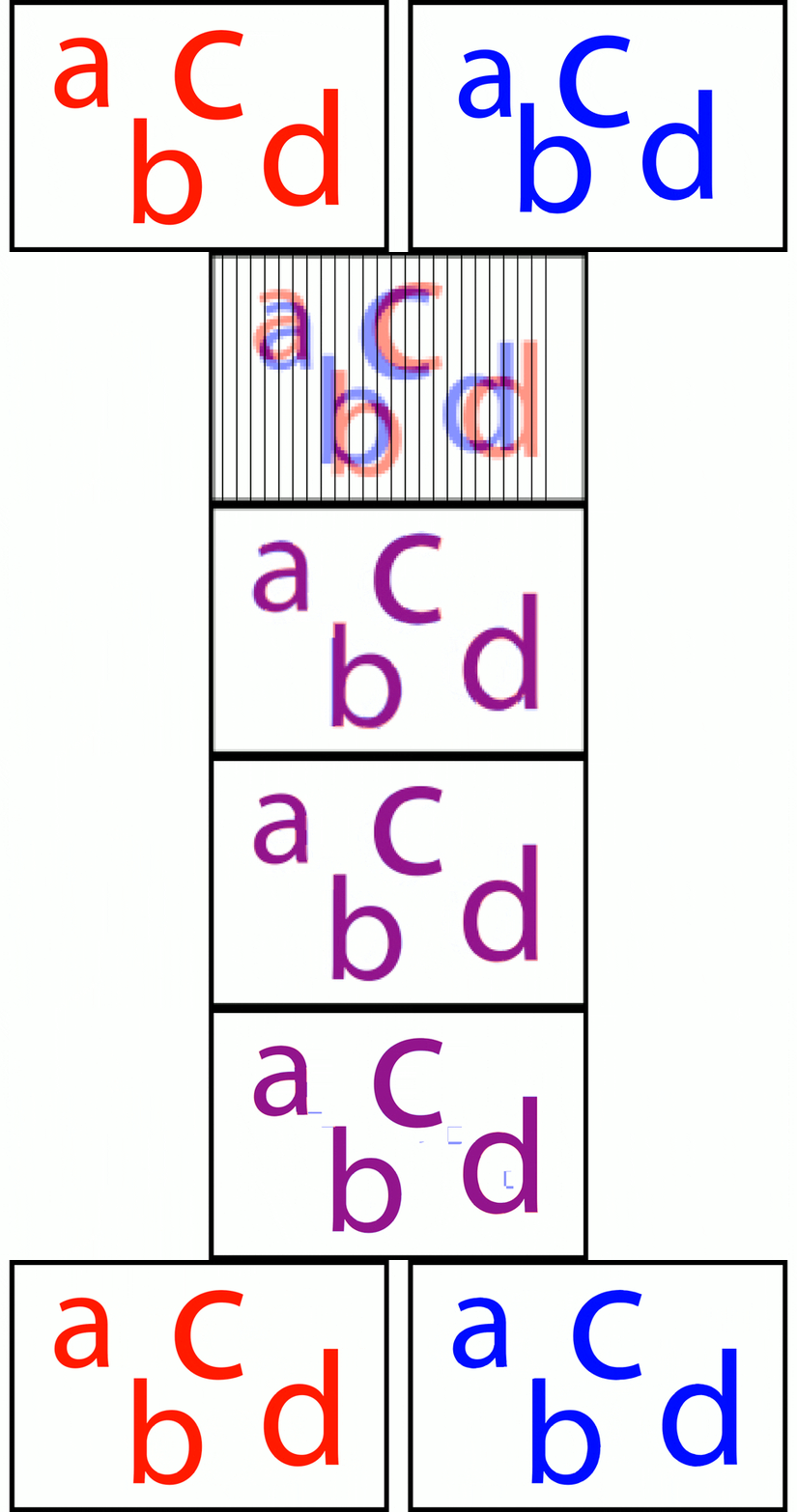

This allows the approach to handle *significant* movement within a frame. And by significant, I mean people walking across the frame, cars driving, waves. Depending on how much movement there is in the scene, you may not be able to match each of the small squares, if that happens, then that square is not merges and you will end up with higher amounts of noise around the things that are moving.

The files you get out of it are regular DNGs. They will not have as much dynamic range as the 32-bit float DNGs, or EXR, or whatever other format your HDR software might output in. But, you will be able to process them in your regular workflow, just like any other raw file.

The effects are particularly striking on older or sub-full-frame sensors. For example this shot is from another contributor (Chris, who has done a lot of work on the app) is from a 12-bit M4/3 camera. The top left shows the scene, and the exposure you would need to not clip your highlights. I encourage you to pixel peek at the crops below to look at the differences in the result.


Some more technical features:
  • Raw-in-raw-out without demosaicing.
    • Raw files are small and fit right back into your regular workflow.
  • Optional 16-bit output to retain as much information as possible.
    • My sony has 14-bit raws, but my ancient canon (and my foveon camera) have 8-bit raws. Choosing 16-bit for the canon has significant improvements in noise and dynamic range.
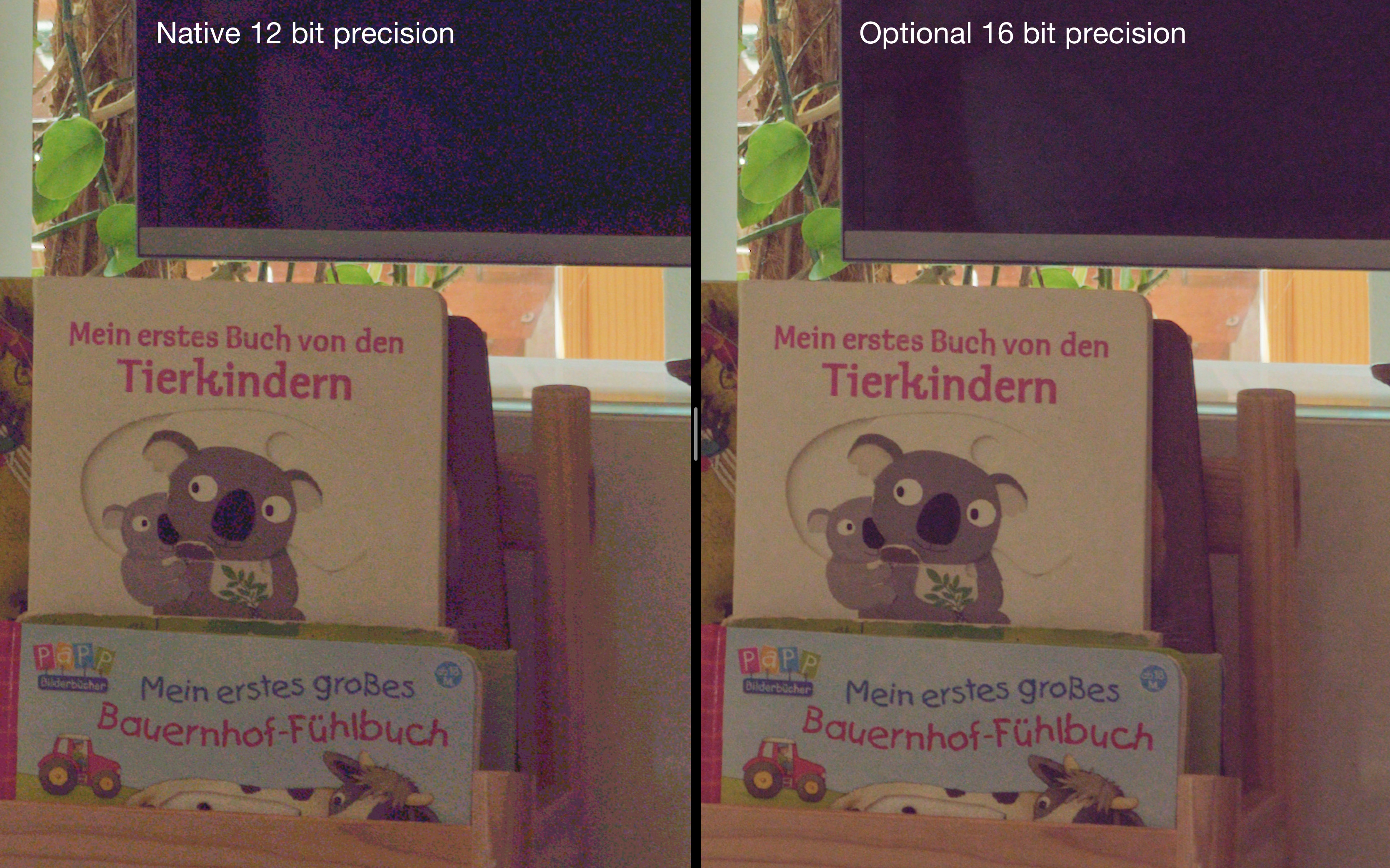
    • See the impact on the shadows in this comparison. Again for a 12-bit M4/3s camera. The only difference between them is whether to use 12 bits or 16 bits for the output raw.
  • Optional tone mapping of the output raw file. Compare the images in the bottom row from above
    • This will lift the shadows and reduce the quantization effects caused the raw files using integers (whole numbers) to represent the information.
    • It will compress the highlights to get more information into the file than you could with a linear response curve.
    • This tonal compression will preserve more of the dynamic range of the burst when saving it back into a raw file. This will require extra processing on your part in whatever raw convertor you use.
  • Mild Hotpixel-correction is applied to remove some hotpixels without affecting stars for astrophotography.

How I personally use it:
  • I find it especially useful for indoor events where I'm already shooting bursts in order to capture the right moment. I find that merging the photos gives me, on an a7III, the equivalent noise reduction of dropping my ISO >2 stops. The actual amount depends on how much movement there is between the frames, and how much sharpness you are willing to sacrifice. I then apply regular noise reduction in my raw editor (Capture One).
  • Lets me shoot with a full electronic shutter (which for my Sony drops me from 14-bit raws to 12-bit raws) in high contrast scenes by doing an exposure bracketed burst.

Try it for yourself
  • If your camera supports an automatic exposure bracket consider turning it on to gather some images. This will provide the most amount of benefit. Otherwise set it to burst and take a few photos. The closer together you take the images the better the noise reduction will be.
  • Open the application and change settings if you'd like.
  • Drag and drop the raw files into the application.
    • The raw files must be converted to .dng. If you have the adobe dng convertor application installed in the default location, Burst Photo will find it and convert the files for you behind the scenes. If you do not, you will have to download the convertor, or convert them yourself.
  • When it's finished, the raw files are saved in Pictures/Burst Photo.

Camera Support:
  • Bayers sensor camera
  • X-Trans sensor cameras (Beta, not all features available. If you have X-Trans cameras and want to contribute some photos, I would love to hear from you.)
  • Foveon (Not **yet**, but soon. If you have a Foveon camera, you know how badly it needs noise reduction)
  • Demosaiced images (Not Yet)

Alternatives:
  • Capture One supports producing HDR images in its newer version. The resulting image will have less noise and be a 16-bit DNG. However I have my gripes with it:
    • It really struggles with movement within the frame. But, if there is very little movement, the resulting image is sharper than Burst Photo.
    • It does not handle clipped highlights or many images well. I find that has a tendency to create ugly artifacts, especially around highlights (specular reflections, car headlights, bright windows, etc).
    • It produces massive raw files which I have not been able to open in all software.
      • My sony a7III files go from 49MB .ARWs to ~160MB .DNGs This is because Capture One demosaics the images (so the DNG has 2x more data for green, 3x for blue, and 3x for red).
      • The 16-bit images coming out of Burst Photo on the other hand are ~29MB.
  • DxO PhotoLabs:
    • Does not support HDR merging. I think there are plugins for it, but I'm not willing to buy one and test (I could not find only if it supported).
    • They do have fairly strong noise reduction algorithms, especially their deep prime. But I am personally skeptical of applying anything machine learning related to images since that extra information that they provide is not from the image itself but hallucinated by the software. Burst Photo is using only information contained in the photos.
  • Aurora HDR:
    • The version I have does not do RAW-in-RAW-out
    • The version I have does not handle movement within the frame very well
  • Photoshop
    • You could stack the images yourself with a median filter, but this requires an extra step and the result is not a raw file.

Disadvantages:
  • macOS only. None of the original developers used a windows/linux computer for our photo workflow so it was written to be mac only. Theoretically it could be moved to windows/linux, but that would require a completely rewrite, which none of us have any plans on doing.
  • In exchange for the ability to handle this movement, you will lose some amount of sharpness. How much depends on the burst and the settings you choose, but it's within the user's control.
  • Because the software lets the user set how aggressive to be about noise reduction, you can get situations where you end up with artifacts caused by the software being unable to merge the tiles. These artifacts are not always noticeable unless you're pixel peeping. But they can always be removed by using a less aggressive setting for the noise reduction.

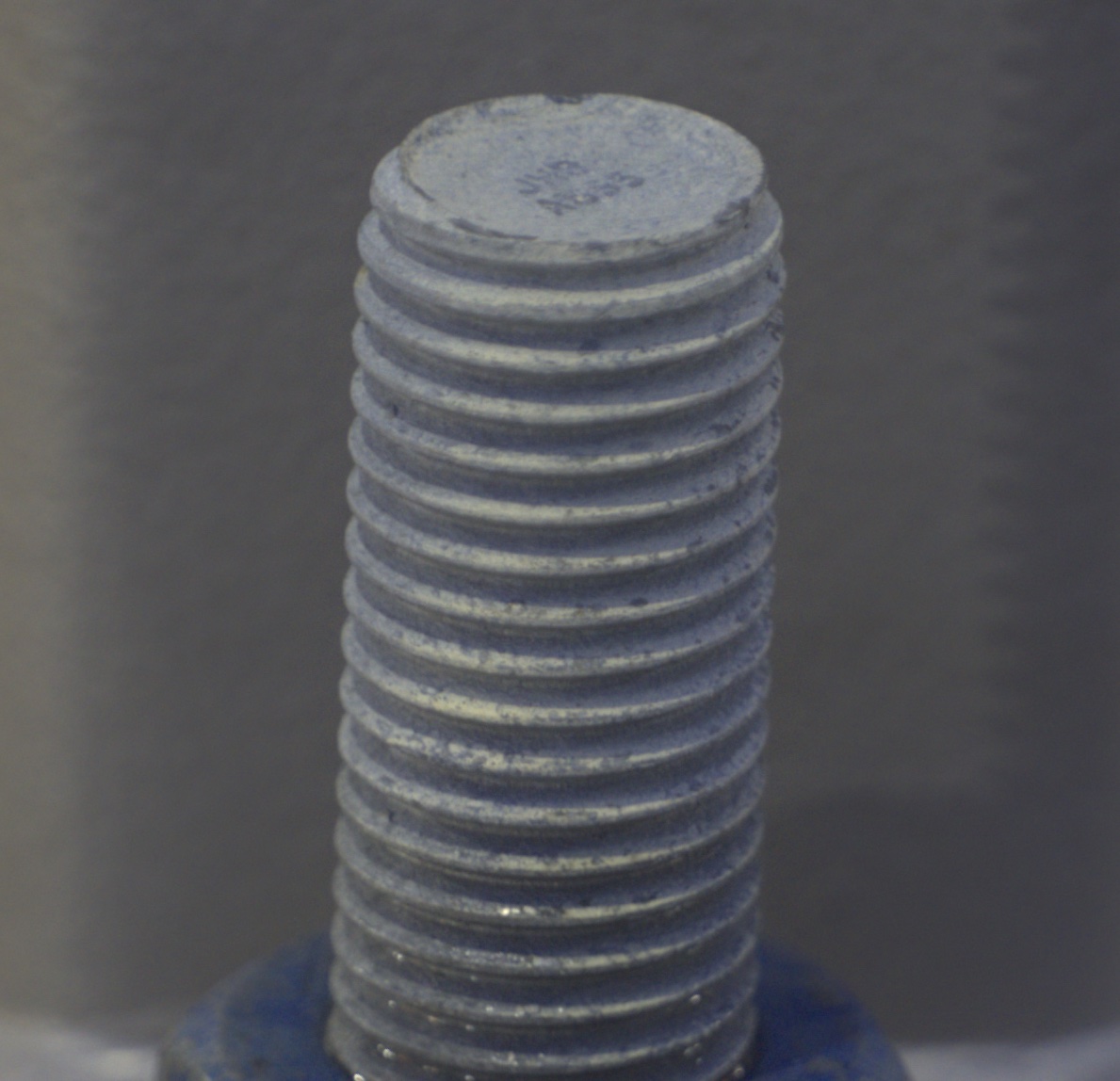
If you read all the way to the end, here's one last example. It's a 1:1 crop from Rawdigger (so no sharpness or noise reduction applied). I took it with my a7III, handheld with a 100mm macro lens at ISO 20,000. I recommend you follow the link and check it out at 100%.
iso 20,000.jpg
 
Last edited:

AlanLichty

Moderator
I use burst mode a lot with my drones when shooting waterfalls so this has my attention. I have been using median blending for the water flows but I don't like the workflow for this since I have to leave RAW in order to align/merge the images as layers. This task was a whole lot less work in Burst to do the same blending and I was able to pick up where I left off in LR. Once I imported the Burst .DNG file I played with it a bit and then just for grins handed the .DNG file off to DxO PureRAW3. DxO still thought the DNG was an original DNG from the 70mm lens on my Mavic 3 Pro drone and happily processed the image. I can state that the processing time for the 5 shot burst stack (48MP) was quick on a Mac Studio w/64GB of RAM.

Click through on both of these for the full processed image size.

Full scene (reduced for web):

DJI_M3P_70_BurstMultnomahFull.jpg


and a 100% crop of the area down near the bridge at the bottom of the falls:

DJI_M3P_70_BurstMultnomah100.jpg


Pretty impressive piece of software. I need to play with it some more.
 

Alex Vasile

Well-Known Member
I use burst mode a lot with my drones when shooting waterfalls so this has my attention. I have been using median blending for the water flows but I don't like the workflow for this since I have to leave RAW in order to align/merge the images as layers. This task was a whole lot less work in Burst to do the same blending and I was able to pick up where I left off in LR. Once I imported the Burst .DNG file I played with it a bit and then just for grins handed the .DNG file off to DxO PureRAW3. DxO still thought the DNG was an original DNG from the 70mm lens on my Mavic 3 Pro drone and happily processed the image. I can state that the processing time for the 5 shot burst stack (48MP) was quick on a Mac Studio w/64GB of RAM.

Click through on both of these for the full processed image size.

Full scene (reduced for web):

and a 100% crop of the area down near the bridge at the bottom of the falls:

Pretty impressive piece of software. I need to play with it some more.
Glad you hear that it seems to fit your workflow. If you get a change, I'd love to see what a single frame from the bursts looks like at 100%
 

JimFox

Moderator
Staff member
Hey Alex, what a really neat process! I enjoyed the explanation and illustrations.

I don't use a Mac, but for an app like this you are making me wish that I did. It's great to see that Alan can get some use from this.
 

Alex Vasile

Well-Known Member
Hey Alex, what a really neat process! I enjoyed the explanation and illustrations.

I don't use a Mac, but for an app like this you are making me wish that I did. It's great to see that Alan can get some use from this.
If you're feeling adventurous and are willing to deal with a bit of programming, there is an option available (though I haven't tried it). The person who started the app, Martin, initially implemented a version in python for research purposes. It's not actively developed, and doesn't have many of the features I talked about above (e.g. exposure bracketing or raw output) since they were implemented afterwards, but it is an option and may be faster than the photoshop route.

You can find the code here. And try out a demo in your browser here.
 

AlanLichty

Moderator
Glad you hear that it seems to fit your workflow. If you get a change, I'd love to see what a single frame from the bursts looks like at 100%
This is a 100% crop on one of the frames I fed into Burst. I tried to match the crop for the 100% image above. The original is 8056 x 6040 pixels so far too big to include the whole frame here.

DJI_M3P_70_BurstMultnomah100Single.jpg
 

Alex Vasile

Well-Known Member
This is a 100% crop on one of the frames I fed into Burst. I tried to match the crop for the 100% image above. The original is 8056 x 6040 pixels so far too big to include the whole frame here.
I can see why you do the stacking. Is that noise level after noise reduction in your raw editor or before you apply anything?
 

AlanLichty

Moderator
I can see why you do the stacking. Is that noise level after noise reduction in your raw editor or before you apply anything?
No noise reduction has been applied to the single frame at all - just Lightroom edits for exposure and color balance. Photoshop only resized the image and converted the profile to sRGB.

My usual use of stacking is to blend the water flow in the waterfalls. This is from a Mavic 3 Pro drone hovering at around 200' above the Columbia River so long exposures with a 70mm lens are going to introduce at least some motion blur from the camera. I like the keep the shutter speed high enough to minimize motion blur from the aerial tripod. DxO has been doing an excellent job with cleaning up a lot of the noise in single frame images but the workflow for using DxO inside of Lightroom on each frame in the burst and then moving everything over to PS for median blending is far from ideal. This process gets really painful when I shoot panorama sequences with 3 or 4 panels to stitch and 5 shot bursts for each frame.
 

Ken Rennie

Well-Known Member
I also shoot bursts when I either forget my ND filters or they fog up and usuallly use mean merging in photoshop to give a long exposure effect. I have just tried Burst Phot with 36 times 60Mp A7R4 files and it woked perfectly on my 16Mp M1 macbook air. It is surprisingly quick, apart from converting the files into dng's. The resultant file is tiny and I am unsure how a small file can contain more detail(sharper) than a larger one. I will see how this compares with my usual mean merge technique when I have time but so far it looks impressive. Ken
 

Alex Vasile

Well-Known Member
I also shoot bursts when I either forget my ND filters or they fog up and usuallly use mean merging in photoshop to give a long exposure effect. I have just tried Burst Phot with 36 times 60Mp A7R4 files and it woked perfectly on my 16Mp M1 macbook air. It is surprisingly quick, apart from converting the files into dng's. The resultant file is tiny and I am unsure how a small file can contain more detail(sharper) than a larger one. I will see how this compares with my usual mean merge technique when I have time but so far it looks impressive. Ken
Hi Ken, thanks for trying it out!

I (and all the other developers) use an m1 laptop so we target performance for that.

The next update will significantly speed up the dng conversion and reading of images, I just finished with that a few days ago.
 
I would like to introduce to you a free and open source photography app that I have been helping develop. It's called Burst Photo. Before I get your hopes too high, you should know it's only for macOS. It does:
  • Noise reduction: burst of photos all with the same exposure.
  • HDR + noise reduction: exposure bracketed shot (e.g. -2, 0, +2EV)
  • Synthetic long exposure: you can also turn off the aligning of images and do a temporal average (including HDR support).
  • Breathing new life it your old cameras: If a single photo does not have the dynamic range or noise levels of current cameras, a burst of them will. Lets you hold onto your gear longer, unless you want an excuse to buy new gear ;).
There's a lot to this application so this post is long, and somewhat technical. If you'd like to skip all that, take a look at the photos, download the application, take a burst of photos and drag the raw files into the application. The output raw file will be in the Pictures folder inside a folder called Burst Photo.

The basic idea is very similar and many of the people on this forum i'm sure are already aware of, and it is image stacking. Very common in astrophotography. Some of you probably have experience doing this in photoshop with landscape, architecture, or still life. It's less common in other types of photos because of the difficulties (and tediousness) associated with aligning everything in the frame. The way Burst Photo handles this is by splitting each image into very small rectangles and then automatically aligning each of those rectangles. Something like this gif from our website:


This allows the approach to handle *significant* movement within a frame. And by significant, I mean people walking across the frame, cars driving, waves. Depending on how much movement there is in the scene, you may not be able to match each of the small squares, if that happens, then that square is not merges and you will end up with higher amounts of noise around the things that are moving.

The files you get out of it are regular DNGs. They will not have as much dynamic range as the 32-bit float DNGs, or EXR, or whatever other format your HDR software might output in. But, you will be able to process them in your regular workflow, just like any other raw file.

The effects are particularly striking on older or sub-full-frame sensors. For example this shot is from another contributor (Chris, who has done a lot of work on the app) is from a 12-bit M4/3 camera. The top left shows the scene, and the exposure you would need to not clip your highlights. I encourage you to pixel peek at the crops below to look at the differences in the result.


Some more technical features:
  • Raw-in-raw-out without demosaicing.
    • Raw files are small and fit right back into your regular workflow.
  • Optional 16-bit output to retain as much information as possible.
    • My sony has 14-bit raws, but my ancient canon (and my foveon camera) have 8-bit raws. Choosing 16-bit for the canon has significant improvements in noise and dynamic range.
    • See the impact on the shadows in this comparison. Again for a 12-bit M4/3s camera. The only difference between them is whether to use 12 bits or 16 bits for the output raw.
  • Optional tone mapping of the output raw file. Compare the images in the bottom row from above
    • This will lift the shadows and reduce the quantization effects caused the raw files using integers (whole numbers) to represent the information.
    • It will compress the highlights to get more information into the
    • This tonal compression will preserve more of the dynamic range of the burst when saving it back into a raw file. This will require extra processing on your part in whatever raw convertor you use.
  • Mild Hotpixel-correction is applied to remove some hotpixels without affecting stars for astrophotography.

How I personally use it:
  • I find it especially useful for indoor events where I'm already shooting bursts in order to capture the right moment. I find that merging the photos gives me, on an a7III, the equivalent noise reduction of dropping my ISO >2 stops. The actual amount depends on how much movement there is between the frames, and how much sharpness you are willing to sacrifice. I then apply regular noise reduction in my raw editor (Capture One).
  • Lets me shoot with a full electronic shutter (which for my Sony drops me from 14-bit raws to 12-bit raws) in high contrast scenes by doing an exposure bracketed burst.

Try it for yourself
  • If your camera supports an automatic exposure bracket consider turning it on to gather some images. This will provide the most amount of benefit. Otherwise set it to burst and take a few photos. The closer together you take the images the better the noise reduction will be.
  • Open the application and change settings if you'd like.
  • Drag and drop the raw files into the application.
    • The raw files must be converted to .dng. If you have the adobe dng convertor application installed in the default location, Burst Photo will find it and convert the files for you behind the scenes. If you do not, you will have to download the convertor, or convert them yourself.
  • When it's finished, the raw files are saved in Pictures/Burst Photo.

Camera Support:
  • Bayers sensor camera
  • X-Trans sensor cameras (Beta, not all features available. If you have X-Trans cameras and want to contribute some photos, I would love to hear from you.)
  • Foveon (Not **yet**, but soon. If you have a Foveon camera, you know how badly it needs noise reduction)
  • Demosaiced images (Not Yet)

Alternatives:
  • Capture One supports producing HDR images in its newer version. The resulting image will have less noise and be a 16-bit DNG. However I have my gripes with it:
    • It really struggles with movement within the frame. But if there is very little movement, the resulting image is sharper than what Burst Photo currently produces.
    • It does not handle clipped highlights or many images well. I find that has a tendency to create
    • It produces massive raw files which I have not been able to open in all software.
      • My sony a7III files go from 49MB .ARWs to ~160MB .DNGs This is because Capture One demosaics the images (so the DNG has 2x more data data for green, 3x for blue, and 3x for red).
      • The 16-bit images coming out of Burst Photo on the other hand are ~29MB.
  • DxO PhotoLabs:
    • Does not support HDR merging. I think there are plugins for it, but I'm not willing to buy one and test (I could not find only if it supported).
    • They do have fairly strong noise reduction algorithms, especially their deep prime. But I am personally skeptical of applying anything machine learning related to images since that extra information that they provide is not from the image itself but hallucinated by the software. Burst Photo is using only information contained in the photos.
  • Aurora HDR:
    • The version I have does not do RAW-in-RAW-out
    • The version I have does not handle movement within the frame very well
  • Photoshop
    • You could stack the images yourself with a median filter, but this requires an extra step and the result is not a raw file.

Disadvantages:
  • macOS only. None of the original developers used a windows/linux computer for our photo workflow so it was written to be mac only. Theoretically it could be moved to windows/linux, but that would require a completely rewrite, which none of us have any plans on doing.
  • In exchange for the ability to handle this movement, you will lose some amount of sharpness. How much depends on the burst and the settings you choose, but it's within the user's control.
  • Because the software lets the user set how aggressive to be about noise reduction, you can get situations where you end up with artifacts caused by the software being unable to merge the tiles. These artifacts are not always noticeable unless you're pixel peeping. But they can always be removed by using a less aggressive setting for the noise reduction.

If you read all the way to the end, here's one last example. It's a 1:1 crop from Rawdigger (so no sharpness or noise reduction applied). I took it with my a7III, handheld with a 100mm macro lens at ISO 20,000. I recommend you follow the link and check it out at 100%.
View attachment 64258
I gotta try this, the result looks very good.

Oliver
 
Top Bottom