Mesa Arch by moonlight

Ben Egbert

Forum Helper
Staff member
This is the second of my series of Icons shots taken by the light of a full moon. I will post a version using my current PP methods for moonlit shots as well as a straight out of camera RAW that has only been downsized and saved as JPG.

Feel free to download either image and play with them to show how you would work it.

Like to have opinions on any aspect, but in particular.

1. Too dark?
2. Lacking a milky way, it's not special enough?
3. Color (WB choices)
4. Needs more emphasis on the sky.
5. Lower shadows distract?
6. Composition?

Lets see if we can kickstart this forum.

Ben
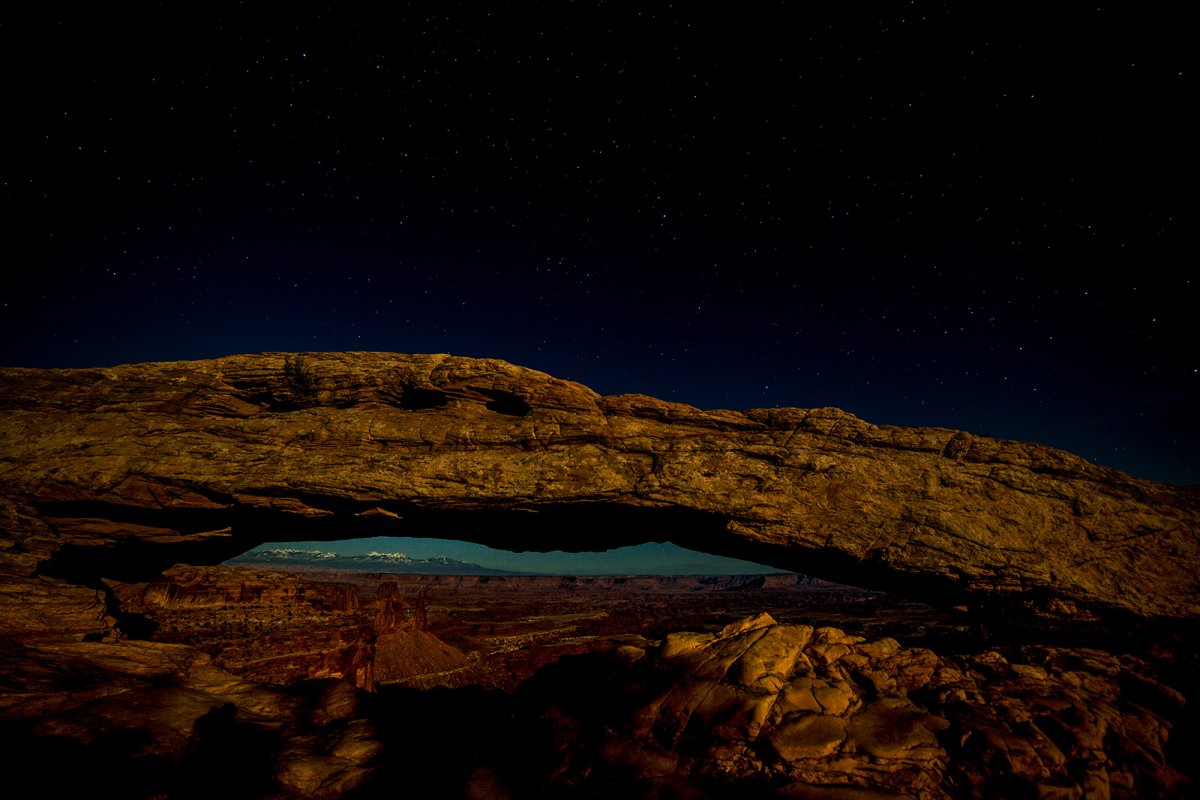
130327-0543-5dm3 bw sharp.jpg


130327-0543-5dm3 sooc.jpg
 
Last edited:

JimFox

Moderator
Staff member
What a cool project Ben.

I probably won't be able to help with this as I am still on the road and will be driving up from Santa Fe back to Ouray very shortly. But it will be interesting to see what others come up with.

Jim
 

AlanLichty

Moderator
Ben - almost none of my nighttime shots have had the milky way in the scene so I am used to trying for stars and moonlight already. For me the colors in your edit were kind of over the top for moonlight where the blue cast tends to suppress yellows and reds. Folks who do underwater photography have to deal with the same issue when you go below 30 feet down and the reds/yellows get muted in a hurry without bringing along additional illumination.

I took a stab at it but RAW would get better results. In this case I used the Adobe Camera RAW filter in photoshop to tease out more details.

AlansHack.jpg


I tried for a darker sky using the brush tool with clarity cranked up as well as contrast with about -10 for blacks. I also darkened the sky under the arch but above the ground level features. There was some unevenness to the sky color under the arch so I couldn't quite match the skies above.

For the ground level features I used a new brush with more shadow, a bit more white to lighten things, contrast cranked up a bit and clarity jammed up to about +40. I didn't go for quite as much saturation as your first image since moonlight tends to be a bit on the blue side anyway and I was trying to preserve that mood to the scene with this jpeg hack.

It's hard to get enough light for distant vistas like this at night.

I was entertained trying - :) Thanks for letting us play with it.
 

Ben Egbert

Forum Helper
Staff member
Thanks a lot Alan for doing this. I like your version a lot, especially the colors. I have some tricks in ACR that bring out the stars better as well as after I get into PS I used a large radius USM that brings them out even more. They look pretty good at monitor size. but sort of get lost here.

You are correct, Yellow is a dominant color of moonlight.

I appreciate your work. Hope to see a few others here and then I will start making some tweaks.
 

lightsgood

Well-Known Member
Ben - almost none of my nighttime shots have had the milky way in the scene so I am used to trying for stars and moonlight already. For me the colors in your edit were kind of over the top for moonlight where the blue cast tends to suppress yellows and reds. Folks who do underwater photography have to deal with the same issue when you go below 30 feet down and the reds/yellows get muted in a hurry without bringing along additional illumination.

I took a stab at it but RAW would get better results. In this case I used the Adobe Camera RAW filter in photoshop to tease out more details.

View attachment 1687

I tried for a darker sky using the brush tool with clarity cranked up as well as contrast with about -10 for blacks. I also darkened the sky under the arch but above the ground level features. There was some unevenness to the sky color under the arch so I couldn't quite match the skies above.

For the ground level features I used a new brush with more shadow, a bit more white to lighten things, contrast cranked up a bit and clarity jammed up to about +40. I didn't go for quite as much saturation as your first image since moonlight tends to be a bit on the blue side anyway and I was trying to preserve that mood to the scene with this jpeg hack.

It's hard to get enough light for distant vistas like this at night.

I was entertained trying - :) Thanks for letting us play with it.
Well done Alan. Great comments as usual!
 

Kyle Jones

Moderator
Here's my take. Increased contrast, clarity and added some vibrance in the camera RAW filter. In photoshop I selected the blue sky under the arch and adjusted the color to take out some of the cyans and yellows and then darkened that area. I also added a layer to add some contrast to the brights (hoping to emphasize some of the stars a little more).

I then removed (fairly sloppily) the shadow of the camera/tripod in the lower left. Fin ally, I switched to a 16x9 aspect since (a) I know Ben likes them and (b) there isn't much in the sky to hold any attention.
130327-0543-5dm3_kyle.jpg
 

lightsgood

Well-Known Member
This is the second of my series of Icons shots taken by the light of a full moon. I will post a version using my current PP methods for moonlit shots as well as a straight out of camera RAW that has only been downsized and saved as JPG.

Feel free to download either image and play with them to show how you would work it.

Like to have opinions on any aspect, but in particular.

1. Too dark?
2. Lacking a milky way, it's not special enough?
3. Color (WB choices)
4. Needs more emphasis on the sky.
5. Lower shadows distract?
6. Composition?

Lets see if we can kickstart this forum.

Ben
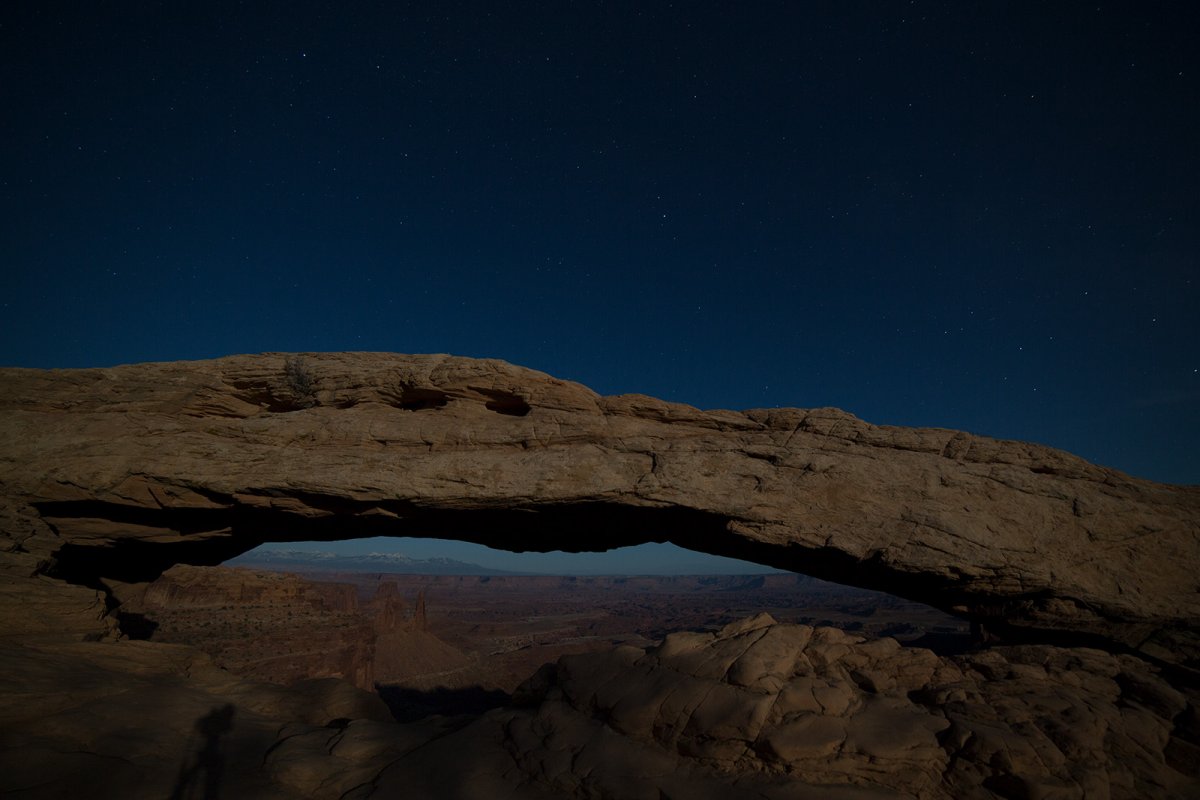
View attachment 1678

View attachment 1679
Hey Ben, I am not qualified to advise, but I love the concept here!
 

Ben Egbert

Forum Helper
Staff member
Here's my take. Increased contrast, clarity and added some vibrance in the camera RAW filter. In photoshop I selected the blue sky under the arch and adjusted the color to take out some of the cyans and yellows and then darkened that area. I also added a layer to add some contrast to the brights (hoping to emphasize some of the stars a little more).

I then removed (fairly sloppily) the shadow of the camera/tripod in the lower left. Fin ally, I switched to a 16x9 aspect since (a) I know Ben likes them and (b) there isn't much in the sky to hold any attention.
View attachment 1696
Thanks a lot Kyle very pleased to see you doing this. I added vibrance in ACR, and also darkened the sky under the arch.. I think I can get better stars from a raw than from this jpg. But seeing the direction you are and Alan are going, I will take another stab tomorrow with the RAW and see if I can get those results.
 

Kyle Jones

Moderator
These are always fun for me! I was thinking the same thing about the stars - there just isn't enough detail in this downscaled jpg
 

Ben Egbert

Forum Helper
Staff member
Here is a complete redo with a slightly different exposure that started out brighter (trying for better stars). I worked hard to darken the under arch sky, but these were too close to dawn and the horizon was just too bright to get much more than this. I also worked hard to keep the saturation down, but the moon on the arch was best rendered as shown I think. I also looked for but could not find a tripod shadow, There were tree shadows however, and i left them.

I think this sort of image would be better served with a darker moon phase.

130327-0544-5dm3 A ec sharp.jpg
 

Kyle Jones

Moderator
Definite improvement from my standpoint. If the tripod shadow is in this frame, it is nicely hidden by the tree shadows. I probably wouldn't darken the sky quite so much, but that's just personal preference. I like trying to nod to the fact that it is a night shot (slightly cooler tones than a daylight shot, darker shadows, etc.) but don't need a fully dark sky.
 

Ben Egbert

Forum Helper
Staff member
Definite improvement from my standpoint. If the tripod shadow is in this frame, it is nicely hidden by the tree shadows. I probably wouldn't darken the sky quite so much, but that's just personal preference. I like trying to nod to the fact that it is a night shot (slightly cooler tones than a daylight shot, darker shadows, etc.) but don't need a fully dark sky.
Thanks Kyle, I have a few more of these to show, maybe once a week or so, and I will apply what I learn here to the next one.
 

JimFox

Moderator
Staff member
Hey Ben,

This is a great example for critique.

As Kyle mentioned lighten up the sky above the arch and darken the sky below the arch. Obviously the sky is feathering a lot between the brighter sky on the horizon and the darker sky above the arch. But with the Arch blocking that transition the brighter sky along the horizon seems way too bright. I would edit the sky, so that the horizon sky was only slightly lighter then above the arch.

As for the photos uploaded for Critiques, I will have to double check the settings later, but for now I think you are able to upload a good sized tiff file in the 5 to 8mb range if I recall correctly. I will have to double check that when I get home later this week.

Jim
 

Ben Egbert

Forum Helper
Staff member
Thanks Jim. I was too close to sunrise which is why the horizon is so bright. This is ultimately not a good candidate for this sort of shot.
 
Top Bottom