Lake Tahoe Mega Sunset Panoramic

Josh Dye

Well-Known Member
Hey everyone, it's been a while (again). This past week was my last full week of summer before the new semester starts so I decided to make a trip up to Tahoe for about three days. My original plan for this trip was to shoot some new Milky Way photos, but as the week got closer my plans somewhat shifted to getting whatever conditions may develop because of the summer storms brewing over the Sierras.

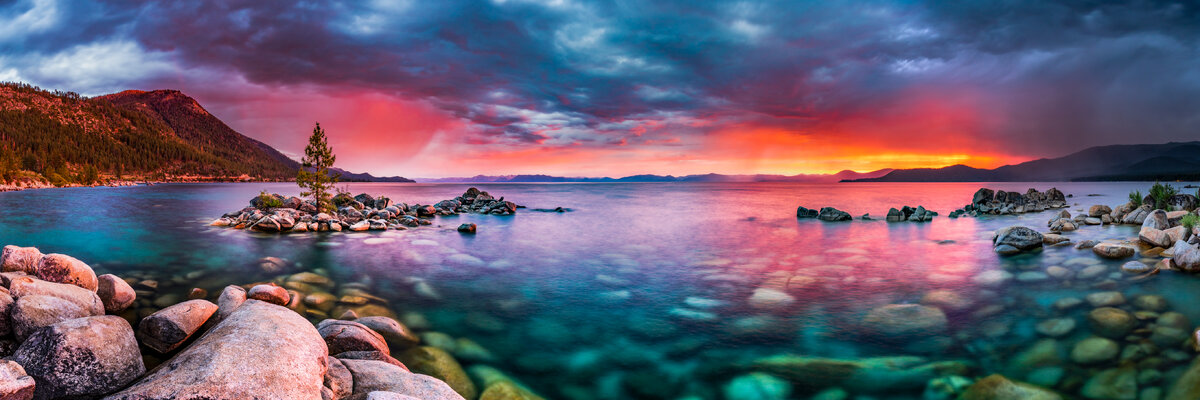
This was my last evening up there and boy, what a sunset it was! I really quickly moved from one composition to this one and scrambled to get my tripod somewhat level to start shooting this panoramic (the tripod wasn't perfectly level and fixing the stitching was a nightmare in Photoshop). The light faded quickly, but I was lucky enough to get 14 images off to make up this panoramic which includes 3 pockets of rain and even a faint rainbow on the top of the mountain just to the left of the tree!

I still feel like there are a few adjustments that could be done to make the image a bit better but at this point, I'm pretty stuck and I can't figure it out. I barely even pushed the saturation and vibrance sliders while editing because the raw files already had so much color within them! If you awesome people have any suggestions as to what could be done to help it out please let me know!
Out-of-Nowhere.jpg
 
Hey everyone, it's been a while (again). This past week was my last full week of summer before the new semester starts so I decided to make a trip up to Tahoe for about three days. My original plan for this trip was to shoot some new Milky Way photos, but as the week got closer my plans somewhat shifted to getting whatever conditions may develop because of the summer storms brewing over the Sierras.

This was my last evening up there and boy, what a sunset it was! I really quickly moved from one composition to this one and scrambled to get my tripod somewhat level to start shooting this panoramic (the tripod wasn't perfectly level and fixing the stitching was a nightmare in Photoshop). The light faded quickly, but I was lucky enough to get 14 images off to make up this panoramic which includes 3 pockets of rain and even a faint rainbow on the top of the mountain just to the left of the tree!

I still feel like there are a few adjustments that could be done to make the image a bit better but at this point, I'm pretty stuck and I can't figure it out. I barely even pushed the saturation and vibrance sliders while editing because the raw files already had so much color within them! If you awesome people have any suggestions as to what could be done to help it out please let me know!

View attachment 64507
Gorgeous sky, well done, Josh.

Oliver
 

AlanLichty

Moderator
Amazing panorama. I like the depth of the scene from the rocks down in front all the way out to the distant mountains on the horizon. Trying to line up that many images in a single stitch job like this is not an easy task and especially when the scene is changing as rapidly as a sunset in its final stages.

If this were mine I would back off the vibrance and saturation a bit more than you already have and would be temped to try to lighten up the shadows in the clouds. The clouds seem a bit darker than they should which makes the top of the image feel overbearing. Both of these tweaks would be best applied in moderation as the result you got is quite nice as is......
 

Josh Dye

Well-Known Member
Gorgeous sky, well done, Josh.

Oliver
Thanks Oliver!

Amazing panorama. I like the depth of the scene from the rocks down in front all the way out to the distant mountains on the horizon. Trying to line up that many images in a single stitch job like this is not an easy task and especially when the scene is changing as rapidly as a sunset in its final stages.

If this were mine I would back off the vibrance and saturation a bit more than you already have and would be temped to try to lighten up the shadows in the clouds. The clouds seem a bit darker than they should which makes the top of the image feel overbearing. Both of these tweaks would be best applied in moderation as the result you got is quite nice as is......
Thanks for the suggestions, Alan. I actually went ahead in Lightroom and did these changes and it helped out quite a bit. It's a minimal difference for most but I definitely notice a change!
 

JimFox

Moderator
Staff member
Hey Josh!

I know you are one busy guy, so it's always great when you are able to share and post photos.

I really like that view, and man, what awesome color you had. My suggestions would have been the same as Alan, and it sounds like you had similar thoughts already. It's a tough edit for sure, because if you back off from the saturation too much, then I know from experience on my images, that it will zap the life out of the image. It's with a gentle touch, and just a nudge of the vibrance to back off on the color ever so slightly. If there was one color I would back off more then the others, it would be the blue in the sky. You could go like -5 on the Dehaze slider too.
 

Josh Dye

Well-Known Member
Hey Josh!

I know you are one busy guy, so it's always great when you are able to share and post photos.

I really like that view, and man, what awesome color you had. My suggestions would have been the same as Alan, and it sounds like you had similar thoughts already. It's a tough edit for sure, because if you back off from the saturation too much, then I know from experience on my images, that it will zap the life out of the image. It's with a gentle touch, and just a nudge of the vibrance to back off on the color ever so slightly. If there was one color I would back off more then the others, it would be the blue in the sky. You could go like -5 on the Dehaze slider too.
Hey thanks for the kind words Jim! Definitely one of the tougher edits I’ve done and probably the most difficult pano I’ve put together. But I think I may have read your mind when putting Alan’s suggestions to use as I dehazed some of the blues by -7 in my new edit! Once I get back to my computer I’ll attach the new image.
 

Jeffrey

Well-Known Member
Hard to believe that any RAW file would be that massively saturated. Maybe your camera or computer software is doing something automatically to the colors before you get to play with them. This is just not good, sorry.
 
Top Bottom