DxO Pure RAW2 including Deep Prime

Ken Rennie

Well-Known Member
I have been playing with Deep Prime and so far have been very impressed. Not just the noise reduction but its ability to pull more detail out of the files. I include one of the red kite images that previously had to go through Topaz de noise AI and Topaz sharpen AI but this is just with deep prime with minimal processing in Lightroom ISO 6400, 1/8000s. I also ran some landscape shots through and Deep Prime seems to have pulled out more detail than ACR/Lightroom. Has anyone else tried it?
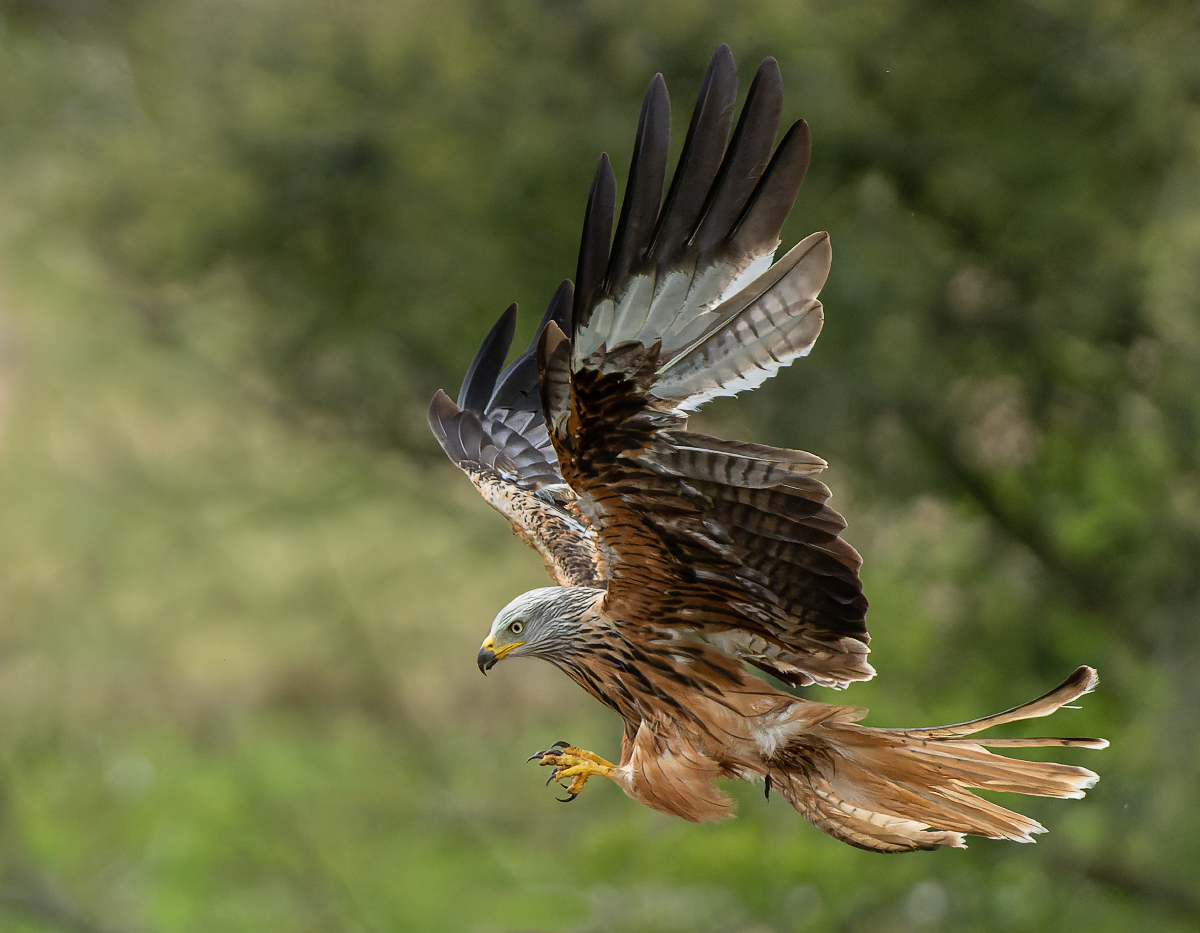
_DSC2365-ARW_DxO_DeepPRIME-Edit.jpg
 

AlanLichty

Moderator
I just downloaded a copy and gave it a whirl - very impressive when it knows about the camera/lens. Almost a bit scary for the level of detail it can extract. The place I wanted to play with it most is for shots taken with the 161mm lens on my Mavic 3 drone and sadly DxO bombs on that lens/camera combination. Very impactful for .DNG files from both my Air 2 drone as well as the output from the Hasselblad 24mm lens/camera on the Mavic 3.
 

AlanLichty

Moderator
I put in a request to DxO to include support for the Mavic 3 with the FC4170 sensor/161mm lens. From what I can see playing around with the demo version it is easily a match for Topaz Denoise/Sharp AI with added bonus that the result is still in RAW format for further light/color edits. We lose a lot of color depth/light flexibility when we move from RAW into Photoshop so I like where this could fit into my workflow.
 

Ken Rennie

Well-Known Member
I just tried it with a Fuji GFX 100s raw file and I get color shifts
Bob I saw a you tube video where it looked at though the images were slightly cooler but I have only tried it with a few images and haven't seen this. Is the shift large? I have a color passport so may try a little experiment later. Ken
 

Ken Rennie

Well-Known Member
Bob I may have the solution but I am not an experienced Lightroom user having started long long ago using ACR. The latest Lightroom classic versions seem to default to using the embedded previews that your camera generates, even if like me you shoot RAW only. It used to use the defaults that you had set in Lightroom. I am sure that you can change the default back to the way it was. Deep Prime does not seem to use the embedded profile and this could be the reason for the color shift, of course it may not. I will investigate further. Ken
 

AlanLichty

Moderator
For images coming out of my Mavic Air 2 this plugin is nothing short of remarkable. The Air 2 has 2 pixel modes - 12MP Quad Bayer or 48MP as RAW pixels from a 1/2" sensor. In 48MP mode the pixels are incredibly dirty and take a lot of clean up in LR/ACR along with Topaz Denoise AI and Sharpen AI. PureRAW does it in a single step and lets me continue with adjustments as RAW in LR when it's done. I just posted an image from the Oregon coast in the Landscape forum using this DxO application.
 

Ken Rennie

Well-Known Member
For images coming out of my Mavic Air 2 this plugin is nothing short of remarkable. The Air 2 has 2 pixel modes - 12MP Quad Bayer or 48MP as RAW pixels from a 1/2" sensor. In 48MP mode the pixels are incredibly dirty and take a lot of clean up in LR/ACR along with Topaz Denoise AI and Sharpen AI. PureRAW does it in a single step and lets me continue with adjustments as RAW in LR when it's done. I just posted an image from the Oregon coast in the Landscape forum using this DxO application.
Alan a couple of right green blobs in the surf roughly in the middle of the image. Apart from that it looks very good. Ken
 

AlanLichty

Moderator
More comments on testing with PureRAW - it does have limits on older camera output. It is not able to process RAW files (CRW format) from my old Canon D60 with Canon lenses but does fine with the same lenses for RAW output (CR2 format) on a Canon 20D.
 

JimFox

Moderator
Staff member
Hey Ken, thanks for the update. I did purchase the first version of Pure Raw, tested it a time or two and then forgot about it... I need to find my license for it and maybe I can upgrade it.
 
Top Bottom