

AlanLichty
Moderator
I used to use a Nikon SuperCoolScan 4000 when I first starting moving over to digital and had pretty mixed results that were usually a bit disappointing relative to what I could see for color/light with a loupe. I tried various software solutions and ended up using SilverFast software but still was never impressed much by the results. Most of my slide collection has been sitting on shelves ever since.
I recently ran across an archive article in Outdoor Photographer by George Lepp where he was answering questions from readers about scanning film to digital and was surprised at his response - use a copy stand and simply shoot the slide with a DSLR. I read where Dan Swiger used this for one of his images on here a little while back and at the time thought that would be a makeshift solution at best but Lepp's take was that a high end DSLR has better sensors than a lot of scanners. I pondered over that and decided to test that thought out. I wanted to see what I could do with what I had on hand if possible before spending money on a copy stand, etc. so I scrounged around my boxes of old gear and found a Nikon window mount I tried using at the local wildlife refuge. It could open wide enough to clamp onto something just over 1/2 inch thick so I made up a quick stand out of scraps in my woodshop. I grabbed two macro extension tubes (20mm and 36mm) and combined that with a good fast lens - a Canon 24-70mm f/2.8L and mounted this over a light box on a Canon 5D Mk IV:
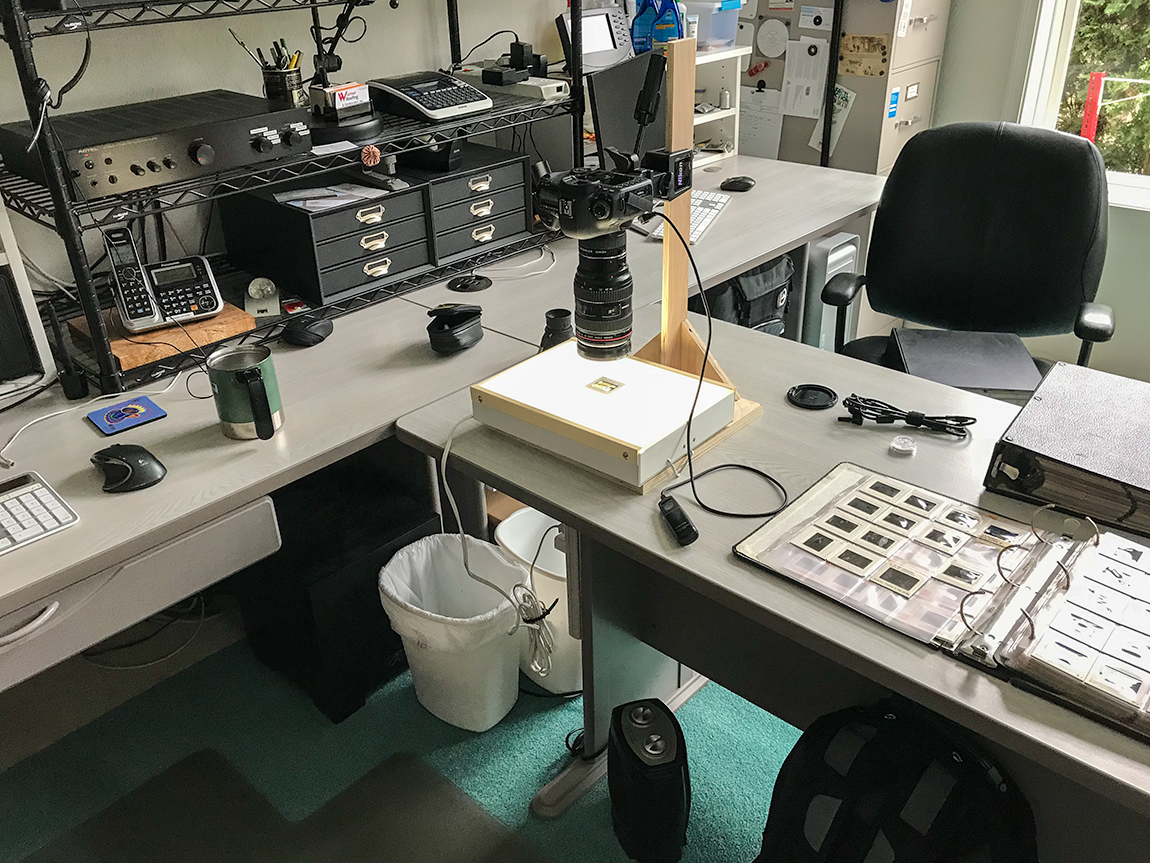
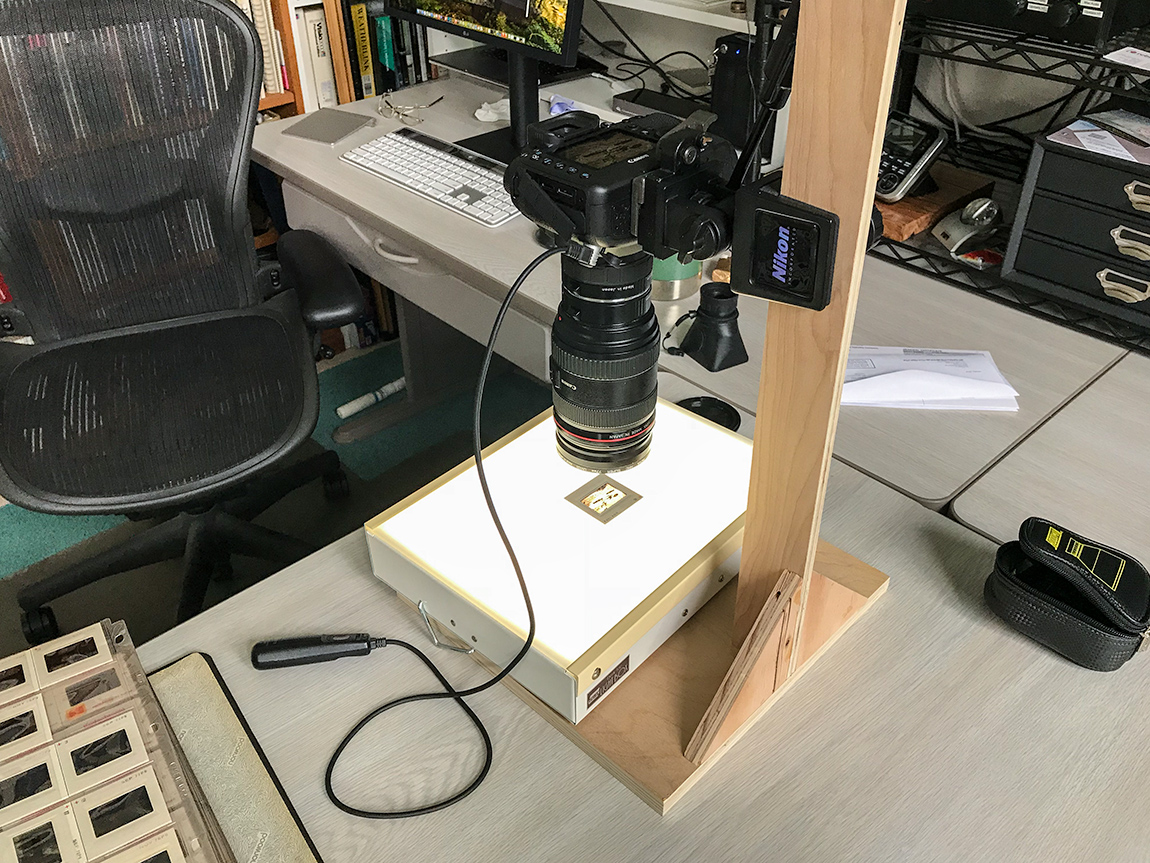
The hard part was getting the camera level and finding the right height so I could fill the frame. Level wasn't hard with a bubble surface level and I have a Manfrotto quick mount that allows me to pull the camera off quickly without disturbing the position of the Nikon window mount. The zoom on the lens gave me a little flexibility for the mounting height. I use my Hoodman loupe to assist with fine focus and a cable release so the camera stays steady when I squeeze off a shot.
I was fully prepared to be highly disappointed and was going to be glad I didn't spend a dime to make this setup and then started taking some images.
I am still astonished at how well this actually works and how pathetic it makes the scans I got from my old scanner look. I have a number of images that I scanned on the old scanner that I have nursed along through the years to make them appear not dated and this simply blew them away. I have much better control over light - especially dynamic range - and colors are far more faithful to the original slides. The best part yet - this fits perfectly into my workflow of bringing new material into Lightroom for cataloging and ACR touchups before taking them into Photoshop.
This is an example of a slide scan using this technique:
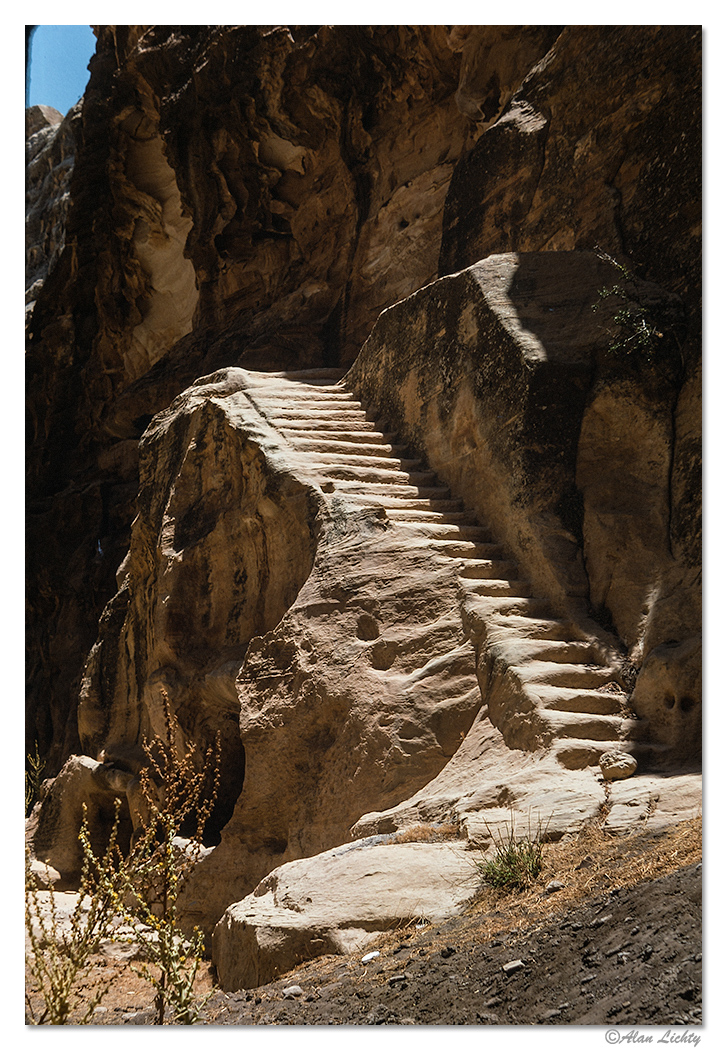
The old scanner had troubles with the shadows and the harsh light on the remains of the carved stairs with nowhere near the level of detail I got from this technique. FWIW - the image is of a set of Nabataean stairs carved into the sandstones near Beidha just north of Petra.
The downside - my homemade stand is good for what it is - about 2 hours total in my shop including waiting for the glue to dry and free since it was on hand scraps. What it isn't is a super strong stand that doesn't let my camera wobble when I am getting ready to shoot so I have to wait for the image to become stable while watching via Live View before squeezing off the shot. The 1/2" plywood upright I had to use in order to clamp with the window mount allows for oscillations with the weight of the camera mounted like this and even though I used side bracing on the upright it's not a match for a metal stand.
At this point I am convinced this is a workable path and I will go ahead and acquire a real copy stand for the job.
Is this a common technique for digitizing old slides? If so I have been living under a rock and was not aware this could be done so easily.
I recently ran across an archive article in Outdoor Photographer by George Lepp where he was answering questions from readers about scanning film to digital and was surprised at his response - use a copy stand and simply shoot the slide with a DSLR. I read where Dan Swiger used this for one of his images on here a little while back and at the time thought that would be a makeshift solution at best but Lepp's take was that a high end DSLR has better sensors than a lot of scanners. I pondered over that and decided to test that thought out. I wanted to see what I could do with what I had on hand if possible before spending money on a copy stand, etc. so I scrounged around my boxes of old gear and found a Nikon window mount I tried using at the local wildlife refuge. It could open wide enough to clamp onto something just over 1/2 inch thick so I made up a quick stand out of scraps in my woodshop. I grabbed two macro extension tubes (20mm and 36mm) and combined that with a good fast lens - a Canon 24-70mm f/2.8L and mounted this over a light box on a Canon 5D Mk IV:
The hard part was getting the camera level and finding the right height so I could fill the frame. Level wasn't hard with a bubble surface level and I have a Manfrotto quick mount that allows me to pull the camera off quickly without disturbing the position of the Nikon window mount. The zoom on the lens gave me a little flexibility for the mounting height. I use my Hoodman loupe to assist with fine focus and a cable release so the camera stays steady when I squeeze off a shot.
I was fully prepared to be highly disappointed and was going to be glad I didn't spend a dime to make this setup and then started taking some images.
I am still astonished at how well this actually works and how pathetic it makes the scans I got from my old scanner look. I have a number of images that I scanned on the old scanner that I have nursed along through the years to make them appear not dated and this simply blew them away. I have much better control over light - especially dynamic range - and colors are far more faithful to the original slides. The best part yet - this fits perfectly into my workflow of bringing new material into Lightroom for cataloging and ACR touchups before taking them into Photoshop.
This is an example of a slide scan using this technique:
The old scanner had troubles with the shadows and the harsh light on the remains of the carved stairs with nowhere near the level of detail I got from this technique. FWIW - the image is of a set of Nabataean stairs carved into the sandstones near Beidha just north of Petra.
The downside - my homemade stand is good for what it is - about 2 hours total in my shop including waiting for the glue to dry and free since it was on hand scraps. What it isn't is a super strong stand that doesn't let my camera wobble when I am getting ready to shoot so I have to wait for the image to become stable while watching via Live View before squeezing off the shot. The 1/2" plywood upright I had to use in order to clamp with the window mount allows for oscillations with the weight of the camera mounted like this and even though I used side bracing on the upright it's not a match for a metal stand.
At this point I am convinced this is a workable path and I will go ahead and acquire a real copy stand for the job.
Is this a common technique for digitizing old slides? If so I have been living under a rock and was not aware this could be done so easily.


