Can This Edit Be Done? (Reasonably...)

Mike Lewis

Staff Member
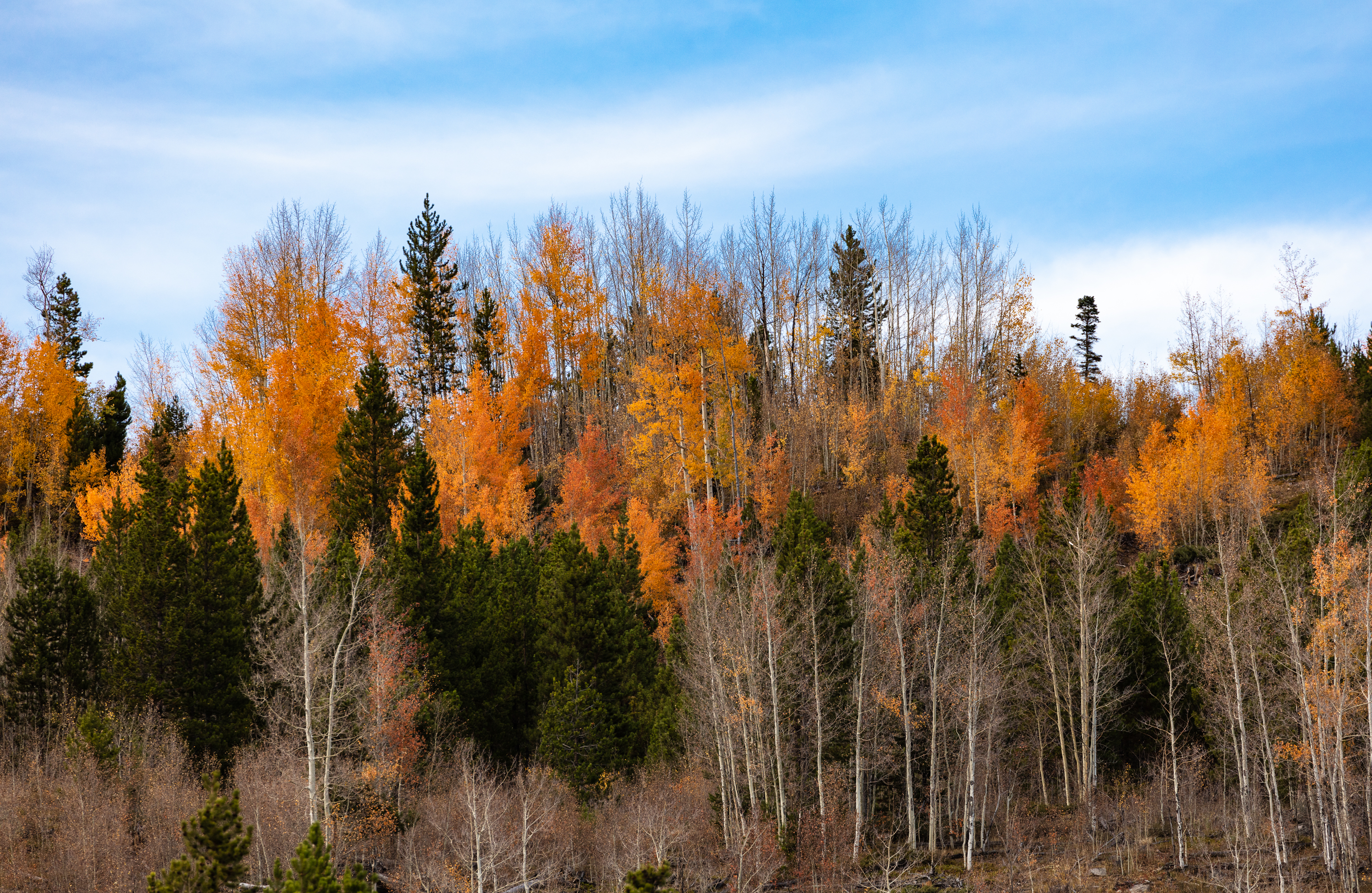
So this shot was taken pulled off of I-70 in CO, coming back form our UT trip. I really liked the stand of orange Aspen, but was constrained by only being able to stand by the car, and having to shoot over cars and trucks in between me and the scene. So I did the best I could with the framing. I liked it when I worked on it in post, except for the issue of the closer OOF evergreens. I have cropped them out as best I could (perhaps already making things appear a bit cramped at the bottom?) but cannot get rid of them entirely by cropping without giving the shot a real truncated look. I was wondering if this is a candidate for the warp removal stuff I saw Alan employing so well in one of his previous posts, or is there some other approach or technique one could try, or is this just one of those 'needed to be fixed when shooting instead of in post' kinda situations? I want to fix this if I can, but I do not want to spend hours of crazy editing on it...

Thanks for any insights.

ML
 

AlanLichty

Moderator
Two of the OOF evergreens are an easy mark for a clone job but the one in the middle where it covers part of an aspen trunk is going to be a bit trickier since you are going to need to lengthen the aspen trunk a bit. Not impossible by any means.

The warp stuff works great in an image like the Japanese Garden shot I used it on since I could easily allow the warp tool to spread the branches at the tree crown a bit without harm. In this case it would pull the aspen trunks out of alignment which could be an obvious edit.
 

Ben Egbert

Forum Helper
Staff member
That grass is so wild that it hides stuff well. I cloned out the road in my Hendricks pond image and it was not small
 

Mike Lewis

Staff Member
Wow , Ben, that seems like it worked great! I did not think the fill tool would be able to work that well. I will give that one a try. Thanks to you, Alan, and Kyle for the inputs!

ML
 

JimFox

Moderator
Staff member
Wow , Ben, that seems like it worked great! I did not think the fill tool would be able to work that well. I will give that one a try. Thanks to you, Alan, and Kyle for the inputs!

ML
Hey Mike, I didn’t get a chance to comment on this yet but let me say that the Content Aware full tool is one of the most powerful tools in your arsenal. It doesn’t always work, but it is successful probably a good 80 to 90% of the time. It’s pretty much the first tool I use to remove objects or to cover objects.
 

Mike Lewis

Staff Member
Hey Mike, I didn’t get a chance to comment on this yet but let me say that the Content Aware full tool is one of the most powerful tools in your arsenal. It doesn’t always work, but it is successful probably a good 80 to 90% of the time. It’s pretty much the first tool I use to remove objects or to cover objects.
Yes, I have used it myself. Cannot recall why I did not try it this time. But glad to see that it will work. Thanks to all who chimed in on this :)

ML
 
Top Bottom