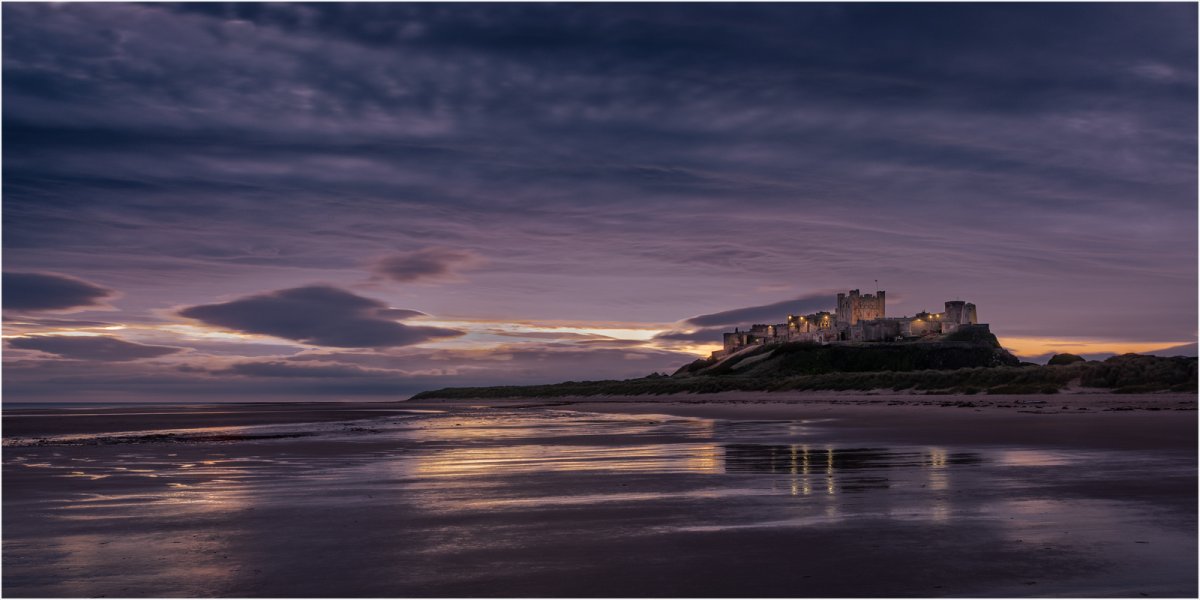
Blue Hour Bamburgh, how blue do you make it?

Jameel Hyder

Moderator
Staff member
I like your approach. I have taken a similar approach to a couple of my blue hour images to give it a different look. I might try toning down the magenta a bit though.
 

JimFox

Moderator
Staff member
Here is a quick go at it Ken, I don't have much time this morning.

I wanted to keep the blue hour, but what I wanted to do was emphasize the warmer sunrise light that I saw a glimpse of burning through.

So I did 2 layers, the top one to taste with the blue cast, and then then bottom layer warmed up a bit. Then I did my Luminosity Mask technique to let the highlights in the Blue layer be filled with that warmer light.

I didn't care for the openings in the clouds in the upper left, and thought about filling them in with Content Aware, but I also didn't care for the horizon placement, so I went with a 16x9 format crop. Now that did cause the image to lose some of those nice curving lines in the upper clouds, so I am not sold on the 16x9 crop but I went with it for now to show something different.

Ken_DSC1013_16x9_dw.jpg
 

Ben Egbert

Forum Helper
Staff member
Ken here is my take. I used auto in ACR and gave it a 16x9 crop taking it off the bottom, the light spot in the clouds does not bother me.

I then set threshold to find the light and dark point and set white and black point. This warmed it up a bit. I then used Topaz exposure to brighten it up a bit, and Studio cont and col boost, but in luminance mode and faded. I finished with Topaz Brilliant Warm, also faded, then sharpened.

I will do your other image a bit later.

_DSC1013.jpg
 

Amy Nelson

Well-Known Member
Here's what I have Ken. Took out most of the strong blue and replaced it with more of a gray blue and added in additional magenta and red. Also a 406 x 228 crop. Tried to keep more of a even tone to it.

L Blue Hour Scene - 1.2-1.jpg

Gorgeous image, thanks for letting us play with it!
 

Ken Rennie

Well-Known Member
Here's what I have Ken. Took out most of the strong blue and replaced it with more of a gray blue and added in additional magenta and red. Also a 406 x 228 crop. Tried to keep more of a even tone to it.

View attachment 14611
Gorgeous image, thanks for letting us play with it!
Amy your mage has a stormy look to it that I like even though it was a lovely calm morning. I may have a go at a monochrome later but am now off to photograph waterfalls. Ken
 

Ken Rennie

Well-Known Member
Here is a quick go at it Ken, I don't have much time this morning.

I wanted to keep the blue hour, but what I wanted to do was emphasize the warmer sunrise light that I saw a glimpse of burning through.

So I did 2 layers, the top one to taste with the blue cast, and then then bottom layer warmed up a bit. Then I did my Luminosity Mask technique to let the highlights in the Blue layer be filled with that warmer light.

I didn't care for the openings in the clouds in the upper left, and thought about filling them in with Content Aware, but I also didn't care for the horizon placement, so I went with a 16x9 format crop. Now that did cause the image to lose some of those nice curving lines in the upper clouds, so I am not sold on the 16x9 crop but I went with it for now to show something different.

View attachment 14604
Jim I have thought of using luminosity masking on this image but will give it a go on a wet and windy day, and we have plenty of those. Ken
 

AlanLichty

Moderator
I decided to take a quick stab at this one as well. I took my basic color mix cues from the color of the sunrise behind the clouds which shows that this a bit later than a true blue hour light on a clear day which would not have the yellows present. I did most of the light and color work in Lightroom and then added some contrast and sharpening adjustments in Photoshop.

KensCastle.jpg


I'm not entirely certain I like what I did with this edit.
 
Top Bottom