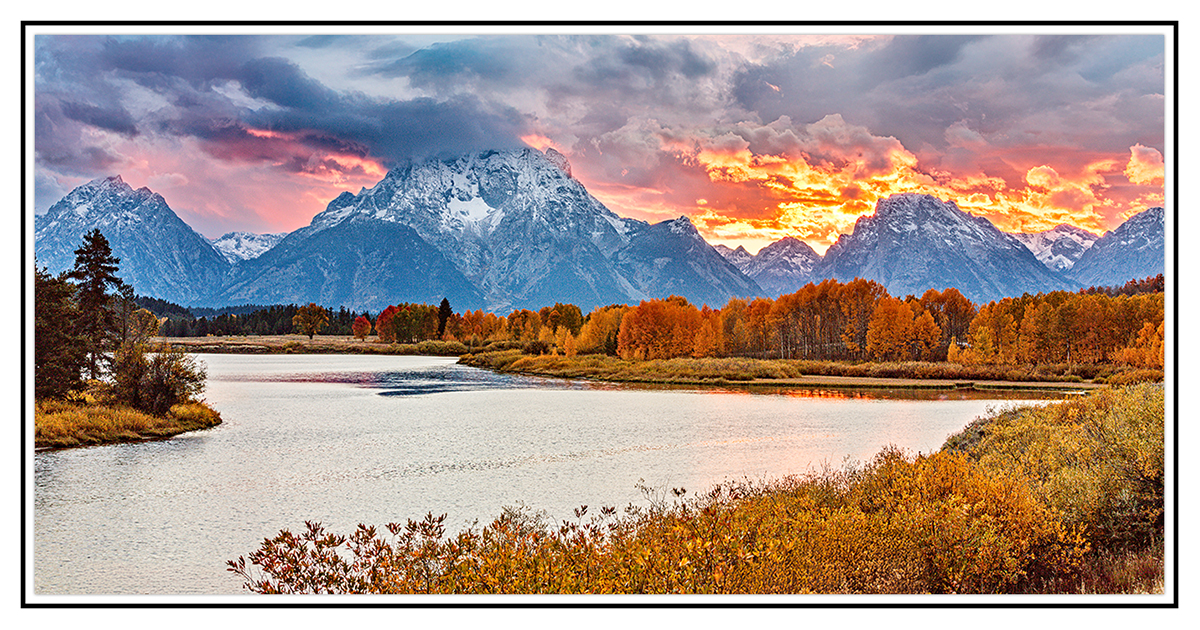
A fall sunset

Jameel Hyder

Moderator
Staff member
From a spot everyone here is familiar with and have likely visited mutiple times. I have processed this image a few times and this iteration I am reasonably satisfied with. This iteration was with DXO Pure RAW 4 using linear profile. There still remained a few blown highlight spots which I initially attempted to manually clone and then it dawned on me to use generative AI to fill those out.

C&C Welcome
5DSR2370.jpg
 

JimFox

Moderator
Staff member
Very nice reprocess. And good thinking about AI to fill the highlights.

I still have to figure out how to use Linear Profiles. They can be used in PureRaw along with ACR it looks like. Are these profiles premade and can be found on the web?
 

AlanLichty

Moderator
Shooting sunsets with intense colors in front of the Tetons can be extremely challenging when it comes to taming the DR. Another option besides AI fill is to add an adjustment layer in PS using Selective Color and then picking white as the color. Use the sliders (in CMYK) to change the white pixels to match the surrounding colors. Definitely a bit more work than using AI these days but a handy technique that has been around for a while.

I have not shot the Oxbow before at sunset but had similar issues with some images taken at Jackson Lake.
 

Jameel Hyder

Moderator
Staff member
Very nice reprocess. And good thinking about AI to fill the highlights.

I still have to figure out how to use Linear Profiles. They can be used in PureRaw along with ACR it looks like. Are these profiles premade and can be found on the web?
Thanks Jim. There are linear profiles available on the web for most cameras. Alan has linked a site a while ago where these can be found.

My workflow is to use DXO Pure RAW to do the RAW conversion, bring it into ACR and then apply the linear profile there before taking it to PS.

Alternately one can use the Adobe DNG convertor (available free on adobe) to create your own. I use the MacBeth chart for this.
 

Jameel Hyder

Moderator
Staff member
Shooting sunsets with intense colors in front of the Tetons can be extremely challenging when it comes to taming the DR. Another option besides AI fill is to add an adjustment layer in PS using Selective Color and then picking white as the color. Use the sliders (in CMYK) to change the white pixels to match the surrounding colors. Definitely a bit more work than using AI these days but a handy technique that has been around for a while.

I have not shot the Oxbow before at sunset but had similar issues with some images taken at Jackson Lake.
Thanks Alan. I have used the adjustment layer you referenced above before to do this and it is a bit tedious.
 

Beth

Well-Known Member
this looks much nicer than it was a few weeks ago when i was there. then again, the sky was so smoky i couldn't see the mountains from us 89.
 

Jameel Hyder

Moderator
Staff member
this looks much nicer than it was a few weeks ago when i was there. then again, the sky was so smoky i couldn't see the mountains from us 89.

Thanks. Part of landscape photography is being in the right place at the right time. Much of that is chance unless one carefully plans or chases light.
 
Top Bottom