Salvage Saturday

Ben Egbert

Forum Helper
Staff member
Time to pile on with your recently reworked images.

This is another DXO image. It has become a part of my workflow now, I like the way it converts RAW and exports to ACR ready to process. This image is from 2013 and in the past required a dark and light process then blended. Now it's just one time through.
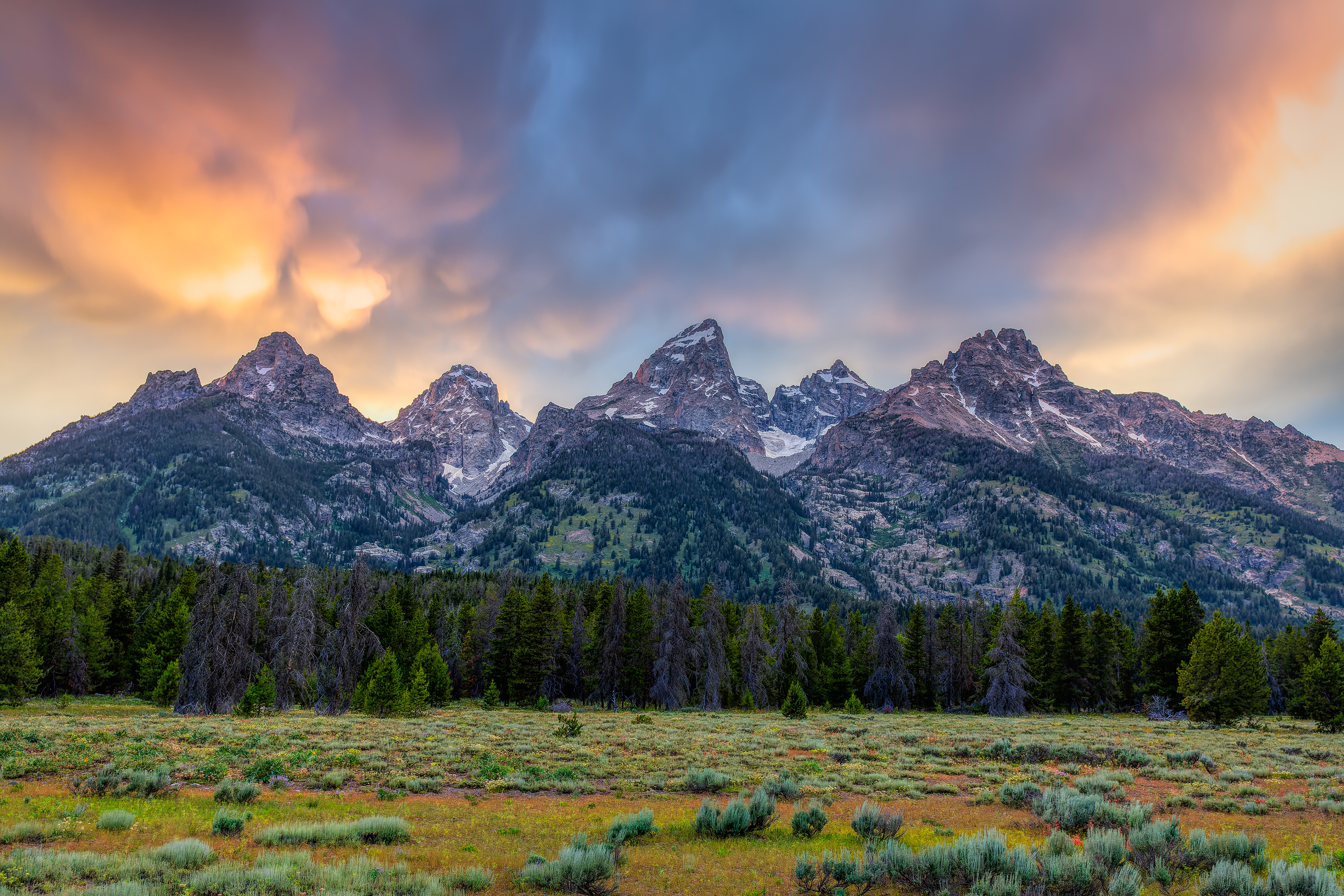
130707-3639-5dm3-CR2_DxO_DeepPRIME.jpg
 

AlanLichty

Moderator
Nice rework of the Tetons Ben.

My salvage job for today is from a February visit to the Hoh rain forest right after a storm that left snow on the forest floor. I had seen the Hoh with snow before and ran into the same problem in both cases - a very dark forest floor, bright snow, and if any part of the sky was in the frame a dynamic range that was simply out of reach. I was shooting film during my first visit with snow and almost none of those images are salvageable but in this case I was able to bring up a lot of the shadow areas and then used content aware fill to eliminate patches of sky.

SS-SnowyHoh.jpg
 

Ben Egbert

Forum Helper
Staff member
Nice rework of the Tetons Ben.

My salvage job for today is from a February visit to the Hoh rain forest right after a storm that left snow on the forest floor. I had seen the Hoh with snow before and ran into the same problem in both cases - a very dark forest floor, bright snow, and if any part of the sky was in the frame a dynamic range that was simply out of reach. I was shooting film during my first visit with snow and almost none of those images are salvageable but in this case I was able to bring up a lot of the shadow areas and then used content aware fill to eliminate patches of sky.

View attachment 52623
This came out really nice, great strategy and well executed. I cannot tell where you cloned out sky.
 

Ben Egbert

Forum Helper
Staff member
Badlands National Park, SD (October 2016) Nikon D810. I re-edited the RAW file for highlights in the sky and rock formations. Worked with the deeper shadows in the rocks. Also tweaked the WB as well.

View attachment 52626
Nice one John, even camera raw has come a long ways with shadow recovery, Then we have all the add on programs to enhance it further. Those are nice clouds against that sandstone.
 

John Holbrook

Well-Known Member
Nice one John, even camera raw has come a long ways with shadow recovery, Then we have all the add on programs to enhance it further. Those are nice clouds against that sandstone.
Yes, I used ProPanel by Weatherby for the recovery selections. I’ve also used Kuyper and Lumenzia—a lot easier than the old days when you had to create your own masks!
 

John Holbrook

Well-Known Member
Time to pile on with your recently reworked images.

This is another DXO image. It has become a part of my workflow now, I like the way it converts RAW and exports to ACR ready to process. This image is from 2013 and in the past required a dark and light process then blended. Now it's just one time through.

View attachment 52602
Yes, I used ProPanel by Weatherby for the recovery selections. I’ve also used Kuyper and Lumenzia—a lot easier than the old days when you had to create your own masks!
By the way, are you using DxO Photolab 5 or DxO PureRaw? I tend to use Photolab 5 more.
 

John Holbrook

Well-Known Member
Nice rework of the Tetons Ben.

My salvage job for today is from a February visit to the Hoh rain forest right after a storm that left snow on the forest floor. I had seen the Hoh with snow before and ran into the same problem in both cases - a very dark forest floor, bright snow, and if any part of the sky was in the frame a dynamic range that was simply out of reach. I was shooting film during my first visit with snow and almost none of those images are salvageable but in this case I was able to bring up a lot of the shadow areas and then used content aware fill to eliminate patches of sky.

View attachment 52623
Alan, a great edit and landscape. Content Aware can certainly make editing easier—good job! And an interesting story accompanying this very nice image too!
 

Ben Egbert

Forum Helper
Staff member
I am using DXO Pure Raw 2, the only one I have. I did not know about Photolab 5, is this part of the old NIK suite?
 

AlanLichty

Moderator
DxO Photolab 5 is not related to the Nik suite (old or the updated version) but is independent main image processor (began with Photolab, then versions 2, 3, 4, and 5—current version. I have the Elite version. See link below:

https://www.dxo.com/
Actually its even older than that - I had a copy of DxO Optics Pro back in 2004 that I bought to do lens corrections and RAW conversions. At the time it was better than Photoshop 7.0's version of ACR for RAW conversions. It ultimately morphed into PhotoLab.
 

John Holbrook

Well-Known Member
Actually its even older than that - I had a copy of DxO Optics Pro back in 2004 that I bought to do lens corrections and RAW conversions. At the time it was better than Photoshop 7.0's version of ACR for RAW conversions. It ultimately morphed into PhotoLab.
Yes, I used DxO Optics Pro as well—earlier I was speaking just about the DxO Photolab versions. Sorry! I went through an editing period where I put many/most of my RAW files through Lightroom>DxO Photolab or earlier (or PureRaw)>Photoshop (if layers were needed for further editing in ACR/third party software)/Lightroom. Now my editing of RAW files is case by case.
 
Last edited:

dan swiger

Well-Known Member
This is from the coast, between Carmel and Big Sur. The bridge isn't Bixby, but a "cousin", Rock Creek Bridge.
This is a tele shot so I could compress the layers. The color image was kind of flat with the hanging mist.
So I tried B&W to get some contrast with Silver Efex
BTW, the arch in the foreground has since collapsed.

DS2_9484_120128_SE1w.jpg
 

John Holbrook

Well-Known Member
An excellent B&W edit and a great image—love the composition and how the light leads you from the foreground arch to the middle rock’s gap to the bridge’s arch and beyond.
 
Top Bottom