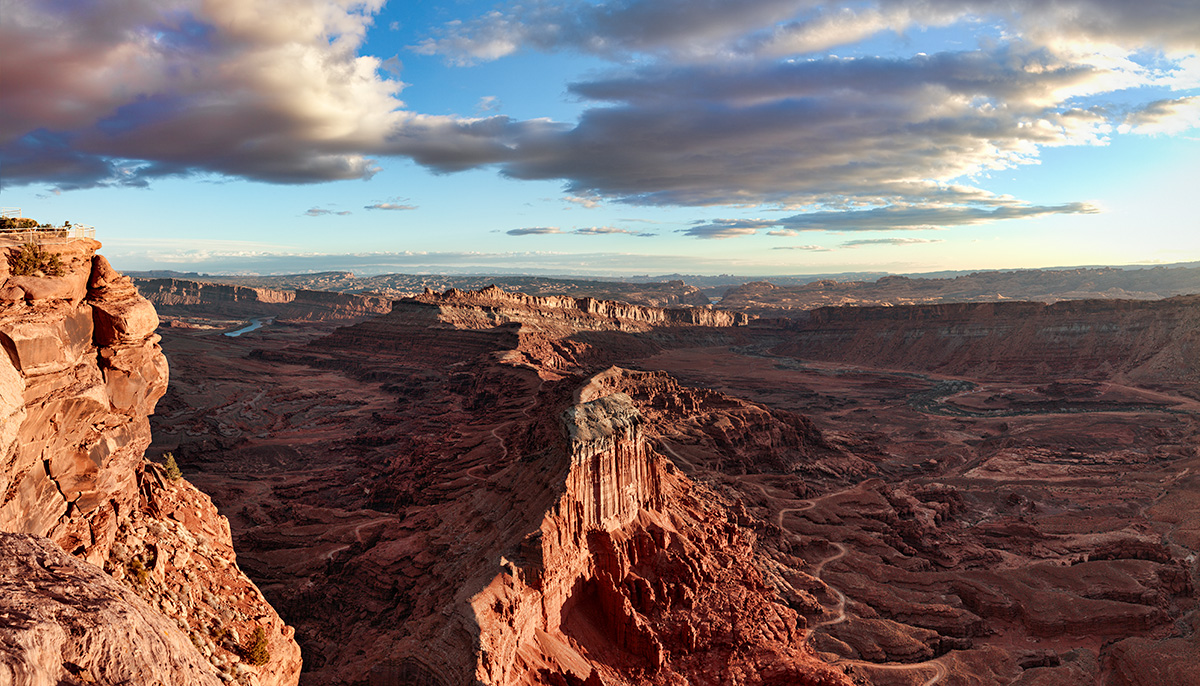
Help me recalibrate

Vote for you favorite version

  • #1 pre surgery

    Votes: 1 50.0%
  • #2, post surgery

    Votes: 1 50.0%
  • #3 add red to #2

    Votes: 0 0.0%

  • Total voters
    2

Ben Egbert

Forum Helper
Staff member
Having cataracts is like having a cheap f2.8 lens with a nasty yellow cast. A successful surgery is like getting an f1.2 high quality Prime. That’s the good news. The bad news is that now many of my old prints and images look overcooked.

I have reprocessed about a dozen of my favorites and reprinted 3 of my prints. Many of these are now boring. I think too many of my old images relied on high saturation, contrast etc to make them pop when they otherwise lacked substance.

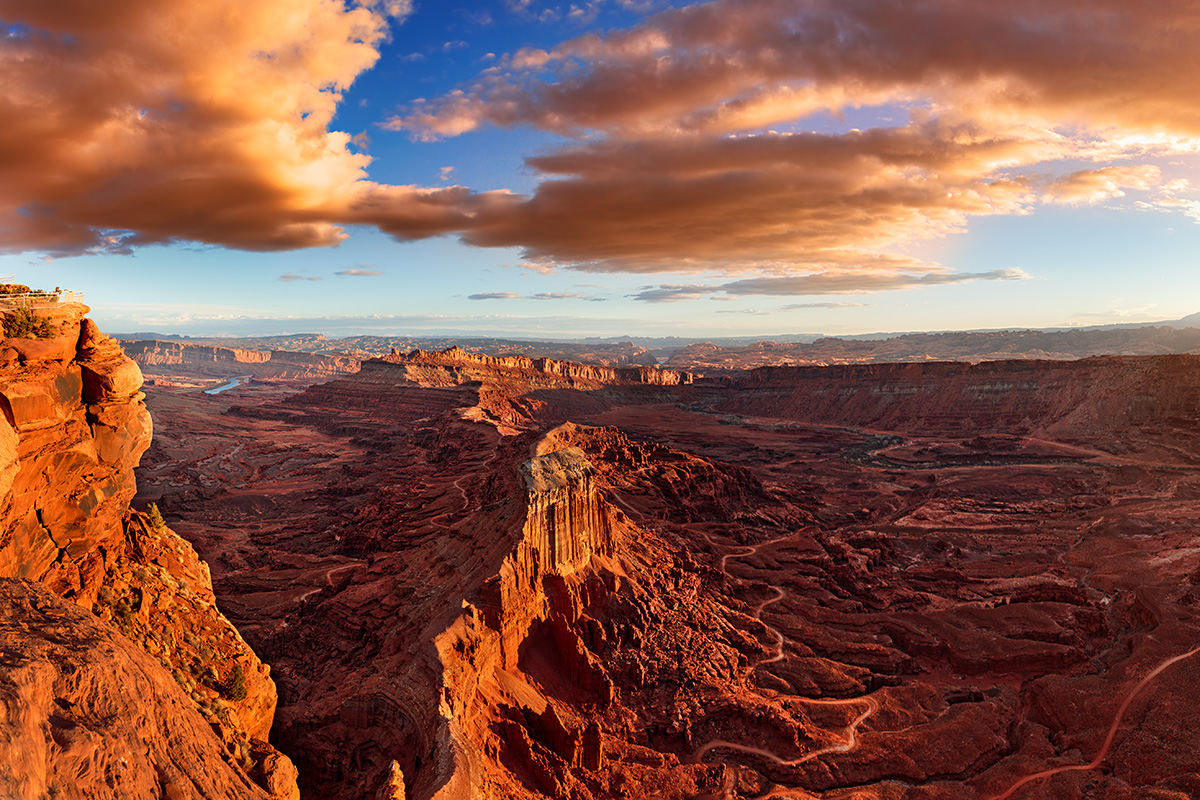
The before and after images displayed here are meant to show the old vision I had versus the new vision which is still in development. I will appreciate your vote, but more than that, I would appreciate a written critique.

I am under no illusion that the new process is optimum. Nor am I under any illusion that the image has much substance.

To my mind this is what a critique forum should be doing, helping each other hone our skills.

#1, the old way of processing before cataract surgery
180317-4937-4947 st 5 med-dark-light blend 2 sky colA24x36.jpg


#2, the new post surgery processing.

180317-4940-47 PC4 16x28.jpg
 

Jeffrey

Well-Known Member
Where's the choice for halfway between those 2? In #1 the clouds are off the scale, but the earth is only a little hot. In the second, the sky is natural and the ground can stand a bit of shadow recovery and a slight bump in saturation (or playing with the reds in Selective Color).
 

Ben Egbert

Forum Helper
Staff member
Thanks a lot Jeffrey, this is exactly the kind of answer I was looking for. You saw this print on my wall so it is really helpful.

I will try any and all suggestions I get here and post as we go along. I really put the pool up mostly for those who did not want to reply.
 

AlanLichty

Moderator
Jeffrey's comments are spot on for me as well. The clouds in the first one look completely unnatural to me and if you hadn't set up the comparison I would not have even guessed that these are the same capture. I would be inclined to pull up the light and colors on the ground features a bit.
 

JimFox

Moderator
Staff member
Hey Ben,

First off, this won't be an easy process for you to in a sense now recalibrate your eye.

I like your original, just back off maybe 20% on the saturation?

As to your edits, you have blown out clouds in both of them, your original didn't have any blown out clouds to speak of. So with your editing, the first thing is to get those blown out clouds back. The rock wall faces also seem really hot where there sun is hitting them. So something has changed on how you are seeing highlights?

The ground layer has a harsh feeling to it, not a rich early light feel.

The difference between your first edit and the second in terms of the red is very slight. My thinking is that the best look for this would be a shot that is halfway between the original and your edit in terms of color. Your #2 edit feels like a 5% change, not the 50% change that I think Jeffrey and myself are suggesting.
 

Ben Egbert

Forum Helper
Staff member
Thanks Jim. Your eye for hot clouds is good. I worked hard on the original to eliminate them, and don't recall how I did it, I suspect lots of clone and dodging work. I knew the edit was blown, but I did not suspect the cliff face. This is not so much my new vision as it was accepting a flaw in the original image.

I also note that the difference between the new and the edit posted above are more obvious on a calibrated monitor. A lot of red gets lost in the sRGB conversion.

Here are two new edits. I am not planning on adding more edits to the poll as it is going to get confusing.

The top edit is the original with 20% saturation reduction. Note the red in the clouds was added by me, and were not in the raw.

The second edit is the new post op version with some shadow recovery and selective red enhancement to the rock faces. Adding too much in the shadows causes a muddy look.

Original version with 20% less sat.
180317-4937-4947 st 5 med-dark-light blend 2 sky colA24x36 desat20.jpg


Post op version with shadow lift and selective red enhancement
180317-4940-47 PC4 16x28 addsat2.jpg
 

JimFox

Moderator
Staff member
Hey Ben,

Of the 2 new ones, I am going with your Original that has the 20% decrease in saturation.

The rock faces still feel too hot to me, and is coming across too harsh.

This photo might be a hard one to help you recalibrate since you had added the red in the original, and especially with the 20% decrease in saturation, it's a very pleasing shot. So to see it next to a photo that doesn't have that added red in the clouds, your new edits will fall short because we are all expecting to see the clouds with more color.

I am thinking that in the original raw conversion, you perhaps used the Split Toning to the Highlights and added red in there? That would help soften the harshness of all of your highlights. If you haven't done that with your new editing, look at that option, it can be a great way to help deal with the highlights as long as you don't over do it and keep it looking natural.
 

Ben Egbert

Forum Helper
Staff member
Ok Jim, thanks for staying with me on this. This is what I would call and interim step. First this is a 3 image stitch so I need to restitch whenever I need to do any adjustment in ACR. This time I processed a bit darker and did the split toning. I managed to fix the highlights in the clouds and rock faces I think. The shadows are now darker, and could maybe be lifted some. I did not bother to crop this yet or add red to the clouds, I just wanted to see if I got the basics right.

The ground layer appears too red to me now. But that would be easy to fix.
180317-4940-47 PC5.jpg
 

JimFox

Moderator
Staff member
I am not at home Ben, I had to go out for some BBQ ribs, but this is an improvement for sure. Yeah, the reds in the lower portion look a bit too red, but the cliff wall on the left looks perfect. But I can tell better when I get home. I will say you are on the right track.
 

Ben Egbert

Forum Helper
Staff member
Thanks Jim, have a rib for me. And after your reply, I will do some more work. I think I need to lighten the shadows in the dark ares just a bit, tome down the red a bit and then see if I can add red/yel to the clouds again without overdoing it.
 

Ben Egbert

Forum Helper
Staff member
Here is where I am now, brightened the shadows, toned down the reds, darkened the rock faces a tad and then added some color to the clouds and cropped.

Still not happy, on my calibrated screen, it still too red and I am not happy with the clouds yet.

180317-4940-47 PC5B36x24.jpg
 

Kyle Jones

Moderator
I like the ground, although I might lift the shadows a touch more on the left. The clouds still look too strong to me (not having seen them in person of course). I tried a color balance on the sky. I ended up with -28 (cyan), +10 (green), +28 (blue) for the version below. Still colorful but looks a little more natural to my eye.
test.jpg
 

Ben Egbert

Forum Helper
Staff member
Here ya go Kyle, exactly your formula but I also reduced the red in the left shadow areas. This is starting to look fairly satisfying on my monitor now. Not exactly photo realistic, but bot over the top either. Thanks a lot for your help.

I would love to see other people get involved in the forum with either questions or answers. This is been a great thread IMO.

180317-4940-47 PC5B28x16 kyle.jpg
 

BarryHamilton

Founding Member
Agree with Alan! The last one is my fave of these. Now I know why I always thought your images were over-saturated. Apologies for my sentiments. :)
The last one definitely has a nicer balance of light.
The only thing I might add is to reduce the warmth in the shadows. Shadows, in my thinking and by definition should be a touch, at least, cooler than well lit areas. This is especially true in early morning and late afternoons.
 
Top Bottom