Lets Play 3/9/2018

AlanLichty

Moderator
It's been a month or so since we have done Let's Play, a fun contest that Ben has come up with.

The basic rules are you can play with the color version to try and come up with something better and then post your results here in this thread. On Sunday evening the best works by everyone who plays will be put into a voting Poll so we can all vote on the best edit.

The technical:
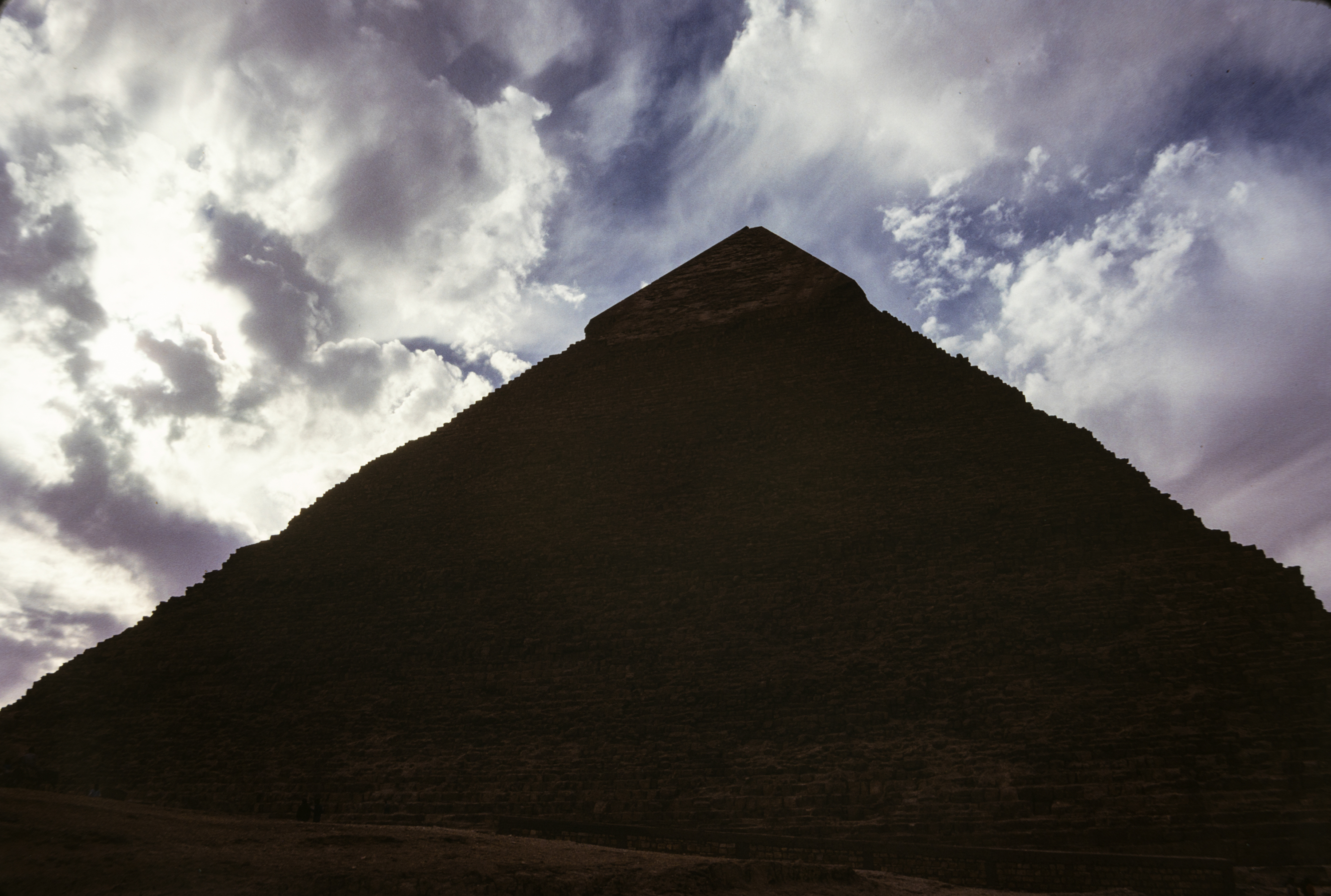
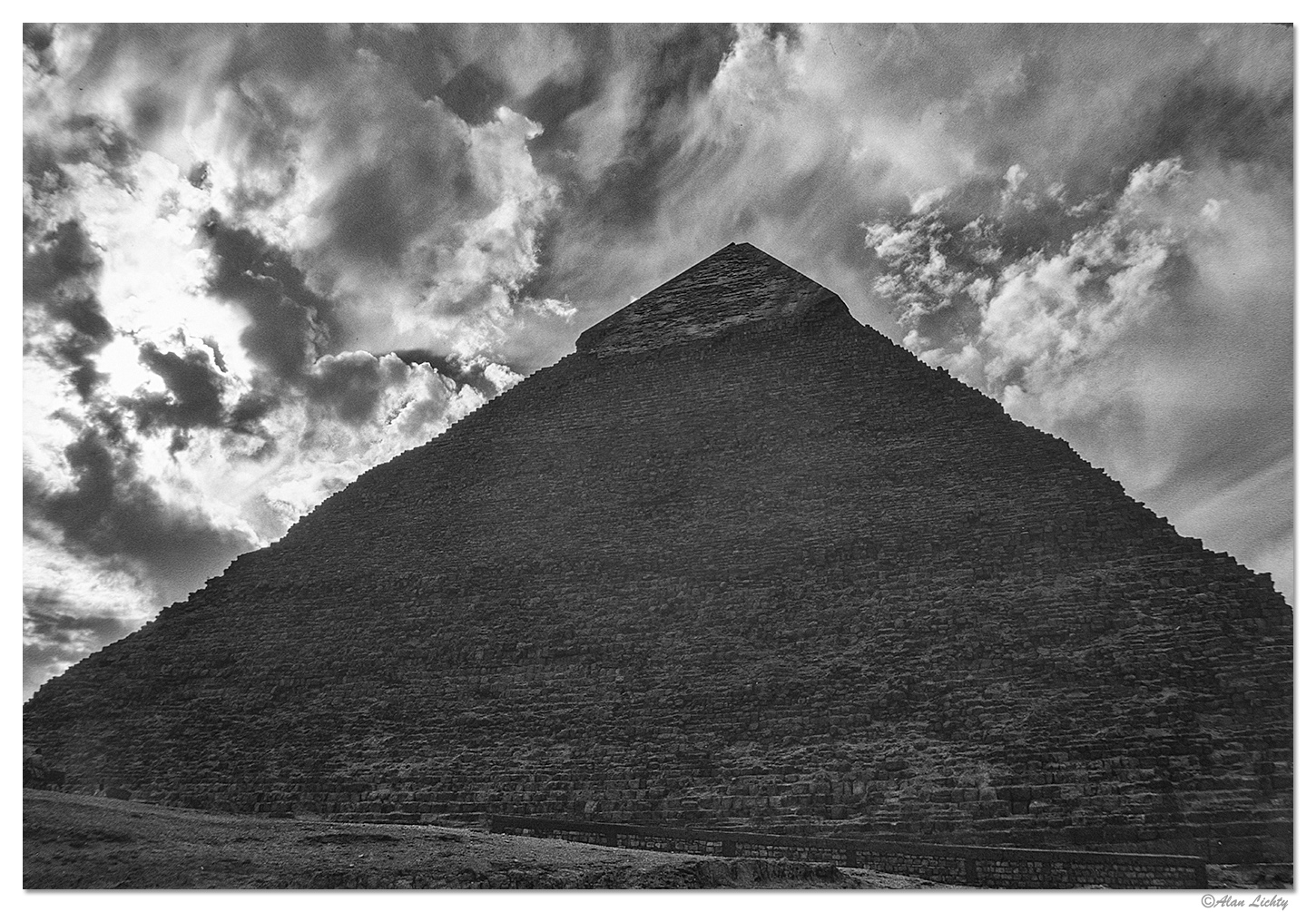
This is a 40 year old slide (Kodachrome 25) that I have scanned with various methods with this one being the most recent using my DSLR (Canon 5D Mk IV) on a copy stand. I loved the odd angle shooting from the base of Khafre's with the winter clouds at Giza but the dynamic range of what I was asking my olde Pentax to do with the Kodachrome was beyond what I could get. I am posting a B&W version I posted this morning in a Historical forum thread as one take and there is a color version there as well. Both are compromises at best so I am inviting folks to give this a shot and maybe I can learn something new on how to recover something like this.

I have cropped out the slide mount, reduced the size to the 3000 pixel limit for critique, sampled it to 8 bits and converted to sRGB.


The critique forum version for downloads: (Click on this Photo first before downloading to get the full 3000 pix version to play with)


My B&W:

I will be interested in what comes out of this so thanks for playing :)
 

Mike Mancil

Well-Known Member
Well... you asked for it ;).

Here's my version where I separated the sky from the subject, softened the contrast/highlights a tad in the sky and then brightened the pyramid along with increasing the mid tones and adding contrast to the stones. I seasoned it with some selective dodging and burning with selective sharpening on the stones.

See what you think:

Khafre1BW.jpg
 

Ben Egbert

Forum Helper
Staff member
Here is my effort. I did a bright and dark conversion, then blended them. There seems to be some flare on the face of the pyramid
KhafreCritique ben.jpg
and I did not try to correct it.
 

AlanLichty

Moderator
Well... you asked for it ;).

Here's my version where I separated the sky from the subject, softened the contrast/highlights a tad in the sky and then brightened the pyramid along with increasing the mid tones and adding contrast to the stones. I seasoned it with some selective dodging and burning with selective sharpening on the stones.

See what you think:
Thanks - I think this is the right direction. I noticed when I tried B&W this morning that the pyramid face can be lightened up quite a bit once you toss the colors. I was thinking that splitting the sky and the pyramid would be the way to go. Pretty nice result considering the starting point was 8 bit sRGB downsampled to half the size of the slide scan.
 

JimFox

Moderator
Staff member
Here is my effort. I did a bright and dark conversion, then blended them. There seems to be some flare on the face of the pyramidView attachment 6881 and I did not try to correct it.
Hey Ben, I do like what you have going on here overall with the color edit, it actually to me means that a color version could be possible.
 

JimFox

Moderator
Staff member
Well... you asked for it ;).

Here's my version where I separated the sky from the subject, softened the contrast/highlights a tad in the sky and then brightened the pyramid along with increasing the mid tones and adding contrast to the stones. I seasoned it with some selective dodging and burning with selective sharpening on the stones.

See what you think:

View attachment 6880
Hey Mike, now this is very much along the lines of what I was thinking when I suggested Alan put a copy here in the Critique forum.

Ben has inspired me, so I am going to try a color version in a bit just as soon as I get done folding clothes... :rolleyes:
 

Darcy Grizzle

Well-Known Member
Hey Darcy, I am working on my edit of this and decided I better look in here and check with my competition. :rolleyes:

Very nice what you have done with this.

Thank you Jim and also Alan! Only played in lightroom with the single image, bringing the contrast down, highlights all the way down, shadows all the way up. Warmed it and barely moved the magenta towards the green a little. Took the blue luminance slider all the way to the left and used the magic wand on the flare on the pyramid with some de-haze and burning.
 

Jeffrey

Well-Known Member
I was contemplating participating, but I see I will not be able to make this image the way I would like to because the dynamic range of the actual scene far exceeded the latitude of the color film used to capture it. But I do like some of the attempts shown here.
 

JimFox

Moderator
Staff member
Here is mine. From Mikes B&W, I thought this won't be too hard. But man, this one is much tougher then I thought. I stayed in Color, and little by little worked on the lens flare. Every time I adjusted the contrast the lens flaring would show up again... :mad:

And towards what I thought was the end, I still didn't like the coloring of the pyramid. It had a greenish cast in places from the lens flaring. So what might have been a stroke of genius or desperation I desaturated everything but the sky to turn the pyramid and ground to B&W. I then used a warming filter to color the pyramid back to an even warm color. Then I selected the grass area at the bottom and removed some red from the color and added some yellow.

I didn't do much with the sky, I removed some of that magenta, and the blow area's I brought the white point down just a hair.

Anyway, here is what I got.

Alan_KhafreCritique_a6.jpg
 

Ben Egbert

Forum Helper
Staff member
That's a nice job Jim, and some good tricks. I never would have thought to go B&W then add a warming filter.
 

AlanLichty

Moderator
I was contemplating participating, but I see I will not be able to make this image the way I would like to because the dynamic range of the actual scene far exceeded the latitude of the color film used to capture it. But I do like some of the attempts shown here.
Wise man - you have correctly identified the problem with the Kodachrome slide. This same scene would be trivial with our current digital cameras since we can chimp the shots and bracket.
 

AlanLichty

Moderator
Here is mine. From Mikes B&W, I thought this won't be too hard. But man, this one is much tougher then I thought. I stayed in Color, and little by little worked on the lens flare. Every time I adjusted the contrast the lens flaring would show up again... :mad:

And towards what I thought was the end, I still didn't like the coloring of the pyramid. It had a greenish cast in places from the lens flaring. So what might have been a stroke of genius or desperation I desaturated everything but the sky to turn the pyramid and ground to B&W. I then used a warming filter to color the pyramid back to an even warm color. Then I selected the grass area at the bottom and removed some red from the color and added some yellow.

I didn't do much with the sky, I removed some of that magenta, and the blow area's I brought the white point down just a hair.

Anyway, here is what I got.
Interesting approach. The color is a little on the funky side compared to the other shots I have of this pyramid with reasonable light. I do have another effort of my own but was going to hold off since I have the advantage of working with a 16 bit RAW version of the original with twice the resolution.
 

JimFox

Moderator
Staff member
Interesting approach. The color is a little on the funky side compared to the other shots I have of this pyramid with reasonable light. I do have another effort of my own but was going to hold off since I have the advantage of working with a 16 bit RAW version of the original with twice the resolution.
Thanks! Yeah, you do have the advantage of actually seeing the pyramid too, so you would be able to get the color of the pyramid more realistic then the rest of us. And it didn't hit me right away, but I think the idea of converting just the Pyramid to B&W and then color balancing the pyramid back to the exact color it should be could be an approach you could take here with this.

Maybe tomorrow morning post your effort on it? Or maybe even another shot where it shows the true colors better? And then we can all see how close we got.
 

AlanLichty

Moderator
I do have another shot of this specific face of Khafre's pyramid so it shows the color quite well. This pyramid is not quite the same color as Kufu's (The Great Pyramid). This pyramid is a bit darker. I can post that anytime. Its not a spectacular comp and is more of a snapshot while we were approaching the pyramid.
 
Top Bottom