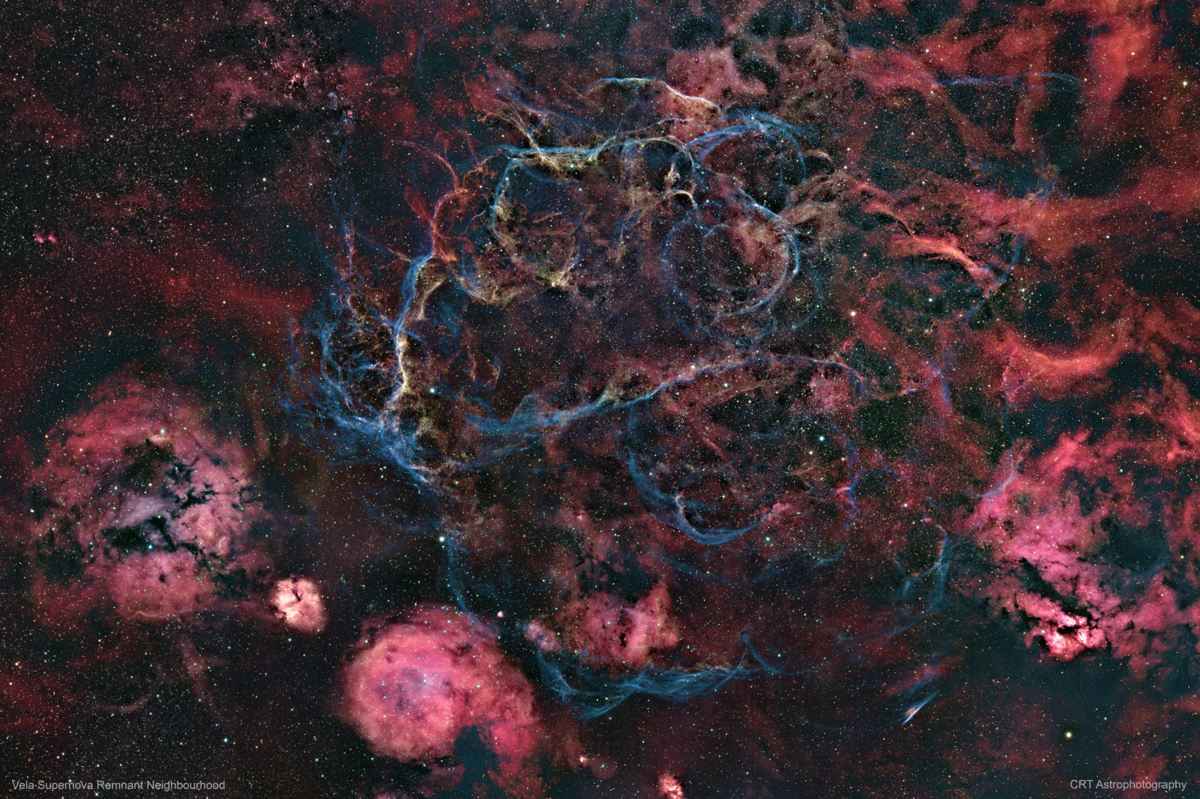
Vela Supernova Remnant Neighbourhood 26-Panel Mosaic in Narrowband HSO

CRTAstro

Well-Known Member
This was a project that started at the end of January. The original plan was to shoot an 8-panel mosaic around the area of RCW32 (Gum15) and its proximity to the Vela Supernova Remnant. It since grew into a 26-panel mosaic covering a wider area. The final image is 14998 x 9999 pixels in width and height and includes DSOs like RCW33, RCW27, the double star HIP42884, PK 263+00.1, the Pencil Nebula, RCW38, NGC2626, some open star clusters including NGC2670, NGC2660 and NGC2671 and of course the Vela Supernova Remnant all in the southern constellation of Vela.
This was a long but satisfying project even though I could not use my camera of choice and had to use my backup camera.
826 x 600s subs were shot @-10C spread across 32 nights for a total integration time of almost 138 hrs. PixInsight tone-mapping and colour-masking applied. PTGui used for stitching with LDR blending turned on.
For a higher resolution visit: https://www.astrobin.com/2fzcji/

Sharpstar 61EDPH II APO Triplet Refractor
Sharpstar 0.8x Flattener/Reducer
Skywatcher NEQ6 Pro Hypertuned by Astronomy Academy Perth
Primaluce Sesto Senso2 Electronic Focuser
ZWO ASI183MM Pro Cooled Camera
ZWO Off Axis Guider
ZWO ASI290MM Mini Guide Camera
ZWO Electronic Filter Wheel
Antlia 3nm Pro Narrowband 36mm unmounted filters
Rollon rolloff modified backyard shed observatory
Bortle 5
Data acquisition software: NINA Astronomy Software
Processing software: PixInsight and Photoshop CC

http://instagram.com/crt_astrophotography
1647685739759.png
 

JimFox

Moderator
Staff member
I will have to say Wow, wow, wow!!! This is perhaps one of the most mind blowing Deep Space Astro images I have seen! There is just so much beauty to behold in this one. I don’t know how many of your images you print, but I honestly could see this printed to cover a whole wall!
 

CRTAstro

Well-Known Member
I will have to say Wow, wow, wow!!! This is perhaps one of the most mind blowing Deep Space Astro images I have seen! There is just so much beauty to behold in this one. I don’t know how many of your images you print, but I honestly could see this printed to cover a whole wall!
Cheers Jim ! Much appreciated ! This was a labour of love for sure !
 

CRTAstro

Well-Known Member
Wow. Just the effort to capture this is mind boggling to me and I am not even an astro photographer. A labor of love for sure.
Thanks Jameel ! I anticipated 'pain' with what I was about to do but soon got less painful as I processed each panel as I shot it, something I will do from now on if I ever do it again haha 😀
 

Mike Lewis

Staff Member
Carlos,

Wow - mind blown! I have been feeling good about my little 2 panel mosaics :) There must be an incredible variation in brightness across this whole area with the SNR being a lot dimmer than many of the Hα regions I'm guessing. How long did you integrate on each one of the panels? The result looks totally natural and well matched - just a jaw dropping result.

I'm also interested in why you had to go back to the 183 camera for this, obviously the 2600 camera would have covered lots more area. Image circle of the 61 scope too small?

Fantastic work my friend! I dropped some love on this over at AB too, should be getting selected for Top Pick at least over there...

ML
 

CRTAstro

Well-Known Member
Carlos,

Wow - mind blown! I have been feeling good about my little 2 panel mosaics :) There must be an incredible variation in brightness across this whole area with the SNR being a lot dimmer than many of the Hα regions I'm guessing. How long did you integrate on each one of the panels? The result looks totally natural and well matched - just a jaw dropping result.

I'm also interested in why you had to go back to the 183 camera for this, obviously the 2600 camera would have covered lots more area. Image circle of the 61 scope too small?

Fantastic work my friend! I dropped some love on this over at AB too, should be getting selected for Top Pick at least over there...

ML
Thanks Mike! The background gradients vary throughout most of the panels and this was very evident early on when lining up each panel side by side. But PTGui does a fantastic job of blending that background almost seamlessly as I added each panel. Yes, I added each panel to the mosaic as I shot it. I found this way easier as in the past if I waited to stitch at the very end aligning would be a problem especially if PTGui failed in the initial alignment and I had to manually select control points between adjacent panels. Stitching as I went along made it a whole lot easier as I knew exactly where the next panel would be. I shot 10-12 10min subs of each filter per panel, early on that seemed to give me a good result after stacking. I had to retake some along the way due to satellite streaks etc

I had to go back to my backup camera as my 2600MM was giving me problems downloading the captured sub. Tried everything including specific instructions from ZWO to capture logging from the SDK to inf out the root cause. In the end, they decided it was an RMA job so at the moment it's on a 'low boat to China' and I don't expect it back for at least another month. Also, yes I do get minimal vignetting with the 2600MM on the 61 EDPH.

Thanks man! Appreciate your comments and your time for looking at it. Oh and I'm assuming you are the same mlewis at AB? Cheers buddy ! :D
 

Mike Lewis

Staff Member
Thanks Mike! The background gradients vary throughout most of the panels and this was very evident early on when lining up each panel side by side. But PTGui does a fantastic job of blending that background almost seamlessly as I added each panel. Yes, I added each panel to the mosaic as I shot it. I found this way easier as in the past if I waited to stitch at the very end aligning would be a problem especially if PTGui failed in the initial alignment and I had to manually select control points between adjacent panels. Stitching as I went along made it a whole lot easier as I knew exactly where the next panel would be. I shot 10-12 10min subs of each filter per panel, early on that seemed to give me a good result after stacking. I had to retake some along the way due to satellite streaks etc

I had to go back to my backup camera as my 2600MM was giving me problems downloading the captured sub. Tried everything including specific instructions from ZWO to capture logging from the SDK to inf out the root cause. In the end, they decided it was an RMA job so at the moment it's on a 'low boat to China' and I don't expect it back for at least another month. Also, yes I do get minimal vignetting with the 2600MM on the 61 EDPH.

Thanks man! Appreciate your comments and your time for looking at it. Oh and I'm assuming you are the same mlewis at AB? Cheers buddy ! :D

Carlos,

OK, good info. I asked about the failure mode on of the 2600 in another thread but you answered it here. Hopefully they get it back to you soon.

I have heard of PTGui before - I guess I might have to check it out again. I usuall stitch any of my terrestrial panoramas with Microsoft ICE (Image Composite editor, now discontinued I guess but works well) and my astro stuff with the tools in Pixinsight. Really an amazing result with that huge one you show here - just spectacular!

Yes, the mlewis on AB is me. About the only time I was early enough to the party to get a user name that I didn't have to add extra characters too - Mike Lewis is too common of a name I guess :) Thanks for the kind comments on my stuff. I think the majority of those have been posted here but a lot were in the past to the point where many of the newer folks on our Astro forum here have not seen some of them. And being constrained to only take data when my friend is at his 2nd house in AZ means months go by without me being able to post. he is considering moving down there full time though, so that could be a big improvement for my ability to gather my data on my gear - we will see how that goes,

Glad we are following each other over there now - it is always really nice to not only see the images in higher resolution but also to see all the capture details too.

Best Regards,

ML
 

CRTAstro

Well-Known Member
Carlos,

OK, good info. I asked about the failure mode on of the 2600 in another thread but you answered it here. Hopefully they get it back to you soon.

I have heard of PTGui before - I guess I might have to check it out again. I usuall stitch any of my terrestrial panoramas with Microsoft ICE (Image Composite editor, now discontinued I guess but works well) and my astro stuff with the tools in Pixinsight. Really an amazing result with that huge one you show here - just spectacular!

Yes, the mlewis on AB is me. About the only time I was early enough to the party to get a user name that I didn't have to add extra characters too - Mike Lewis is too common of a name I guess :) Thanks for the kind comments on my stuff. I think the majority of those have been posted here but a lot were in the past to the point where many of the newer folks on our Astro forum here have not seen some of them. And being constrained to only take data when my friend is at his 2nd house in AZ means months go by without me being able to post. he is considering moving down there full time though, so that could be a big improvement for my ability to gather my data on my gear - we will see how that goes,

Glad we are following each other over there now - it is always really nice to not only see the images in higher resolution but also to see all the capture details too.

Best Regards,

ML
PTGui has an LDR blending option that does all the magic and produced really satisfying results off the bat. I'm not sure if stitching it all together over piecemeal would have had an even better result but was not willing to try as I had trouble in the past where PTGui couldn't match certain panels and I had to go in and manually select control points for matching as stated earlier. I'd like to learn more about how to stitch in PI but what I experimented with in the past (ImageSolver, MosaicByCoordinates, TrimMosaicTile and PhotometricMosaic ) turned out to be a pain and pretty tedious and that was for only 6 panels. There must be an easier way!

Cheers,
Carlos
 

Mike Lewis

Staff Member
Carlos,

I have followed this tutorial a few times with very good results, granted we are only talking about a 1 x 3 and then a different 1 x 2 mosaic - so nothing like you are talking about.

https://www.lightvortexastronomy.com/tutorial-preparing-a-mosaic.html

I use steps 1,2 and 4 (finding the alternative approach in step 3 to be unnecessary to get good results and very complex compared to the other approach that is covered...)

Conversely, Microsoft ICE is a drag and drop solution with virtually no work required at all. I have only used it on terrestrial (scenic) photography though so fa. It would be interesting to see if it could work on astro images.

ML
 

CRTAstro

Well-Known Member
Carlos,

I have followed this tutorial a few times with very good results, granted we are only talking about a 1 x 3 and then a different 1 x 2 mosaic - so nothing like you are talking about.

https://www.lightvortexastronomy.com/tutorial-preparing-a-mosaic.html

I use steps 1,2 and 4 (finding the alternative approach in step 3 to be unnecessary to get good results and very complex compared to the other approach that is covered...)

Conversely, Microsoft ICE is a drag and drop solution with virtually no work required at all. I have only used it on terrestrial (scenic) photography though so fa. It would be interesting to see if it could work on astro images.

ML
Hi Mike, yeah it starts to get hard the bigger the mosaic gets and with this one I found it easy to add each panel to the mosaic as I acquired it. That meant just opening my PTGui project and selecting 'add image' then align and it did it right away. I wouldn't want to know what would happen if I had to do it from scratch each time haha ! 😁
 
Top Bottom